



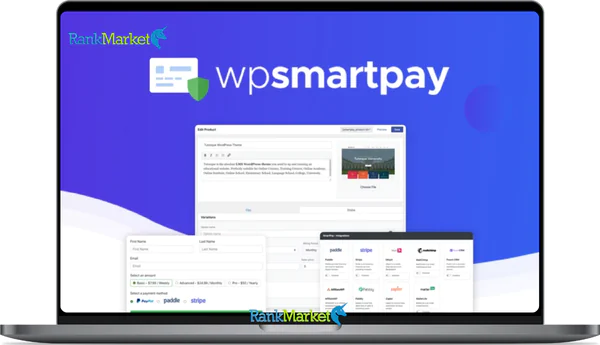
Cheap WPSmartPay Agency Plan LTD license key activation service
Original price was: $199.00.$20.00Current price is: $20.00.
WPSmartPay – digital payment plugin, customer & product management
| Deliver | Product FE |
|---|---|
| Access | Install Service |
| Type | WordPress plugin |
| License | No License |
| Details | GB Salespage |
WPSmartPay Agency Plan LTD - Overview
Are you looking for a comprehensive digital payment solution for your WordPress website? WPSmartPay is the tool you cannot ignore! With the ability to create digital products and subscriptions in just a few steps, manage customers, integrate CRM, automate marketing and optimize file security, WPSmartPay makes selling online easier, more flexible and more professional than ever.
Whether you are a freelancer, agency or business, WPSmartPay provides smart payment options, coupons and reports, helping to improve customer experience and optimize revenue significantly. Join RankMarket to explore this tool in more detail in the article below!
What is WPSmartPay?

WPSmartPay is a specialized WordPress plugin for selling digital products and collecting money online, from eBooks, music, images, to courses or consulting services. Unlike WooCommerce or Easy Digital Downloads, WPSmartPay doesn’t require you to build a full shopping cart, keeping things simple yet fully featured.
Simply put, it’s an “all-in-one” solution for those who want to receive online payments without the hassle of complicated steps. You simply create products, set up one-time or recurring payments, and then insert the form into your page via shortcode or Gutenberg block – and you’re done. No coding required, and no need to worry about complicated integrations.
Writing by WPSmartPay
WPSmartPay’s founder is Parvez Akther, a seasoned WordPress expert. He developed the plugin out of a practical need, aiming to create a lightweight, powerful, and easy-to-use tool for both beginners and experts. Parvez and his team are committed to providing regular updates, ensuring the plugin remains stable and integrates smoothly with all popular platforms.
Features of WPSmartPay
- Easily sell digital products: WPSmartPay helps you create and sell digital products in just a few simple steps. You can set up one-time products or recurring subscriptions, supporting all types of products, from simple variations to recurring ones. Product management has never been so quick and convenient.
- Flexible payments: With WPSmartPay, payments become diverse and flexible. The plugin supports Stripe, PayPal, Paddle, and bKash gateways, and allows setting up one-time or recurring payments with trial, instalment or initial fee options. All transactions are easy and secure.
- Intuitive form builder: WPSmartPay comes with a drag-and-drop form builder directly in Gutenberg, eliminating the need for programming knowledge. You can customize the payment, donation or subscription forms as you like, making the user experience smoother and more professional.
- Customer and file management: This plugin helps you control who can download digital resources and track payment history, including the number of payments, as well as the status of completed or pending payments. Customer and resource management becomes clear and scientific, supporting you to optimize business operations.
- Flexible coupons and discounts: You can create coupons with fixed values or percentages (%), with expiration dates and usage limits. This helps increase sales and create promotional campaigns easily, targeting the right customers.
- Utility integration: WPSmartPay connects directly to CRM and marketing systems, such as Mailchimp, MailerLite, FluentCRM, Zapier, and AffiliateWP. Thanks to that, customer data is automatically synchronized, saving time and reducing errors.
- Shortcode & Gutenberg block: Inserting forms into any page becomes simple with the shortcode and Gutenberg block. The plugin supports the most popular page builders, including Gutenberg, Elementor, Beaver Builder, and Classic Editor, providing flexibility in website design.
- Intuitive reports and dashboards: WPSmartPay provides an intuitive dashboard with statistics organised by day, week, month, customer, product, or payment status. You can download reports in various formats to analyse and optimise business operations more easily.
- File security: Only paid customers can download resources. This process is completely automated, does not require complex configuration, and ensures security, avoiding the risk of unauthorised sharing.
- Flexible license support: WPSmartPay offers various license packages, ranging from 1 site to 50 sites. All updates are automatically applied and supported via email, ensuring the plugin operates stably and reliably in the long term.
How to use WPSmartPay: step by step
RankMarket will guide you through the process of installing and creating your first product with WPSmartPay. Here are the steps:
Step 1: Install and activate the plugin
- Buy a license on RankMarket
- Upload the plugin to WordPress, enter the license key, and activate it.
Step 2: Set up basic configuration
- Go to Settings → General: select your currency, configure the success/failure pages, and enable/disable coupons.
- Go to Payment Gateways: select Stripe, PayPal, or Paddle, and enter the payment gateway information.
- Go to Emails: set up email notification for orders, payments, and subscriptions.
Step 3: Create a digital product
- Go to Products → Add New.
- Fill in the name, description, and upload the file to sell.
- Select product type: Simple, Variation, or Recurring.
- Set price: one-time or recurring, apply coupon if needed.
- Click Publish and copy the shortcode or Gutenberg block to insert into the page.
Step 4: Create a donation or subscription form
- Go to Forms → Add New.
- Select a donation or subscription template.
- Add necessary fields: name, email, and amount (fixed or custom).
- Set recurring if you want to collect periodically.
- Publish and insert into the page.
Step 5: Manage customers and reports
- Go to Customers to view information, payment history, and subscription status.
- Go to Payments: track transactions, filter by date, and status.
- Create detailed reports and export them as CSV files if needed.
Step 6: Advanced customization (optional)
- Create product variations by adding consulting packages and bundling multiple files.
- Allow customers to select a custom donation amount.
- Connect CRM and Zapier to automate marketing.
WPSmartPay Plans and Pricing Comparison Table
| Plan / Features | Essential | Business – Most Popular | Agency |
| Price (USD/year) | $79 (regular $99) | $119 (regular $149) | $223 (regular $279) |
| Ideal For | Startups and small teams | Growing businesses with multiple websites | Development and design agencies |
| Site License | 1 site | 5 sites | 50 sites |
| Automatic Updates | ✔️ | ✔️ | ✔️ |
| Email Support | ✔️ | ✔️ | ✔️ |
| All Features Included | ✔️ | ✔️ | ✔️ |
| Documentation & Knowledge Base | ✔️ | ✔️ | ✔️ |
Where to Buy WPSmartPay Safely and Affordably?
Looking for a reliable source to get WPSmartPay at a budget-friendly price without compromising on safety or copyright? RankMarket is the go-to platform. Trusted by WordPress users, freelancers, and digital marketers, RankMarket offers not only competitive pricing but also professional support that ensures a smooth experience.
Some reasons why RankMarket stands out:
- Affordable and Legitimate: Get WPSmartPay with full copyright protection, no nulled plugins, no security risks, and no data loss.
- Fast, Expert Support: Encounter an issue? RankMarket’s team responds promptly with clear, step-by-step guidance to solve problems quickly.
- Regular Automatic Updates: Stay on the latest version effortlessly. All plugins are updated to prevent conflicts and security vulnerabilities.
Why Choose RankMarket to Buy WPSmartPay?
When it comes to purchasing WPSmartPay, safety and copyright compliance are top priorities. Using licensed plugins ensures your website runs securely and smoothly, minimizing risks such as hacking, plugin conflicts, or unexpected errors.
Key Advantages of Buying from RankMarket
- Cost-Effective and Reliable: RankMarket offers highly competitive pricing compared to buying directly from the developer, while still including all essential benefits like updates and professional support.
- Step-by-Step Installation Support: Whether you’re new to WordPress or digital tools, RankMarket provides clear, easy-to-follow instructions for installing and configuring WPSmartPay.
- Seamless Marketing Integrations: Connect effortlessly with popular tools such as Mailchimp, FluentCRM, Zapier, and AffiliateWP right after installation.
- Trusted by the Community: Freelancers, digital marketers, and agencies rely on RankMarket for its solid reputation and dependable service.
How to Purchase WPSmartPay from RankMarket
Buying WPSmartPay is quick and straightforward, even if it’s your first time purchasing a plugin:
- Visit RankMarket: Search for “WPSmartPay”.
- Choose Your License: Select the package that best fits your needs.
- Add to Cart and Checkout: Pick your preferred payment method and complete the purchase.
- Download and Install: After payment, you’ll receive a download link with full copyright information.
- Activate Your License: Enter the license key to enable automatic updates and unlock all features.
- Start Using WPSmartPay: Create digital products, subscriptions, donation forms, and coupons, and manage your sales with detailed reports, all from your dashboard.
With these simple steps, WPSmartPay is fully ready to power your online business efficiently and securely.
Advantages of WPSmartPay
- Doesn’t Slow Down Your Website
WPSmartPay is designed to be lightweight, ensuring it doesn’t cause any “traffic jams” or slow down your website. Transaction data and forms are stored in separate database tables, which helps reduce load and optimize speed. Furthermore, this plugin uses ReactJS and SPA (Single Page Application) along with Ajax communication, ensuring lightning-fast admin interface performance. - Compatible with All Themes
No matter which theme you are using, as long as it follows WordPress standards, WPSmartPay integrates seamlessly as a friendly member. With optimized HTML code, this plugin ensures maximum speed without conflicts. - Easy to Use, No Coding Required
Don’t worry if you’re not a “tech geek”! WPSmartPay is designed for everyone to use, even if you don’t know a single line of code. With just a few clicks, you can start selling digital products or creating payment forms. - Friendly Support
Got issues? The friendly support team is always ready to guide you step-by-step to set up and operate the plugin easily. - Suitable for All Payment Needs
From one-time payments, recurring payments, to donation forms or variable products, WPSmartPay has everything you need for flexible business operations.
Disadvantages of WPSmartPay
- Usage Limits with Personal and Business Plans
If you want to use the plugin for a client’s website, you’ll need to purchase the Agency Plan. Personal and Business plans only apply to websites owned and operated by you. - Depends on WordPress Theme Standards
Although WPSmartPay is compatible with most themes, if your theme doesn’t follow WordPress standards, you may encounter issues. - Requires WordPress Installation
This is not a standalone solution. You need a working WordPress site to use WPSmartPay.
Who is WPSmartPay for?
It doesn’t discriminate – anyone who needs to collect payments, sell products, or accept donations on WordPress can use it! But if we had to list the most suitable users, these would be the prime candidates:
- Artists and Content Creators
Are you a painter, musician, or photographer who wants to sell artwork, music, or exclusive photos? WPSmartPay will be your invaluable assistant, helping you bring your creations closer to art lovers without complicated shopping carts. - Entrepreneurs and Digital Business Owners
Selling eBooks, online courses, or software? This plugin will help you set everything up in just a few clicks – from one-time payments to subscriptions, from simple products to various combo packages. - Coaches and Consultants
Have coaching packages, classes, or consulting programs you want to offer via subscription? WPSmartPay will help you manage these services easily and professionally. - Charities and Community Organizations
If you're an organization in need of donations, WPSmartPay lets you create customizable donation forms, helping you call for and attract support from the community. - WordPress Website Owners
Do you simply want a flexible, easy-to-install, and user-friendly payment system on your website? WPSmartPay excels at doing that. - Web Development and Design Companies
With the Agency Plan, web development companies can use this plugin to build payment systems for clients easily, optimizing time and effort.
FAQs
- What is WPSmartPay, and what is it used for?
It is a payment plugin for WordPress, enabling you to create flexible payment forms that support multiple gateways, including Stripe, PayPal, and Paddle. It is suitable for both digital and physical products, from selling online courses to goods in WooCommerce.
- How to install WPSmartPay on WordPress?
Just download the plugin, go to Plugins → Add New → Upload Plugin → Activate. Then, go to the settings to connect the desired payment gateway and create a sales form according to your needs.
- Does WPSmartPay support selling digital products?
Yes, it is specially designed for selling digital products, online courses, and ebooks… with the feature of protecting download links and sending them automatically after successful payment.
- Can WPSmartPay be integrated with WooCommerce?
Absolutely. This plugin enables you to integrate with WooCommerce, create a direct payment form, or add it to the product page, making the shopping experience smoother.
- Does WPSmartPay support recurring payments?
Yes. You can create subscription packages with recurring monthly or yearly payments, which are very suitable for online courses or membership sites.
- Is WPSmartPay safe?
The plugin adheres to high security standards, encrypts payment data, and is compatible with reputable payment gateways, including Stripe and PayPal. You can be completely assured of customer security.
- How much does WPSmartPay cost?
It offers various paid plans, suitable for both personal and business websites. You should purchase from reputable sources to receive comprehensive updates and support.
- Can you create a drag-and-drop payment form with WPSmartPay?
Yes, the plugin provides an intuitive drag-and-drop form builder, helping you easily design a payment form without needing programming knowledge.
- Common Errors When Using WPSmartPay and How to Fix Them
Some common errors include being unable to connect to the payment gateway and the form not displaying. Usually, it is due to a misconfiguration of the API key or a plugin conflict. Solution: check the API, clear the cache, or contact support.
- Who is WPSmartPay suitable for?
Individuals who want to sell digital products to small and medium-sized businesses, especially those using WordPress and WooCommerce, can fully leverage the potential of this plugin.
- What is a RankMarketco-purchase account?
RankMarket is a platform for co-purchasing digital tools, plugins, and software at a significantly reduced cost. A co-purchase account allows you to access all features without needing to purchase each package separately.
- Is buying a RankMarket account safe?
Absolutely safe. RankMarket provides legal, secure accounts with A-Z support, ensuring you use tools like WPSmartPay without copyright risks or technical errors.
Conclusion
In short, WPSmartPay is not just a payment plugin; it is a powerful assistant for any website selling digital products. From simple product creation, recurring subscriptions, secure customer and file management, to flexible coupon setup, drag and drop form builder
– friendly drop, integrated CRM and marketing tools, intuitive revenue reports… all are packaged in a single tool. It helps you save time, operate professionally and optimize revenue without deep programming knowledge.
And if you want to own a copyrighted plugin, a reasonable price, full support and continuous updates, RankMarket is a reputable destination. By buying account at RankMarket, you not only invest in the tool, but also invest in peace of mind and long-term business development. Experience WPSmartPay today and feel the difference!
Reference:
Home: https://wpsmartpay.com/
Some Questions Before Join US
Group buying, also known as collective buying, offers products and services at significantly reduced prices on the condition that a minimum number of buyers would make the purchase.
- First, we will list product Here as people request & Collect Money From other peoples.
- Sec, Once enough moneys from customer, we will buy products From Developer.
- Then, we deliver to all Joiners.
- You can join directly by Purchase at our site and Reach Support about that to confirm.
- You can join via our Community : https://bit.ly/RMKDiscord
- How to Buy
We have 2 Product Status
- Instant-Deliver : Avaible and Deliver within 24-48hs (not on Sat-Sun, Holiday)
- Group Buy/Pre-Order : Not avaible, Still collect more people to join, need to wait.
OTO mean that One-Time-Offer/Upsell/Upgrade of Product For limited time only
Cancelled mean that order is not pay/process within 24hs. Please reach us with Order ID to check.
You will get Products by Download via Email .Once you finish payment to us and get confirm. You will get download Links inside your Account
- SAAS : You will get Individual account via Mail or On your Order List
- Shared Tool : via our chrome (WIN/MAC/Linux)
- WP : We will active key for your site.
- Course/Book/GraphicKit : Download link will send via mail or On your Order List.
- ETA Time : Fast maybe 3-4 days or 1 Week , Always be 3-4 Weeks or some times as Member Request it can be up to 3 Months to Group Buy WIN.
- GB Fail : You will get refund or exchange other.
– If Products problem, Capture screenshot/Video to us. We will forward to developer to fix it.
– If impossible sloved, we will exchange to other product. With Annual Product, we will refund or exchange by subtract times that you used.
– If used product for 1 or few years then not work. we will try to contact developer to fix it. But if some bad Vendors keep money and run, we just can give you some discount for future orders.
Warranty Time :
- Monthly Product : 30 days
- Annual/One Time Product : 1 year.
Our Store Credit mean credit can use to redeem on Your orders. 25 Credit = 1$.
Earn by some way :
- Place Orders. Each 1$ spend you will earn 1$
- Exchange some not work/not-fullfill orders by your agreed.
- By Reffer Your Friends to buy at our store.
How to redeem
- At Checkout page have redeem button to use it. Maxium is 250/orders.
- If you need redeem more. Reach our Support
We support only via 2 channel :
- Email : [email protected]
- Messenger : m.me/rankmarkenet (Live chat on Site)
TIme : From 9AM - 6PM Monday - Friday (GTM+8).
All Order/Ticket on Sat-Sun/Holiday will be supported on next Monday.
WE ARE TRY TO WORK HARD AND SUPPORT ALL PEOPLE BUT WE CAN NOT MAKE ALL HAPPY 100%
Thanks For You are here and belive US for longtime.
While working,we meet someone like & we will not support :
– People buy 1 but want to exchange to 10 Products.
– People who steal our products then ask refund.
– People fake payment to get our products.
– People always ask refund,can not wait for waiting product. Dont Pay. Wasted our Time.
Best Regards
David Green – RankMarket
Related products

WordPress

WordPress

WordPress

WordPress
WordPress

WordPress

WordPress