


Cheap Swift Performance AI license key activation service
Original price was: $199.00.$19.00Current price is: $19.00.
| Deliver | Product FE + OTOs |
|---|---|
| Access | Install Service |
| Type | WP Product |
| License | No License |
| Details | GB Salespage |
Swift Performance AI - Overview
What is Swift Performance AI ?
Swift Performance is a comprehensive WordPress caching plugin designed to speed up WordPress websites.
Swift Performance has three caching plugin versions including:
- Swift Performance Lite
- Swift Performance PRO (aka Swift Performance 2)
- Swift Performance AI
They all include advanced caching mechanisms, file optimisation (CSS & JS), media optimisation, database optimiser, plugin optimiser, CDN integration, and various other optimisation tools.
The Pro version has a few more advanced features like preloading images and fonts, which is nice. However, it seems like the Pro version is being phased out and replaced with the AI version.
The AI version essentially provides the same features as the Pro version but the main difference is that the AI automatically configures everything for you.
Swift Performance Review
Below you’ll find my review of Swift Performance including Swift Performance Lite, Swift Performance PRO and Swift Performance AI.
Swift Performance Lite Review
Swift Performance Lite was the very first caching plugin I used. I used it for a couple of years. I always loved the advanced caching, file optimisation and preloading features it provides. It was my secret weapon for speeding up WordPress websites. However, the more aggressive you get with optimisation, the more likely something will break. So even though Swift Performance Lite was great at speeding up websites, it did cause a lot of issues, which took considerable time to resolve.
So, I only recommend using Swift Performance Lite if you are tech-savvy, already optimise websites yourself, or you own a website that needs advanced optimisation features for your developer to implement. However, you could install it and only enable the most important features. e.g. page caching. But if you enable more features you might run into problems you don’t know how to fix.
Swift Performance PRO Review
My thoughts on the PRO version, also known as Swift Performance 2, are pretty much the same as my thoughts above. The main reason I purchased the PRO version in the past was because of the image optimiser. But this is now apparently available in the free version, you just need to click the button that says activate features (at least that is what it says today 21/11/23).
There are more advanced features available including image and font preloading though, which is great. However, I prefer to preload images and fonts using Perfmatters. So, I don’t see the value in Swift Performance PRO anymore. If you are going to use Swift, use the free version or the AI version (if it works).
Swift Performance AI Review
Recently Swift Performance has moved towards using AI and automating the configuration and optimisation process. They claim that their plugin is ‘easy to use’. However, I’ve personally tested their latest AI version and while it is easy to set up, it seemed to break multiple parts of my website.
Here are some of the problems I experienced:
The initial page load showed up broken for a split second; showing a weird bullet-point list of menu items from the WordPress Dashboard. It reminded me of similar issues I experienced with multiple websites using Swift Performance Lite and PRO a few years ago, where the initial page load would show a broken version of the page for a split second before loading. Remember the movie Fight Club? And the scene where he would stitch a ‘random’ image into movies at the cinema for a split second? Yeh, it was kinda like that. i.e. it’s quite a shock to see. But to be fair, most of the websites that had that problem were ones with bloated WordPress themes like Divi that had a higher risk of conflicting with Swift Performance settings like concatenation (outdated tactic), critical CSS, etc.
Once I finished waiting for the AI to complete the configuration and optimisation, I started testing my site. I was shocked when I clicked from the home page through to one of my service pages which then froze. I couldn’t click back or to a new page. It just completely froze. No good.
Swift Performance AI also broke my font styling. i.e. the system fonts I was using were no longer being displayed.
The above issues might not happen to you. And I’m sure many people are using Swift Performance AI that have had a better experience. But they did happen to me, which is surprising considering my website uses a lightweight, performance-focused theme with minimal features and minimal plugins, which makes it less likely to cause conflicts. This has been a common occurrence using Swift Performance over the years though, so I’m not surprised that Swift Performance AI broke my website.
Note that I could have spent an hour or so trying to figure out what the AI got wrong when it was configuring and optimising, but I felt this was going against the whole purpose of this new AI version that is meant to be easy to use, configures everything automatically, etc. So instead of troubleshooting, I simply deactivated and deleted the plugin. If this happens to you, I recommend contacting support and having them manually inspect your website and manually configuring the settings ‘under the hood’.
Overall I prefer Swift Performance Lite over Swift Performance AI. Advanced caching plugins like Swift should be configured manually, not by an AI that may or may not get it right.
Swift Performance AI's Key Features
Caching
Both plugins offer page caching and browsing caching.
Swift Performance goes further by allowing you to fine-tune the caching settings to suit your website.
Some advanced settings include:
Caching mode: Choose between disk cache with rewrites, disk cache with PHP, and memcached with PHP
Cache expiry mode: Time-based or action-based
Warmup table rebuild speed: Reducing speed is useful for those using cheap shared hosting
Even though Swift Performance has advanced settings for caching, most users don’t need them.
I prefer the simplicity of the WP Rocket caching settings.
File Optimisation
While Swift Performance seems to have more options to optimise CSS and Javascript files, I think most of the settings aren’t needed by the majority of WordPress website owners.
For example, most WordPress websites should not be merging aka concatenating CSS and Javascript files because files can now be loaded in parallel using HTTP/2. Although some of the internet still uses the HTTP/1.1 protocol, the majority doesn’t. If you check this website using Chrome Dev Tools and the Network tab, you’ll see that the majority of my files are served using the latest HTTP/3 protocol, some using HTTP/2 and none using HTTP/1.1.
Chrome Developer Tool > Network > Protocol
Merging your files is more likely to slow down your website, not speed it up. If you look at the file optimisation settings inside Swift Performance, you’ll notice that merging scripts and styles is a requirement to use any of their other script and style optimisations. So the file optimisation settings inside Swift Performance are quite limited when you aren’t merging files (which you should be doing).
Also, WP Rocket has a Delay Javascript Execution option, which is something the current version of Swift Performance does not have. However, they did in the past, so I’m not sure why they’ve removed it. But even if they did still have it, you had to merge scripts before you could delay scripts, which isn’t great.
Anyway, this feature will delay javascript from loading until user interaction. i.e. the scripts will load once a user starts clicking, scrolling, etc. WP Rocket also provides some preset exclusions for common plugins and the ability to manually exclude certain scripts if they can’t be delayed. This website uses Perf Matters to delay all javascript until user interaction, but it could just as easily use WP Rocket to do the exact same.
I prefer WP Rocket because of the delay javascript option. The other options can stay off.
Media Optimisation
Both caching plugins have media optimisation options including lazy loading images/iframes and adding missing image dimensions to reduced content layout shifts aka CLS.
However, the Add Missing Dimensions option is only available in the Pro version of Swift. But Swift does have a cool option to inline lazy-loaded images and other small images in the free version to reduce the number of requests. But as mentioned above, this isn’t that important considering the latest network protocols.
Even though these plugins can lazy load images, it’s not critical because WordPress has introduced native lazy loading since version 5.5. With that being said, it can help to be more aggressive with lazy loading and to tell browsers when you want them to start lazy loading. Many sites that use lazy loading actually provide a poor user experience, because images take forever to load as you scroll.
So it can be better to use a plugin like Perf Matters that has much more advanced media optimisation settings. e.g. setting images to start lazy loading 500px below the viewport. I think this is much better. i.e. to start loading images once they are a certain distance below the part of the page you are viewing. This way it doesn’t appear to lazy load and is ready to be viewed once you’ve scrolled to it. Thoughts?
One thing that Swift Performance PRO provides that WP Rocket does not is an image optimiser where images are compressed and optimised upon upload. I don’t mind because I use an image optimisation plugin called Imagify that does the same thing but with better compression.
So overall, I don’t rate the media optimisation settings of WP Rocket or Swift Performance. I leave all of this off. But if I were to use it, I prefer the simplicity of WP Rocket. The UI is so much nicer too!
Preloading
Both WP Rocket and Swift Performance have cache preloading, which is great. WP Rocket also has link preloading, which loads a page in the background after someone hovers over a link and makes it load almost instantly when clicked.
Cache preloading and link preloading are great options for static websites. These settings might cause issues though, particularly cache preloading, for dynamic websites or websites on cheap hosting.
Database Optimiser
Both plugins have options to optimise the database including removing old post revisions, drafts, trashed posts, spam comments, transients, etc.
CDN Integration
Both plugins have options to integrate Cloudflare or another CDN.
Performance Testing
Running performance tests using tools like Google Lighthouse can help uncover issues holding your site back. Google Lighthouse powers tools like GTmetrix and Google Page Speed Insights.
To compare Swift Performance vs GT Metrix, I’ve used GT Metrix for speed testing. It’s important to note that these tests only simulate a device to collect lab data, they don’t test real devices getting actual field data. Regardless, simulations and lab data can still be helpful to analyse website speed.
It’s also important to note that the Performance % and Structure % score given by GT Metrix isn’t that important. The most important metrics are the Core Web Vitals. e.g. Largest Contentful Paint, Total Blocking Time, Cumulative Layout Shift, etc.
And even more important than the scores and simulated metrics, is how fast the website feels to users.
Here are some steps I take to test website feel:
Open up Google search on Chrome Incognito
Search for my website home page
Click through to my home page from Google and get a feel for how quickly everything loads
Click through to an internal page, e.g. service page, and again get a feel for how quickly it loads
Try clicking back to a previous page to see how much quicker it loads
I recommend using Chrome Incognito because you’ll see how fast your website initially loads without the browser cache.
Speed Tests Using GTmetrix
To test each caching plugin, I installed each on this website, ran 3 tests and recorded the average result.
Metrics Swift Performance Lite
Location Vancouver, Canada
Browser Chrome
Connection Unthrottled
Performance 100%
Structure 100%
TTFB (ms) 101
LCP (ms) 259
Fully Loaded (ms) 267
Table showing GT Metrix speed test results for Swift Performance Lite.
Metrics Swift Performance PRO
Location Vancouver, Canada
Browser Chrome
Connection Unthrottled
Performance 100%
Structure 100%
TTFB (ms) 83
LCP (ms) 217
Fully Loaded (ms) 224
Table showing GT Metrix speed test results for Swift Performance PRO.
Metrics Swift Performance AI
Location Vancouver, Canada
Browser Chrome
Connection Unthrottled
Performance 100%
Structure 94%
TTFB (ms) 51
LCP (ms) 198
Fully Loaded (ms) 207
Table showing GT Metrix speed test results for Swift Performance AI.
Compatibility
I’ve never had a compatibility issue with WP Rocket. In fact, my hosting provider recommends using WP Rocket because it’s so compatible.
Unfortunately, Swift Performance has a low level of compatibility with hosting providers, themes and plugins. But this is to be expected with all of their advanced settings. It’s the price you pay to be able to fine-tune everything.
Support
Both WP Rocket and Swift Performance provide great support. Just as good as each other.
Pricing
Swift Performance Lite = Free
Swift Performance AI (and PRO) = $49.99/year
WP Rocket = $59/year
Read more at: https://www.maxjacobs.com.au/swift-performance-vs-wp-rocket/#compatibility
Pros, Cons & Use Cases
Swift Performance Pros:
Advanced optimisation settings
AI version that is meant to automatically configure optimal settings
Swift Performance Cons:
Advanced settings are likely to break your website if you don’t know what you are doing
AI version can’t be trusted to configure optimal settings
Lots of bad reviews
Use Swift Performance IF:
You need advanced settings not available in WP Rocket
You are on a budget >> Use Swift Performance Lite
You have plenty of time to thoroughly test your website
Conclusion about SwiftPerformance plugin
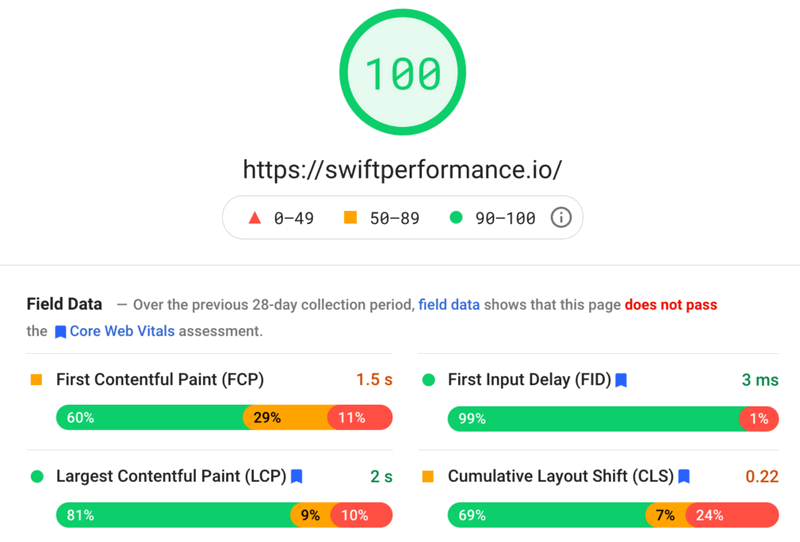
For me, Swift Performance is currently the best caching and performance plugin for WordPress. Especially for the reason that it is an all-in-one solution that offers all performance relevant functions at once and combines them in just one plugin. So gone are the days when it took three plugins (caching, minify, image optimizer, etc.) to optimize performance. If you’re looking for something like this, you’ll find it in Swift Performance and should definitely give the extension a try. And if you don’t like it, you can still use the 14-day money-back guarantee.
Some Questions Before Join US
Group buying, also known as collective buying, offers products and services at significantly reduced prices on the condition that a minimum number of buyers would make the purchase.
- First, we will list product Here as people request & Collect Money From other peoples.
- Sec, Once enough moneys from customer, we will buy products From Developer.
- Then, we deliver to all Joiners.
- You can join directly by Purchase at our site and Reach Support about that to confirm.
- You can join via our Community : https://bit.ly/RMKDiscord
- How to Buy
We have 2 Product Status
- Instant-Deliver : Avaible and Deliver within 24-48hs (not on Sat-Sun, Holiday)
- Group Buy/Pre-Order : Not avaible, Still collect more people to join, need to wait.
OTO mean that One-Time-Offer/Upsell/Upgrade of Product For limited time only
Cancelled mean that order is not pay/process within 24hs. Please reach us with Order ID to check.
You will get Products by Download via Email .Once you finish payment to us and get confirm. You will get download Links inside your Account
- SAAS : You will get Individual account via Mail or On your Order List
- Shared Tool : via our chrome (WIN/MAC/Linux)
- WP : We will active key for your site.
- Course/Book/GraphicKit : Download link will send via mail or On your Order List.
- ETA Time : Fast maybe 3-4 days or 1 Week , Always be 3-4 Weeks or some times as Member Request it can be up to 3 Months to Group Buy WIN.
- GB Fail : You will get refund or exchange other.
– If Products problem, Capture screenshot/Video to us. We will forward to developer to fix it.
– If impossible sloved, we will exchange to other product. With Annual Product, we will refund or exchange by subtract times that you used.
– If used product for 1 or few years then not work. we will try to contact developer to fix it. But if some bad Vendors keep money and run, we just can give you some discount for future orders.
Warranty Time :
- Monthly Product : 30 days
- Annual/One Time Product : 1 year.
Our Store Credit mean credit can use to redeem on Your orders. 25 Credit = 1$.
Earn by some way :
- Place Orders. Each 1$ spend you will earn 1$
- Exchange some not work/not-fullfill orders by your agreed.
- By Reffer Your Friends to buy at our store.
How to redeem
- At Checkout page have redeem button to use it. Maxium is 250/orders.
- If you need redeem more. Reach our Support
We support only via 2 channel :
- Email : support@rankmarket.org
- Messenger : m.me/rankmarkenet (Live chat on Site)
TIme : From 9AM - 6PM Monday - Friday (GTM+8).
All Order/Ticket on Sat-Sun/Holiday will be supported on next Monday.
WE ARE TRY TO WORK HARD AND SUPPORT ALL PEOPLE BUT WE CAN NOT MAKE ALL HAPPY 100%
Thanks For You are here and belive US for longtime.
While working,we meet someone like & we will not support :
– People buy 1 but want to exchange to 10 Products.
– People who steal our products then ask refund.
– People fake payment to get our products.
– People always ask refund,can not wait for waiting product. Dont Pay. Wasted our Time.
Best Regards
David Green – RankMarket
Related products

WordPress


WordPress


WordPress

WordPress


WordPress