

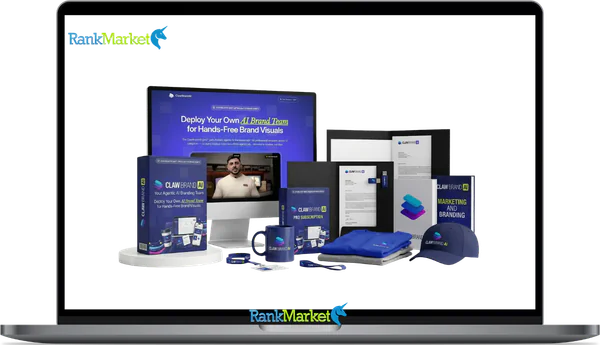
Buy Claw Brand AI + OTOs full account + Bonus
$47.00
Claw Brand AI is a platform that creates photorealistic brand mockups from a logo in seconds to visualize a complete brand identity.
| Deliver | Claw Brand AI + OTOs |
|---|---|
| Access | Individual |
| Type | Brand mockup generator |
| Plan | FE + OTOs |
| Details | GB Details |
Claw Brand AI + OTOs - Overview
Most businesses do not struggle to create a logo. They struggle with everything that comes after, the social posts, the packaging mockups, the storefront signage, the ad banners. That gap between “having a logo” and “having a brand presence” is exactly what Claw Brand AI closes.
Claw Brand AI is an AI,powered brand visualization platform that converts a single logo upload into photorealistic brand mockups in under 60 seconds. Built on Nvidia's OpenClaw agentic AI framework, it was developed by a team carrying over 10 years of experience in software, tools, and technology, meaning the product is a purpose,built branding engine.
The core idea is straightforward. You upload your logo. The system reads your visual identity, matches your colors and typography, and generates a full suite of branded visuals, across social media, product packaging, apparel, digital ads, and physical signage, without any design skills or Photoshop knowledge required.
What This Guide Addresses
- What it is and exactly how it works under the hood
- Its full feature set, template library, and output categories
- Who gets the most value from it and how they use it in practice
- A transparent assessment of strengths and limitations
- A side,by,side comparison with Canva, Midjourney, and Placeit
- A clear answer to whether it's worth buying
What Is Claw Brand AI? (Core Definition & Key Benefits)

Claw Brand AI is an AI,powered branding platform that generates photorealistic brand mockups from a single logo upload in under 60 seconds, across 166 templates and 12 visual categories. It is not a generic AI image generator, and it is not a full design suite. Think of it as an instant brand visualization engine, a system built specifically to bridge the distance between a logo file and a complete brand identity.
The problems it solves are practical. Most business owners do not have a $500–$2,000 budget to hire a designer for initial brand mockups. Most do not have the time to learn Illustrator or Canva's more advanced features. Claw Brand AI addresses these issues with a single, automated workflow.
How Claw Brand AI Works: Step,by,Step Workflow
Claw Brand AI converts your logo into complete brand visuals in five main steps. The process is built to remove friction, there are no technical settings to configure or layers to navigate.
Step 1: Upload Your Logo
You begin by uploading your logo file (PNG, JPEG, or SVG). For the best quality, a PNG with a transparent background at 1000 x 1000 pixels is recommended. The AI analyzes the file immediately, extracting your brand color palette and stylistic fingerprint.
Step 2: Add Brand Details (Optional)
At this stage, you can feed the system additional context: HEX/RGB colors, preferred typefaces, industry niche, and brand tone. Providing these manually improves precision, helping the AI tailor the output to your specific vision.
Step 3: Choose a Category and Template
The platform organizes its output into 12 visual categories, representing distinct branding scenarios like social media, packaging, or apparel. Within those sit 166 templates, each a fully contextualized scene or layout, not just a blank frame.
Step 4: AI Generation (Under 60 Seconds)
This is where Nvidia's OpenClaw agentic architecture does its work. Multiple specialized AI agents operate in parallel: one analyzes the logo structure, another applies the color palette, a third maps the visual to the selected scene, and a final agent optimizes the output.
Step 5: Review, Adjust, and Export
Once the mockups render, you can review each one and make basic adjustments, scaling the logo position or swapping background options. The platform then exports files in formats suited for both digital use (JPG, PNG) and print,ready applications (PDF).
Summarized Workflow View
|
Step |
Your Action |
What the AI Does |
Final Output |
|
1 |
Upload logo |
Analyzes structure, extracts color palette |
Brand “fingerprint” |
|
2 |
Add brand details |
Refines tone, fonts, and use,case context |
Brand profile |
|
3 |
Choose template |
Maps brand identity to selected scene |
Preview layouts |
|
4 |
Generate |
Renders photorealistic mockups at scale |
Full visual set |
|
5 |
Export |
Optimizes files for web and print |
Downloadable files |
To put this in practical terms: a fitness coach uploads their logo, selects the “Social Media” category, picks the Instagram post template, and receives 10+ feed and story mockups in about 40 seconds. No Photoshop, no design brief, and no waiting for a freelancer to respond.
Behind this simple workflow, Claw Brand AI uses Nvidia's OpenClaw agentic architecture to coordinate multiple specialized AI processes, a technical layer worth understanding if you want to evaluate it seriously.
Key Features & Template Library: What You Actually Get
Understanding the feature set of Claw Brand AI means separating what it promises from what it consistently delivers. The platform's strengths concentrate in three areas: its template ecosystem, its brand intelligence layer, and its export infrastructure.
|
Feature / Capability |
What It Does |
Why It Matters |
|
166 Templates / 12 Categories |
Ready,made mockups across major branding scenarios |
Covers most branding needs from a single platform |
|
Auto Brand Matching |
Extracts and applies logo colors and visual style |
Consistent visuals without manual color adjustment |
|
Typography Suggestions |
Matches typefaces to logo style and industry niche |
Cohesive, professional typographic identity |
|
Background Removal |
Cleans logo backgrounds automatically |
Produces a designer,ready file from a basic upload |
|
Multi-Scene Mockups |
Shows the brand on multiple objects in one scene |
Real,life context (e.g., bag + box + signage together) |
|
One-Click Resizing |
Adapts visuals to different aspect ratios |
Fast repurposing across platforms without re,exporting |
|
Unlimited Exports |
No cap on mockup downloads |
Agency,scale usage under a one,time fee |
|
Commercial License |
Full usage rights for marketing, ads, and client work |
Safe for business, resale, and paid campaigns |
The 12 Template Categories: A Full Breakdown
The 166 templates sit within 12 structured categories. Each category represents a distinct context where a brand identity needs to show up, and each one adapts your logo's colors and proportions to fit that context intelligently.
- Social Media Posts — Instagram feed posts, Facebook posts, TikTok cover frames. These are single,image compositions designed for feed placement, with your logo and brand colors applied to lifestyle or product backgrounds.
- Social Media Stories & Reels Covers — Vertical,format templates (9:16) for Stories, Reels thumbnails, and TikTok intro frames. The proportions shift, but the brand identity remains consistent with your feed visuals.
- Online Ads — Display banners and Google,compatible ad formats in standard IAB sizes. For any business running paid traffic, this category alone can save hours of ad production time.
- Print Ads & Posters — Full,bleed poster compositions and print,ready layouts. Suitable for physical distribution, event promotion, or local advertising.
- Product Packaging — Boxes, bags, and product labels with your brand applied to three,dimensional renders. An Etsy seller printing custom packaging can test five design directions in the time it used to take to brief one.
- Bottles & Cans — Purpose,built for beverage brands, cosmetic lines, and personal care products. The renders account for label curvature and material texture, giving outputs a photorealistic finish.
- Apparel & Merchandise — T,shirts, hoodies, caps, and tote bags with your logo placed on realistic garment mockups. Content creators and print,on,demand sellers use this category to build out their merch range before ordering a single unit.
- Stationery — Business cards, letterheads, and envelopes with brand,consistent layouts. Ideal for pitch decks, onboarding kits, and client presentations where brand professionalism signals credibility.
- Web & App Screens — Hero section mockups and UI,style compositions showing your brand in a digital product context. Useful for SaaS brands, app developers, and agencies pitching web projects.
- Storefront & Signage — Window graphics, hanging signs, and exterior brand applications. A restaurant or retail brand can preview physical signage before committing to print orders.
- Event & Booth Branding — Pull,up banners, booth backdrops, and branded table setups. Trade show presenters and event teams use these to align physical presence with digital brand identity.
- Miscellaneous — Stickers, tags, postcards, and product hang tags. This catch,all category handles the smaller,scale branding items that tend to fall through the cracks of most design workflows.
Pricing Plans and OTOs detailed
Front-End – Claw Brand AI ($47 one-time)
- Full access to the AI-powered branding platform for creating high-quality visuals and mockups
- All core features included to design brand assets without needing additional tools or subscriptions
- Simplifies the process of creating professional branding materials for marketing and products
- Suitable for beginners and marketers who want an all-in-one visual creation solution
- One-time payment with no recurring costs compared to traditional design tools
- Includes a 30-day money-back guarantee for risk-free testing
OTO 1 – Claw Brand AI PRO Upgrade ($97 one-time)
- Unlock 48 cinematic scene templates for high-end, professional branding visuals
- SceneScaper AI to generate custom scenes from simple text prompts without design skills
- Advanced AI models for sharper, more realistic mockups and outputs
- Priority rendering queue for faster generation and improved workflow speed
- Includes 775 credits for creating and testing multiple designs
- Ideal for users who want premium-quality visuals and better-performing brand assets
OTO 2 – Claw Brand AI Template Club ($67 one-time)
- Monthly delivery of fresh, high-converting templates to keep your visuals updated
- Access to trending designs and seasonal campaign packs for better engagement
- Early access to new templates before public release
- Includes 225 extra credits each month for additional content creation
- Helps maintain a modern and competitive brand presence
- Perfect for marketers and agencies needing consistent visual updates
OTO 3 – Claw Brand AI Agency Mode ($197 one-time)
- Manage unlimited clients from a single dashboard with organized workflows
- Store and manage separate brand kits for each client بسهولة
- Deliver white-label mockups under your own brand identity
- Includes done-for-you onboarding templates and pricing guides
- Team access features for collaboration and scaling operations
- Enables building a full-service branding business without hiring designers
OTO 4 – Claw Brand AI Reseller Rights ($297 one-time)
- Rebrand and sell Claw Brand AI as your own product with full control
- Sell up to 100 licenses and keep 100% of the profits
- Includes done-for-you sales pages and marketing materials
- No need for technical setup, hosting, or support management
- Fast launch opportunity using a proven and ready-made product
- Ideal for entrepreneurs building scalable software-based income streams
Use Cases: Who Claw Brand AI Is Best For (and How They Use It)
The platform is built for people who need brand visuals quickly and do not have the time or resources to run every asset through a design workflow. That covers a wider group than you might expect.
Small Businesses & Solo Entrepreneurs
For a business operating without an in,house designer, the practical branding challenge is constant. You need social posts for a product launch, a business card for a meeting next week, packaging mockups for a pitch to a retailer, and seasonal promotion graphics for the holiday period, all on a timeline that does not accommodate a design agency's turnaround.
Claw Brand AI fits here because it compresses the production step from days to minutes. A bakery owner who once spent two weeks coordinating with a freelancer to get a cohesive set of launch visuals can now generate a branding kit on the same day the logo is finalized. The cost differential is equally direct: a one,time platform fee versus $500–$2,000 in freelancer or agency costs for comparable output volume.
Marketing Teams & Agencies
For agencies, the value is in throughput. A campaign concepting session that previously required three rounds of mockup requests to a design team can now produce visual drafts in the room, during the briefing. Mockups for client presentations get faster to produce, which means more time for the strategic work that actually differentiates the agency.
The unlimited exports and commercial license are non,negotiable for agency use. Teams can generate mockups for 10 client brand concepts in a single afternoon, present them in a pitch deck, and iterate based on feedback, without logging additional hours in a design tool.
Content Creators & Influencers
Merchandise is a significant revenue channel for creators with established audiences. But before committing to a print run, a creator needs to see what a T,shirt, cap, or hoodie actually looks like with their logo applied. Claw Brand AI's apparel and merchandise category handles that previsualization step without requiring a custom product photography session.
Beyond merch, creators use the platform for social feed branding, ensuring that YouTube thumbnails, podcast cover art, and Instagram posts share a consistent visual language that the audience recognizes across platforms.
E,Commerce & Product Brands
For an online store, product presentation drives conversion. A brand selling on Amazon, Etsy, or a Shopify storefront needs listing images that show the product in branded context, not just a plain shot on a white background. Claw Brand AI's packaging and product mockup categories generate those images without a physical sample or a studio session.
The ability to test packaging design directions before ordering physical units also reduces costly print errors. A skincare brand can review five label concepts on bottle renders, identify the strongest direction, and then brief the printer with confidence.
Freelancers & Designers
For professional designers, Claw Brand AI is not a replacement, it is a speed layer. During a brand discovery phase with a new client, a designer can generate multiple mockup directions quickly to validate a visual concept before investing time in full production. For client,facing proposals and pitch decks, the mockups serve as high,quality placeholders that communicate the brand direction without requiring final design files.
Freelancers who offer brand kit services can use the platform's unlimited exports under the commercial license for white,label delivery, integrating Claw Brand AI's output into their own design packages without attribution requirements.
Pros & Cons: Honest Assessment of Claw Brand AI
No tool is the right answer for every situation. Here is a direct look at where Claw Brand AI performs well and where it falls short.
Assessment Summary
|
Category |
Strengths |
|
Operational Speed |
Under 60 seconds per full set of mockups |
|
Visual Coherence |
Automatic application of colors, typography, and tone |
|
User Entry Point |
High accessibility for those without design training |
|
Financial Value |
One,time pricing with no cap on exports |
|
Final Quality |
Photorealistic renders ready for immediate use |
Strengths
Speed of output is the most immediate advantage. Getting a full set of brand mockups in under 60 seconds is not a marginal improvement over existing tools, it's a different category of experience. For time,sensitive projects, that speed translates directly into hours recovered.
Brand consistency is the second meaningful strength. When a brand's colors, typography, and visual tone apply automatically across 166 templates, the output has a coherence that manual workflows rarely achieve on a first pass. Colors do not drift. Fonts do not shift arbitrarily. The brand identity holds across contexts.
Accessibility for non,designers removes a common bottleneck. A business owner who has struggled with Canva's learning curve or been intimidated by Photoshop can produce mockups that look professionally assembled without prior design training.
One,time pricing with unlimited exports changes the economics of brand visual production. Subscription,based tools charge monthly regardless of how many mockups a team generates. Claw Brand AI's pricing model is more aligned with high,volume users who need output at scale.
Photorealistic quality in the mockups means the outputs can go directly into presentations, ads, and listings without additional post,production.
Testing brand ideas before full design investment is a use case that saves money. A solopreneur can validate a brand direction across multiple visual contexts before commissioning final design assets.
Limitations
Template boundaries are the primary constraint. With 166 templates across 12 categories, the library covers most common branding needs, but it does not cover all of them. If you need a highly specific scene, a luxury yacht interior, a specific regional product format, a niche retail fixture, you may not find it.
Not a full design suite. Deep customization, adjusting individual graphic elements, changing layout structures, adding or removing design components, still requires Photoshop or Canva. Claw Brand AI generates the mockup; refining it at a granular level is a downstream task.
Output quality depends on logo quality. A pixelated or poorly constructed logo will produce mockups that reflect those flaws. The AI enhances what you give it, but it cannot fully compensate for a weak source file.
Advanced designers may find the controls restrictive. For a designer who is accustomed to controlling every visual variable, the platform's simplified interface can feel limiting. The tool is built for speed and accessibility, not for deep creative control.
Style diversity is narrower than pure generative AI tools. Midjourney, for example, can produce wildly varied artistic interpretations of a prompt. Claw Brand AI produces consistent, brand,accurate mockups, which is its strength, but it also means the visual range is more structured and less experimental.
Strategic Capability Overview
|
Aspect |
Strengths |
Limitations |
|
Speed |
Under 60 seconds per mockup batch |
None significant |
|
Ease of Use |
Beginner,friendly, guided workflow |
Limited advanced controls |
|
Output Quality |
Photorealistic, brand,consistent visuals |
Dependent on source logo quality |
|
Flexibility |
12 categories, 166 templates |
No custom scene uploads yet |
|
Pricing |
One,time fee with unlimited exports |
Upfront cost may not suit all budgets |
Claw Brand AI vs Alternatives: Canva, Midjourney, Placeit & Others
Comparing tools means comparing the problems each one is designed to solve. Claw Brand AI, Canva Pro, Midjourney, and Placeit operate in overlapping spaces but with distinctly different approaches. Knowing where each one excels prevents buying the wrong tool for the job.
Side,by,Side Comparison
|
Tool |
Primary Use Case |
Speed to Mockup |
Templates |
Auto Brand Matching |
Pricing Model |
|
Claw Brand AI |
Brand mockups |
~60 seconds |
166 |
Yes (OpenClaw AI) |
One,time |
|
Canva Pro |
General design |
5–10 minutes |
1,000s+ |
Manual |
Monthly / Annual |
|
Midjourney |
AI creative art |
2–5 minutes |
None |
No |
Monthly |
|
Placeit |
Mockups |
~2 minutes |
50,000+ |
Basic (manual) |
Monthly |
How Each Tool Differs in Practice
Canva Pro is the most broadly capable design tool in this comparison. Its template library is vastly larger, and it supports a full range of design tasks from presentations to videos. What it does not offer is automated brand intelligence. Applying your logo consistently across multiple Canva templates requires manual work, selecting colors and adjusting each template individually. For teams with dedicated designers who need editorial control, Canva Pro remains the standard.
Midjourney operates on an entirely different premise. It generates original AI artwork from text prompts. But it has no structured branding system. You cannot upload a logo and receive brand,consistent mockups. Achieving brand consistency across outputs requires careful, iterative prompting. Midjourney excels at illustration and creative concept visualization, but it is not built for brand mockup production.
Placeit is the closest direct comparison in terms of category. It is a mockup,focused platform with over 50,000 items. The key difference is in the degree of automation. Placeit requires you to manually set your colors and upload your logo for each template. There is no system,level brand matching that applies your identity across templates automatically.
When to Choose Which Tool
If you are launching a brand and need a complete set of visuals across multiple categories in the shortest possible time, Claw Brand AI is the fit. If you need custom design work or a tool that handles presentations and social graphics in one place, Canva Pro fills that role. If you need original creative artwork, Midjourney is the appropriate choice. If you need access to the broadest possible template library for occasional mockup needs, Placeit offers the widest selection.
To make this concrete: imagine a coffee brand launching next month that needs 10 branded visuals, Instagram posts, packaging, and signage. In Canva, that process takes 5–10 minutes per template with manual brand setup. In Placeit, each mockup requires an upload and color selection. In Claw Brand AI, one upload and one generation cycle produces the full batch in under a minute.
Frequently Asked Questions About Claw Brand AI
Does Claw Brand AI require any design skills?
No. The platform is built specifically for users without a design background. You upload a logo, select a category and template, and the AI handles the visual production. A basic understanding of branding concepts, like knowing what a brand color is, helps you provide better inputs, but it is not a prerequisite for using the tool.
Can I use Claw Brand AI outputs commercially?
Yes. Every export from Claw Brand AI includes a commercial license. This means the mockups and brand visuals you generate can be used in paid advertising campaigns, client deliverables, e-commerce product listings, social media marketing, and print materials. You are not limited to personal or internal use.
Does Claw Brand AI require a monthly subscription?
No. The platform operates on a one-time pricing model. You pay once and retain access to the tool and its exports without a recurring monthly charge. If there are optional premium add-ons available, those would be disclosed separately, but the core offering does not require a subscription commitment.
Is internet access required to use Claw Brand AI?
Yes. Claw Brand AI is a cloud-based platform, which means generation and processing happen on remote servers, not on your local device. An internet connection is required to upload your logo, generate mockups, and download your exports. The upside is that this architecture allows the AI processing to be significantly more capable than what a local application could achieve.
Will Claw Brand AI replace human designers?
No, and this is an important distinction. Claw Brand AI handles a specific part of the branding workflow: producing photorealistic mockups from existing logo files. It does not perform brand strategy, visual identity design, logo creation, copywriting, or creative direction. Human designers who understand brand positioning, visual hierarchy, and market context will always bring value that automated mockup generation cannot replicate. Think of Claw Brand AI as a production accelerator, not a strategic replacement.
What is a “brand mockup” and why do I need one?
A brand mockup is a photorealistic representation of how your brand identity appears in a real-world context, on a product, a social post, a piece of packaging, or a storefront. Mockups are used in brand pitches, investor presentations, product development, and marketing campaign planning. They allow stakeholders to evaluate a brand direction before any physical or final production work begins. Without mockups, brand decisions are made from abstract references; with them, decisions are grounded in visual reality.
What is agentic AI (like Nvidia's OpenClaw) in plain terms?
Standard AI processes a single task with a single model. Agentic AI coordinates a team of specialized models, each handling a different part of a task, to produce a more refined result. Think of the difference between one generalist handling an entire project versus a specialized team where one person handles research, another handles production, and a third handles quality control. Nvidia's OpenClaw framework applies this coordinated, multi-agent approach to Claw Brand AI's mockup generation, which is why the outputs achieve a level of brand coherence that single-model approaches struggle to match.
What counts as a “template” in Claw Brand AI?
A template is a fully designed scene or layout tied to a specific use case, for example, a coffee cup on a café table, an Instagram feed post with a lifestyle background, or a T-shirt displayed on a flat-lay surface. Each template is not just a blank frame. It is a contextual composition that the AI adapts to your brand inputs. The 166 templates across 12 categories represent 166 distinct brand contexts, each calibrated for a specific visual application.
What types of businesses benefit most from Claw Brand AI?
The platform creates the most value for businesses and professionals who need brand visuals at volume without the resources to maintain a full design workflow. That includes local brick-and-mortar businesses (restaurants, salons, retailers), online sellers on Etsy, Amazon, or Shopify, marketing agencies handling multiple client brands, SaaS companies building pitch decks and landing page visuals, and content creators managing merchandise and social presence simultaneously.
Which visual channels does Claw Brand AI support best?
The platform covers three broad output environments. For digital channels, it handles social media posts, ad banners, and web UI mockups. For print applications, it produces packaging, stationery, posters, and signage in formats suited for professional printing. For mixed use, where a brand needs visuals that work both online and in physical form, the storefront, apparel, and event branding categories bridge both environments.
What file formats and resolutions can Claw Brand AI export?
For web use, exports are available in JPG and PNG formats, optimized for digital display at standard screen resolutions. For print-ready applications, the platform produces higher-resolution files and, where applicable, PDF exports. If you intend to use outputs for large-format printing (banners, signage over 1 meter / approximately 3.3 feet wide), confirm the export resolution against your printer's specifications before ordering.
How is Claw Brand AI different from Canva or Photoshop?
Canva and Photoshop are general-purpose design tools where the user controls the creative output at every step. Claw Brand AI is a brand-specific production tool where the AI drives the output from a logo input. The distinction matters: Canva and Photoshop require design decisions from the user; Claw Brand AI automates those decisions based on brand intelligence. The trade-off is control versus speed. For mockup production specifically, Claw Brand AI is faster. For custom design work, Canva and Photoshop remain the standard.
Should I choose Claw Brand AI or Placeit if I'm focused on mockups?
Both tools serve the mockup category, but they differ in how they apply your brand. Placeit offers a much larger template library (50,000+), which is a meaningful advantage if you need highly specific scene types or niche product formats. Claw Brand AI offers automated brand matching and unlimited exports under a one-time fee, which is a meaningful advantage if you need consistent, high-volume output without manual setup on each template. For occasional, specific mockups, Placeit may offer more variety. For consistent, brand-accurate mockup production at scale, Claw Brand AI's automated workflow is more efficient.
Is Claw Brand AI better than Midjourney for branding?
For brand mockup production, where consistency, logo fidelity, and structured output across recognizable formats are the goal, Claw Brand AI is better suited. Midjourney does not operate with logo inputs or brand systems; it generates original imagery from text descriptions. Where Midjourney surpasses Claw Brand AI is in creative exploration: generating original illustrations, abstract concepts, or highly stylized visual directions that fall outside the scope of structured mockup templates. The two tools are complementary rather than competitive for most branding workflows.
Can I use Claw Brand AI together with other tools?
Yes, and this is the most practical workflow for many users. Claw Brand AI handles the rapid mockup production layer, generating brand-consistent visuals across multiple contexts from a single upload. Those outputs can then move into Canva or Photoshop for custom refinement, additional text overlays, or specific edits required for final production. Designers often describe this as using Claw Brand AI to build the draft and a conventional design tool to finish it, getting the benefit of AI speed without sacrificing the precision that some projects require.
Some Questions Before Join US
Group buying, also known as collective buying, offers products and services at significantly reduced prices on the condition that a minimum number of buyers would make the purchase.
- First, we will list product Here as people request & Collect Money From other peoples.
- Sec, Once enough moneys from customer, we will buy products From Developer.
- Then, we deliver to all Joiners.
- You can join directly by Purchase at our site and Reach Support about that to confirm.
- You can join via our Community : https://bit.ly/RMKDiscord
- How to Buy
We have 2 Product Status
- Instant-Deliver : Avaible and Deliver within 24-48hs (not on Sat-Sun, Holiday)
- Group Buy/Pre-Order : Not avaible, Still collect more people to join, need to wait.
OTO mean that One-Time-Offer/Upsell/Upgrade of Product For limited time only
Cancelled mean that order is not pay/process within 24hs. Please reach us with Order ID to check.
You will get Products by Download via Email .Once you finish payment to us and get confirm. You will get download Links inside your Account
- SAAS : You will get Individual account via Mail or On your Order List
- Shared Tool : via our chrome (WIN/MAC/Linux)
- WP : We will active key for your site.
- Course/Book/GraphicKit : Download link will send via mail or On your Order List.
- ETA Time : Fast maybe 3-4 days or 1 Week , Always be 3-4 Weeks or some times as Member Request it can be up to 3 Months to Group Buy WIN.
- GB Fail : You will get refund or exchange other.
– If Products problem, Capture screenshot/Video to us. We will forward to developer to fix it.
– If impossible sloved, we will exchange to other product. With Annual Product, we will refund or exchange by subtract times that you used.
– If used product for 1 or few years then not work. we will try to contact developer to fix it. But if some bad Vendors keep money and run, we just can give you some discount for future orders.
Warranty Time :
- Monthly Product : 30 days
- Annual/One Time Product : 1 year.
Our Store Credit mean credit can use to redeem on Your orders. 25 Credit = 1$.
Earn by some way :
- Place Orders. Each 1$ spend you will earn 1$
- Exchange some not work/not-fullfill orders by your agreed.
- By Reffer Your Friends to buy at our store.
How to redeem
- At Checkout page have redeem button to use it. Maxium is 250/orders.
- If you need redeem more. Reach our Support
We support only via 2 channel :
- Email : support@rankmarket.org
- Messenger : m.me/rankmarkenet (Live chat on Site)
TIme : From 9AM - 6PM Monday - Friday (GTM+8).
All Order/Ticket on Sat-Sun/Holiday will be supported on next Monday.
WE ARE TRY TO WORK HARD AND SUPPORT ALL PEOPLE BUT WE CAN NOT MAKE ALL HAPPY 100%
Thanks For You are here and belive US for longtime.
While working,we meet someone like & we will not support :
– People buy 1 but want to exchange to 10 Products.
– People who steal our products then ask refund.
– People fake payment to get our products.
– People always ask refund,can not wait for waiting product. Dont Pay. Wasted our Time.
Best Regards
David Green – RankMarket
Related products



SAAS Tools

SAAS Tools

SAAS Tools

SAAS Tools

SAAS Tools