Buy Pitchora AI + OTOs full account + Bonus
$37.00
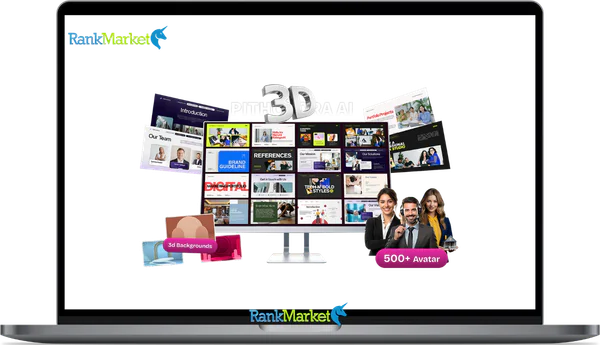
Pitchora AI is an AI-powered sales presentation and interactive landing page platform designed to replace traditional, text-heavy sales pages with engaging, presentation-style “Living Presentations”. It generates dynamic pitch experiences that feature interactive elements like 3D-style layouts, animated slides, and lifelike talking AI avatars
Pitchora AI - Overview
Pitchora AI is an AI pitch agent platform that turns your existing sales content into interactive, conversational AI agents that answer visitor questions, handle objections, and guide prospects toward taking action around the clock.
It belongs to a growing category of specialized AI sales tools, distinct from generic chatbots or general-purpose AI assistants. Where a standard support chatbot answers “where is my order,” Pitchora AI is designed to answer “is this course right for me?” and “what happens if it doesn't work?” and then direct the visitor toward your call to action.
Who it is primarily for: funnel builders, digital marketers, course creators, SaaS businesses, agencies, and local service businesses that want a more interactive, responsive sales experience on their pages without hiring more salespeople.
This guide is independent and not affiliated with or produced by Pitchora AI. It aims for a balanced, evidence-based overview covering how the product works, its key features, pricing considerations, pros and cons, ideal users, alternatives, and frequently asked questions.
What Is Pitchora AI? (Plain-Language Explanation)
Product Category and Core Concept
Pitchora AI is an AI pitch agent and conversational sales assistant platform designed to transform your existing sales assets, including sales page copy, FAQs, offer documents, and pitch scripts, into interactive, real-time sales experiences that engage visitors directly.
Its primary function is to act as a knowledgeable, always-available stand-in for the first stages of the sales conversation. When a visitor lands on your funnel or sales page and has questions, hesitations, or objections, they can interact with a Pitchora AI agent rather than leaving the page unanswered or waiting for a human follow-up.
The core concept in plain terms:
- You provide your sales materials: a URL, uploaded documents, FAQs, and custom instructions
- Pitchora AI processes that content and creates a conversational agent trained on your specific offer
- Visitors interact with the agent, get their questions answered, have their objections addressed, and receive guided nudges toward your CTA
- You see the conversations and use the data to improve your sales process
This positions Pitchora AI as a specialized, sales-focused conversational layer rather than a general-purpose AI interface. It is not trying to be ChatGPT. It is trying to be your best-trained sales assistant, deployed on every page, in every time zone, simultaneously.
How Pitchora AI Differs From Generic Chatbots and Static Pages
Understanding how Pitchora AI fits into the broader landscape of tools requires comparing it against the three most common alternatives people reach for first.
|
Dimension |
Pitchora AI |
Generic Chatbot |
Static Sales Page |
General AI (ChatGPT) |
|
Primary purpose |
Pre-sales conversion |
Customer support |
One-way information |
General use |
|
Knowledge source |
Your pitch materials |
FAQ database |
Fixed copy |
Broad internet training |
|
Objection handling |
Yes, configurable |
Minimal |
None |
Possible, but not native |
|
Funnel integration |
Native |
Often add-on |
Not applicable |
Manual setup required |
|
Analytics focus |
Sales metrics |
Support tickets |
Page analytics only |
None built-in |
The practical difference for a real scenario: A visitor lands on a course sales page. With a static page, they scroll, feel uncertain about whether the program suits their situation, and leave. With a generic support chatbot, they can ask about refunds but get no help understanding if the content is right for them. With Pitchora AI, they can ask “I'm a complete beginner with no tech background, will this work for me?” and receive a contextual, relevant, on-brand answer that addresses their specific concern and nudges them toward enrollment.
How Pitchora AI Works (Step-by-Step Overview)

Input: How You Create a Pitch Agent
The creation process begins with providing your source material. Pitchora AI is designed to work from content you already have rather than requiring you to build something from scratch.
Typical onboarding flow:
- Create an account and set up a project for your specific offer
- Provide source material in one or more formats: a URL pointing to your sales page, uploaded PDFs or slide decks, written FAQ documents, or custom text and prompts you write directly
- Organize knowledge by topic area where relevant, separating your offer explanation, objections and responses, feature details, pricing, and guarantee information
- Configure the agent's tone (professional, casual, enthusiastic), language settings, and behavioral goals (qualify leads, handle objections, push to book a call, drive to checkout)
Skill requirements for setup: The interface is no-code, but the quality of the agent depends heavily on the quality of your copywriting and the clarity of your offer positioning. A technically simple setup with vague or inconsistent source material will produce a vague, inconsistent agent.
Example: A coaching program creator takes their existing sales page URL, uploads a PDF of their most common objection responses, and adds three custom instructions about the program's ideal client. Within an hour, a pitch agent configured around that specific program is ready to deploy.
Processing: How Pitchora AI Turns Content Into Pitch Logic
At a non-technical level, Pitchora AI uses semantic understanding of your source material to construct a knowledge model of your offer. Rather than matching keywords to preset responses, it understands the meaning and context of what you have provided and generates responses that reflect that understanding.
Key processing behaviors:
- Extracting key claims, features, outcomes, objections, and guarantees from your content
- Understanding contextual relationships between different parts of your offer (for example, connecting price to value to guarantee)
- Determining when to provide information versus when to escalate to a CTA based on conversational context
- Applying the tone and behavioral guidelines you configured during setup
Critical dependencies:
- The accuracy and completeness of your source material directly determines agent quality. Gaps in your content become gaps in the agent's ability to respond.
- Explicit guardrails in your configuration instructions help prevent the agent from speculating beyond what you have provided
- Regular review of conversation logs is necessary to catch and correct inaccuracies
Honest limitation: Like all AI systems, Pitchora AI can produce incorrect or overconfident responses, particularly on topics not well-covered in your source material. This is manageable with proper setup and monitoring but should not be dismissed as a negligible risk.
Output: How Visitors Interact With Pitchora AI
The visitor-facing experience is a conversational interface that can be deployed as an embedded chat widget, a module within a page, or a standalone link.
Interaction channels:
- Chat widget embedded on landing pages, sales pages, or checkout pages
- Embedded modules within funnel steps (opt-in confirmation, pre-cart, post-purchase upsell)
- Standalone shareable links for use in email campaigns, paid ads, or social media posts
Typical conversation flows:
- Visitor asks a qualifying question: “Is this right for someone at my level?”; agent clarifies the ideal user profile and asks a follow-up
- Visitor raises an objection: “The price seems high for what I'm getting”; agent addresses value, outcomes, and guarantee
- Visitor asks a specific feature question: “Does this include live support?”; agent provides the accurate, configured answer
- Agent proactively guides: “Based on what you've shared, this sounds like a strong fit. Would you like to see the enrollment options?”
A short sample interaction illustrating objection handling:
Visitor: “What if I try it and it doesn't work for me?” Agent: “That's a fair question. The program comes with a 30-day money-back guarantee, no questions asked. Most people who follow the process consistently see results within the first two weeks, but we want you to feel completely secure in your decision.”
Mobile responsiveness and response speed are UX-critical factors for conversion. Pitchora AI agents are designed to display correctly on mobile devices, which is essential given the volume of funnel traffic arriving from mobile ad clicks.
Deployment, Embeds, and Integrations
Core deployment methods:
- Copy and paste embed code into your website or landing page HTML (compatible with WordPress, Webflow, and most page builder tools)
- Paste script code into funnel builder page settings in tools like ClickFunnels, Leadpages, or similar platforms
- Share a standalone conversation link directly in email sequences, Facebook or Instagram ad destinations, or social media posts
Integration considerations:
- Direct native integrations for popular email and CRM platforms depend on the current Pitchora AI version and plan tier
- Zapier or webhook connections extend the integration options for teams using tools not directly supported
- Lead data captured through Pitchora AI conversations can typically be exported or routed to your CRM through these methods
SEO and UX placement notes: Place the pitch agent widget in a location that is contextually relevant without blocking the primary page content or interfering with the main CTA button. On sales pages, positioning near the primary offer section or near pricing information produces the most relevant conversational context.
Data, Analytics, and the Optimization Loop
The data captured through Pitchora AI conversations represents one of its most underutilized advantages for marketers.
Types of data typically available:
- Total conversation count and active conversation sessions
- Most frequently asked questions and most common objection types
- Conversation engagement duration and drop-off points
- Click-through rates to configured CTAs from within conversations
How to apply this data:
- “Most common questions” data reveals what is missing or unclear on your sales page, guiding copy improvements
- High drop-off rates at specific conversation points indicate where the offer explanation loses visitors
- Low CTA conversion within conversations suggests either weak CTA configuration in the agent or a deeper offer-market mismatch
The optimization feedback loop: Monitor conversation data regularly. Identify the most common confusion points or objections. Update both the pitch agent's configured responses and your underlying sales page copy to address those points directly. Retest and monitor the next data cycle.
Example: Analysis of conversation logs reveals that thirty percent of visitors are asking about whether the product requires ongoing software subscriptions. This question is not answered clearly on the sales page. Updating both the agent's response and adding a FAQ item to the page addressing this question directly reduces drop-offs on that objection.
Key Features of Pitchora AI (With Practical Commentary)
AI Pitch Agent Builder
The agent builder is the core interface where you configure your pitch agent from source materials and custom instructions. The workflow is designed to be no-code accessible, with the primary input being the clarity and quality of your offer materials rather than technical configuration skill.
A basic, functional pitch agent for a straightforward offer can be created in under an hour by someone who has their sales materials organized. Refinement, testing, and optimization of the agent to perform at its best takes additional time, particularly for complex offers with multiple objections, tiers, or audience segments.
Objection Handling and FAQ Automation
Pitchora AI's objection handling capability is one of its most commercially valuable features. The system recognizes recurring question patterns and responds with configured answers that address the specific concern while maintaining brand tone.
Common objections the system can be configured to handle:
- “Is this too advanced for where I am right now?”
- “What if I buy and it doesn't deliver results?”
- “Do you offer refunds?”
- “How is this different from [competitor]?”
- “I don't have enough time to commit to this right now.”
Custom objection responses can be added to override or supplement the AI's default outputs, which is strongly recommended for any objection that has a specific, brand-critical answer. The risk of leaving objection handling entirely to generative AI without custom configuration is that responses may be technically accurate but tonally off-brand or insufficiently persuasive.
Guided Selling and Call-to-Action Flows
Beyond passive Q&A, Pitchora AI can be configured to actively guide visitors through a structured selling sequence: qualifying their situation, suggesting the appropriate offer tier, and directing them to a specific CTA.
Example flow for a SaaS free trial offer:
- Agent greets visitor and asks about their current situation
- Based on response, confirms the product is a relevant fit
- Explains the relevant features for that use case
- Handles any hesitation about the commitment or learning curve
- Presents the free trial option and links directly to the sign-up page
The balance between scripted flows and open-ended AI conversation is a key configuration decision. Tightly scripted flows produce consistent, predictable conversations but feel less natural. Open-ended AI produces more natural interactions but requires more robust source material and guardrails.
Multi-Channel Sharing and Embeds
A single Pitchora AI agent can be deployed across multiple touchpoints in your marketing funnel rather than being limited to one page.
Deployment locations for one agent:
- Primary sales page (main conversion point)
- Opt-in thank-you page (pre-sell before the main page)
- Checkout page (handle last-minute objections before purchase)
- Email campaign link (send warm leads directly to the conversational pitch agent)
- Paid ad destination (replace or supplement a static landing page with an interactive pitch experience)
This reusability means the configuration investment in one well-built agent produces value across multiple funnel touchpoints simultaneously.
Lead Capture and CRM Integration
Pitchora AI conversations can be configured to capture lead information including name, email address, and phone number, and route that data to your CRM or email marketing platform.
Lead capture use cases:
- Capturing email addresses from visitors not yet ready to purchase, placing them into a nurture sequence
- Pre-qualifying leads before routing them to a human sales call booking link
- Collecting phone numbers for high-ticket offers where a call is the next step
Data consent considerations: Any lead capture through a conversational interface must include clear consent language. GDPR, CAN-SPAM, and CASL compliance requires that visitors understand what they are agreeing to when they provide contact information. Add explicit consent language to the agent configuration rather than relying on visitors to infer it.
Analytics, Insights, and Optimization Tools
The analytics dashboard provides the metrics necessary to evaluate pitch agent performance and guide ongoing optimization.
Key metrics available:
- Number of conversations initiated and completed
- Engagement rate (conversations that go beyond the opening exchange)
- Conversion events triggered (CTA clicks, form submissions, booking completions)
- Drop-off points within conversation flows
- Top questions and objections ranked by frequency
Using analytics for offer improvement: The conversation data reveals not just agent performance but offer clarity. If a specific feature is generating disproportionate confusion, that confusion exists in your market regardless of Pitchora AI. The data surfaces it explicitly rather than leaving it invisible in aggregate bounce rate statistics.
User Management, Workspaces, and Agency Features
For agencies and teams managing multiple clients or offers, Pitchora AI supports project-level organization that keeps separate agents, data, and configurations distinct within a single account.
Agency workflow patterns:
- Creating dedicated projects for each client offer, each with its own source materials, tone settings, and CTA configurations
- Managing five to ten client pitch agents within a single account with clear separation between projects
- Packaging Pitchora AI setup and ongoing optimization as a component of a funnel build or retained marketing service
- Using conversation data and optimization insights as deliverables in monthly client reporting
Security, Data Handling, and Compliance (High Level)
As with any SaaS tool that processes visitor conversations and potentially captures personal data, security and compliance considerations are relevant.
Standard SaaS security practices to verify with the vendor:
- Data encryption in transit and at rest
- Clarity on what conversation data is retained, for how long, and who has access
- Data deletion processes for compliance with right-to-erasure requests under GDPR and similar regulations
Best practices for users:
- Add a privacy notice or disclaimer near any pitch agent widget indicating that conversations may be recorded
- Avoid configuring the agent to request sensitive personal or financial data
- Review conversation logs periodically and anonymize or delete records containing identifiable information where required by your applicable regulations
Pricing Plans and OTOs detailed
Front-End – Pitchora AI ($37 one-time)
- One-time payment with lifetime access
- AI-powered interactive pitch creation platform
- Create AI sales pitches with lifelike presenters
- Built-in lead capture and visitor engagement tools
- AI-powered question answering and customer interaction
- CRM and prospect management included
- Visitor tracking and analytics tools
- Voice features and interactive 3D-style sales flows
- Commercial license included
- Built for marketers, freelancers, agencies, coaches, SaaS businesses, and affiliates
- Includes 30-day money-back guarantee
- Early-bird launch pricing available
OTO 1 – Pitchora AI Unlimited ($67 one-time)
- Removes core platform limitations
- More workspaces, pitch agents, and lead capacity
- Build unlimited client campaigns and experiences
- Duplicate and scale pitch funnels faster
- Better suited for agencies and service providers
- Designed for scaling AI pitch businesses
OTO 2 – Pitchora AI Enterprise ($47 one-time)
- Build complete customer journey funnels
- Lead capture and appointment booking tools
- Webinar registration and behavior tracking
- Email integrations and smart offer triggers
- Feedback collection and advanced funnel flows
- Unlimited client license included
- Built for agencies and advanced campaigns
OTO 3 – Pitchora AI Leads ($67 one-time)
- Built-in lead discovery and outreach system
- Find businesses and collect contact information
- Outreach and CRM tools included
- Campaign scaling and lead management features
- Saves time on manual prospecting
- Great for freelancers, agencies, and client outreach
OTO 4 – Pitchora AI Automation ($47 one-time)
- Smart CRM and follow-up automation system
- Lead scoring and conversation memory
- Behavior-based triggers and smart replies
- Organize conversations and campaigns from one dashboard
- Team collaboration and lead assignment features
- Built for agencies and multi-client workflows
OTO 5 – Pitchora AI Agency ($67 – $97 one-time)
- White-label AI pitch agency setup
- Create and manage client accounts
- Custom branding, domains, and dashboard setup
- Done-for-you agency materials included
- Client outreach templates, proposals, and contracts
- Supports Fiverr, Upwork, and agency services
- Built for freelancers and agencies
OTO 6 – Pitchora AI DFY ($97 one-time)
- Done-for-you AI pitch setup service
- AI presenter and brand setup handled for you
- CRM and pitch flow configuration included
- Connect forms and automate lead systems
- Saves setup time and avoids technical work
Who Is Pitchora AI Best For (and Who Should Skip It)?
Ideal Users and Business Profiles
- Funnel-driven businesses with consistent traffic are the clearest fit. Pitchora AI delivers its highest value when there are meaningful numbers of visitors to engage with. A tool designed to improve conversion rates can only demonstrate its impact if there is traffic to convert.
- Agencies managing multiple client offers benefit from the workspace and project structure that allows one account to support multiple pitch agents efficiently, each tailored to a different client's offer and audience.
- Course creators and consultants with complex offers that require explanation, comparison, and objection handling before a visitor is ready to buy represent a strong use case. The more nuanced the offer, the more a conversational agent can add value over a static page.
- SaaS businesses with multi-tiered plans can use Pitchora AI to guide visitors toward the right plan tier, reducing decision paralysis and the support burden of pre-sales tier questions.
Two composite persona examples:
A solo course creator with a $497 program on productivity for entrepreneurs has meaningful traffic from a podcast and email list but knows many visitors have questions about whether the program suits their level. A well-configured Pitchora AI agent handles those questions 24/7 without requiring the creator to manually respond to pre-sales DMs.
A seven-person SaaS team selling a project management tool at three price points uses Pitchora AI to pre-qualify trial sign-ups, guiding visitors toward the plan tier that matches their team size and use case before they hit the pricing page.
Who Might Not Benefit Much From Pitchora AI
- Very simple, low-ticket offers where the purchase decision requires little explanation or persuasion do not provide enough conversational complexity to justify the setup investment. A $7 ebook does not need a pitch agent.
- Highly regulated YMYL topics including medical, legal, financial, and mental health services require careful human judgment that AI agents should not substitute for. Using Pitchora AI in these contexts for anything beyond general information routing and lead capture carries significant liability risk and requires explicit disclaimers.
- Teams with no capacity to configure or maintain the agent will not benefit from the tool. A poorly set up, unmonitored pitch agent can provide incorrect information, create negative brand impressions, and generate compliance risks. The tool requires ongoing attention, not just initial deployment.
Pros and Cons of Pitchora AI (Balanced View)
Main Advantages
- 24/7 availability: A pitch agent handles pre-sales questions at any hour, in any time zone, without staffing costs
- Time savings on repetitive Q&A: Common objections and questions that previously required manual responses are handled automatically at scale
- Faster setup from existing content: You do not need to build a new knowledge base from scratch if your sales materials are organized
- Potential conversion improvement: Visitors who have objections answered in real time are more likely to proceed than those who leave the page with unresolved questions
- Scalability across offers and clients: A single platform manages multiple pitch agents for different offers or client accounts
- Data visibility into the sales conversation: Conversation analytics surface insights about your offer's positioning and your audience's concerns that are invisible in standard page analytics
Potential Drawbacks and Limitations
- Not a replacement for skilled human salespeople on complex, high-ticket offers: A pitch agent supplements and scales the early stages of the sales conversation. It does not replicate the judgment, empathy, and flexibility of an experienced closer on a four-figure or five-figure deal.
- Quality is entirely dependent on your content and configuration: A poorly written sales page fed into Pitchora AI produces a poorly performing agent. The technology does not fix weak offer positioning.
- AI inaccuracy risk: Responses can occasionally be imprecise, overconfident, or out of date. Monitoring conversation logs and updating the agent regularly is a genuine ongoing responsibility.
- Additional complexity and cost in your tech stack: Adding a pitch agent tool means another integration to manage, another subscription to evaluate, and another system whose data needs to be incorporated into your optimization workflow.
- Integration limitations: Deep CRM integrations, complex conditional logic, or highly specific third-party tool connections may require workarounds or be unavailable depending on the current plan tier.
Pitchora AI vs Alternatives
Pitchora AI vs Generic AI Chatbots (ChatGPT, Custom GPTs)
|
Criteria |
Pitchora AI |
ChatGPT / Custom GPT |
|
Sales-specific design |
Yes |
No |
|
Native funnel/website integration |
Yes |
Requires custom dev |
|
Setup complexity |
Low to medium |
Medium to high for custom builds |
|
Analytics and conversation data |
Built-in |
Requires custom logging |
|
Cost structure |
SaaS subscription |
Usage-based or subscription |
When Pitchora AI is worth paying for over a DIY ChatGPT integration: When you need a non-technical setup, built-in funnel deployment, and dedicated sales analytics without developer resources. A solopreneur or small team without technical capacity gets significantly more practical value from Pitchora AI's out-of-the-box sales configuration than from building a comparable experience with a generic AI tool.
When generic tools may suffice: Large teams with developer resources and a preference for maximum flexibility may find building a custom GPT-based agent more cost-effective at scale, particularly if they need deep integrations with proprietary systems.
Pitchora AI vs Traditional Live Chat or Support Chatbots
Traditional live chat and support chatbots are designed to resolve issues after the sale, not to convert visitors before the sale. The core design philosophy is fundamentally different.
Sales-first versus support-first design:
- Pitchora AI is configured around your offer, your objections, and your CTAs. It is optimized for moving undecided visitors toward a purchase or booking decision.
- Live support chat is configured around resolving account issues, answering product use questions, and reducing support ticket volume. It is optimized for problem resolution, not conversion.
Combining Pitchora AI on the pre-sales funnel with a separate live support chat for existing customers represents the full-funnel coverage that many businesses eventually build toward, with each tool serving its intended purpose.
Pitchora AI vs Other AI Sales and Pitch Tools
When evaluating Pitchora AI against competing AI sales tools, apply these criteria consistently:
- Does the tool focus on sales conversion or generic conversation?
- What are the source material input options (URL, upload, manual text)?
- How robust is the analytics dashboard for sales-specific metrics?
- What are the native integration options for your existing funnel and CRM tools?
- What does the pricing look like at your current traffic volume and projected scale?
- Is there agency or multi-project support if you manage multiple offers or clients?
No single tool wins in every dimension. The right choice depends on your specific offer complexity, traffic volume, technical resources, and integration requirements.
Frequently Asked Questions About Pitchora AI
Is Pitchora AI Legit or a Scam?
Pitchora AI is a real software product and not a scam. It follows a standard SaaS or digital product launch model and delivers a genuine AI-powered pitch agent capability. The caution worth applying is to third-party affiliate promotions around the product, which sometimes use exaggerated income claims or guaranteed conversion improvement promises that the product itself does not make. Evaluate the product on its feature set, not on affiliate hype.
Is Pitchora AI Easy for Beginners?
The interface itself is accessible to non-technical users. The bigger learning curve is conceptual: understanding what makes an effective pitch agent requires some familiarity with sales messaging, objection handling, and conversion copywriting. A beginner who has a clear offer and organized sales materials can set up a functional agent. A beginner who is still developing their offer positioning will produce an agent that reflects that underdevelopment, regardless of tool quality.
Can I Use Pitchora AI With My Existing Website or Funnel Builder?
Yes, in most cases. Pitchora AI agents are deployed via embed code or script that can be pasted into most website builders and funnel tools. Platforms where this is commonly straightforward include WordPress (via page header/footer settings or dedicated snippet plugins), Webflow (via custom code embedding), and most major funnel builders through their custom code or script injection settings. Exact steps vary by platform, but the technical requirement is simply the ability to insert a code snippet into your page.
Can Pitchora AI Replace a Human Salesperson?
Partly, in the right contexts. For lower to mid-ticket offers (broadly in the $100 to $1,000 range) where the primary sales barrier is information and objection handling rather than relationship-building and complex negotiation, Pitchora AI can manage a significant portion of the pre-sales conversation effectively. For high-ticket offers, complex B2B sales, or any situation where the buyer needs genuine human judgment and relationship trust before committing, Pitchora AI functions best as an assistant that pre-qualifies and prepares leads for a human conversation rather than as a complete replacement.
Is Pitchora AI Suitable for Finance, Health, or Legal (YMYL) Topics?
With significant caution. In regulated or high-stakes categories like financial advice, medical information, or legal guidance, AI agents should be restricted to providing general educational information and routing interested visitors to qualified human professionals. Never configure a Pitchora AI agent to provide individualized advice, diagnoses, or legal guidance. Include explicit disclaimers within the agent interface and on the page stating that the agent does not provide professional advice. Consult legal counsel about appropriate disclaimer language for your specific context.
Example disclaimer for a financial coaching context: “This conversation is for general informational purposes only and does not constitute financial advice. For personalized financial guidance, please consult a qualified financial professional.”
What Happens if Pitchora AI Gives a Wrong Answer?
Wrong or imprecise answers are a manageable risk with proper monitoring, not an insurmountable barrier. Review your conversation logs on a regular schedule (weekly or monthly depending on traffic volume) and flag responses that are inaccurate, overly confident, or tonally off-brand. Update the agent's source material or add explicit override instructions for those specific scenarios. Provide a clear pathway within the agent for visitors who feel uncertain to reach a human, such as a “book a call” or “email us” CTA.
How Does Pitchora AI Compare to Free Tools?
Free tools including the free tier of ChatGPT or basic chatbot builders can approximate some of what Pitchora AI does for very small projects or internal experiments. For revenue-generating funnels where consistent performance, built-in analytics, reliable funnel integration, and non-technical manageability matter, a purpose-built paid solution like Pitchora AI provides meaningfully more practical value. The comparison is less about features in isolation and more about whether the convenience, reliability, and sales-specific optimization of a dedicated tool justifies its cost relative to your funnel's revenue potential.
Pitchora AI addresses a real and growing need in digital marketing: the gap between a compelling sales page and the conversational engagement that turns uncertain visitors into confident buyers. For funnel-driven businesses, agencies, course creators, and SaaS teams with existing offers, traffic, and sales materials ready to deploy, it provides a practical and commercially meaningful tool for improving pre-sales conversations at scale. Evaluate it against the specific complexity of your offer, your current traffic volume, and your capacity to configure and maintain the agent, and you will have a clear picture of whether it belongs in your 2026 marketing stack.
Some Questions Before Join US
Group buying, also known as collective buying, offers products and services at significantly reduced prices on the condition that a minimum number of buyers would make the purchase.
- First, we will list product Here as people request & Collect Money From other peoples.
- Sec, Once enough moneys from customer, we will buy products From Developer.
- Then, we deliver to all Joiners.
- You can join directly by Purchase at our site and Reach Support about that to confirm.
- You can join via our Community : https://bit.ly/RMKDiscord
- How to Buy
We have 2 Product Status
- Instant-Deliver : Avaible and Deliver within 24-48hs (not on Sat-Sun, Holiday)
- Group Buy/Pre-Order : Not avaible, Still collect more people to join, need to wait.
OTO mean that One-Time-Offer/Upsell/Upgrade of Product For limited time only
Cancelled mean that order is not pay/process within 24hs. Please reach us with Order ID to check.
You will get Products by Download via Email .Once you finish payment to us and get confirm. You will get download Links inside your Account
- SAAS : You will get Individual account via Mail or On your Order List
- Shared Tool : via our chrome (WIN/MAC/Linux)
- WP : We will active key for your site.
- Course/Book/GraphicKit : Download link will send via mail or On your Order List.
- ETA Time : Fast maybe 3-4 days or 1 Week , Always be 3-4 Weeks or some times as Member Request it can be up to 3 Months to Group Buy WIN.
- GB Fail : You will get refund or exchange other.
– If Products problem, Capture screenshot/Video to us. We will forward to developer to fix it.
– If impossible sloved, we will exchange to other product. With Annual Product, we will refund or exchange by subtract times that you used.
– If used product for 1 or few years then not work. we will try to contact developer to fix it. But if some bad Vendors keep money and run, we just can give you some discount for future orders.
Warranty Time :
- Monthly Product : 30 days
- Annual/One Time Product : 1 year.
Our Store Credit mean credit can use to redeem on Your orders. 25 Credit = 1$.
Earn by some way :
- Place Orders. Each 1$ spend you will earn 1$
- Exchange some not work/not-fullfill orders by your agreed.
- By Reffer Your Friends to buy at our store.
How to redeem
- At Checkout page have redeem button to use it. Maxium is 250/orders.
- If you need redeem more. Reach our Support
We support only via 2 channel :
- Email : [email protected]
- Messenger : m.me/rankmarkenet (Live chat on Site)
TIme : From 9AM - 6PM Monday - Friday (GTM+8).
All Order/Ticket on Sat-Sun/Holiday will be supported on next Monday.
WE ARE TRY TO WORK HARD AND SUPPORT ALL PEOPLE BUT WE CAN NOT MAKE ALL HAPPY 100%
Thanks For You are here and belive US for longtime.
While working,we meet someone like & we will not support :
– People buy 1 but want to exchange to 10 Products.
– People who steal our products then ask refund.
– People fake payment to get our products.
– People always ask refund,can not wait for waiting product. Dont Pay. Wasted our Time.
Best Regards
David Green – RankMarket
Related products


SAAS Tools
SAAS Tools

SAAS Tools

SAAS Tools
SAAS Tools