

If you are confused about what to use, Visme or Canva for your content creation, RankMarket is here to your rescue. While each have comprehensive tools for graphic design, presentations, and visual storytelling, which one represents a better value in 2025? This comprehensive comparison will dive into each of their use cases and strengths (but also differences) to help you make the right choice.
Visme vs. Canva: Shared Features
So, let us begin with the core functionalities of these two content creation tools for visual content. There is obviously a ton of overlap when it comes to functionality in Visme vs Canva. Both of them have an easy-to-use interface that lets you pick up where you left off or start completely from scratch.
Drag and Drop Editing
Both Visme and Canva are reliable drag-and-drop design tools, so you will get similar results with both.
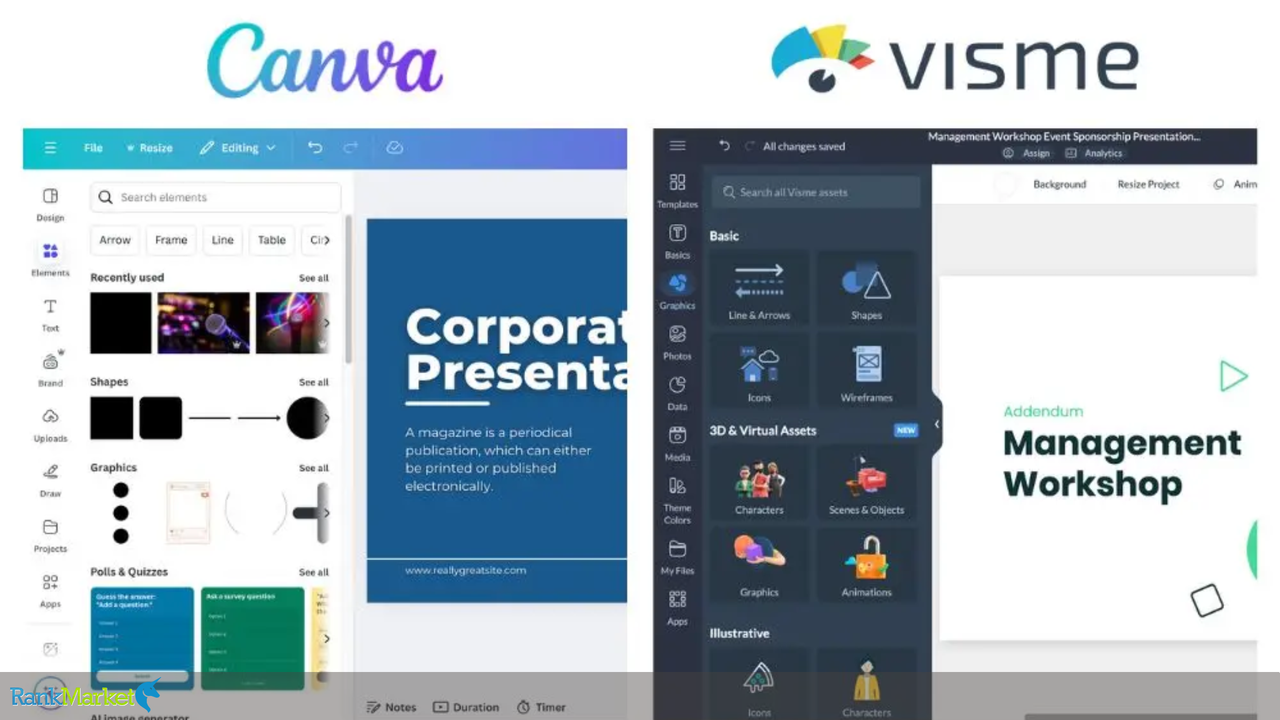
Visme and Canva both show a left-hand side menu, but the way of grouping features is unique. On Canva's far left (above) is an Elements section that includes pretty much any objects you'll want in a design — graphics, tables, photos, videos, and audio. Brand Hub is where you'll keep the visual assets like logos, colours, templates, and presentations (which Canva has). Projects can be saved and media can be imported in the Upload area.
Visme (above) has a similar dashboard when you open a blank template in it. Visme has a different style of dividing up their menu, and you will see that it is slightly less creative in approach and packs a business punch (see Call-to-Action, Diagrams and Stats & Figures sections). Canva presents you with a buffet of all the creative options, while Visme is a little more well-mannered. Although its graphics section is more homogeneous, it still has a myriad of options.
Each dashboard contains all resources that you need to start designing now.
The far-left menu in Visme divides elements into graphics, photos, and media. Therefore, on Visme, types of elements are grouped together, whereas on Canva most of these same types of elements are grouped into one place with a search bar to access what you need faster.
Collaboration
Team members usually operate in the same design environment which makes collaboration an integral feature when it comes to any design tools post comparison. Similar to other web-based design toolkits, each offers room to work together with team members. Canva and Visme offer a few things for you:
- Email designs to team members
- Collaborate in real time with others
Give edit or view access
Product Advertising error: Product not found
Canva and Visme features to let you add point-and-click comments and tag other team members. Choose the visibility level edit/comment settings of projects available and invite them to join (from link or Email). The two platforms also include digital whiteboards where teams can brainstorm ideas visually and share them in real-time.
Interface & Ease of Use
Visme and Canva are both easy to use, but have different target audiences. The interface of Visme is a little bit more complex considering all the customization possibilities that they have, which makes it a great option for anybody that is looking for more structured, presentation-style designs. Canva, meanwhile, has a drag-and-drop interface that is ideal for novices and facilitates the creation of quality graphics without a learning front curve.
Templates
Visme is a variety of templates with an emphasis on presentations, infographics, and business reports Although, it does come with a small amount of social media graphics and casual design projects. On the other hand, Canva has a huge collection of templates for various design types. It includes everything from social media posts to marketing materials, making it a better choice for many of your design tasks.
Stock Photography
For stock photos, Visme and Canva also offer tons of options but Canva has slightly more. Nevertheless, Visme did get change from free to premium subscription to use its good-quality images.
Photo & Video Editing
If you require photo and video editing features, Visme and Canva both offer you assistance. Still, Canva wins out mainly due to its comprehensive editing capabilities and more sophisticated, long-form video and photo editing tools. Such as filter, background removal, among other video editing features.
Visme vs. Canva: Unique Features
This is where the larger distinctions come into play: the free plan on Canva has access to more than 250,000 templates and over 610,000 on its first-tier paid plan. While, Visme has 10,000+ templates. You do still get a lot of templates though with this one, but if you do want your content to be original, then Canva has a much bigger pool of templates (e.g. less risk of your competitors using the exact same template as you). However, if you are prone to analysis paralysis, additional options may simply burden you.
Visme: One of the popular & preferred Canva alternative, if you are lookings for Data visualization then Viseme is here to help you. But to be honest, you can still make data viz on Canva; it is just not what the tool is best at.
Storage
You get 5GB of cloud storage on its free plan and 1TB on each of their paid plans. In this instance, Canva crushes Visme once again. The free plan of Visme gives only 100MB storage space. For its paid plans, these tiers become 250MB, 3GB, and 10–25GB respectively.
If you want a free plan, you can sidestep the storage problem by just keeping your media somewhere else – or not at all (once you post it on social media, you’re done). This feature could make or break the deal if storage is a priority for you. If you are storing high-resolution images that take up around 5 MB each, 5GB of storage would allow you to store around 1,000 images. For users with a sizable video or audio library, however, you can fill up space more quickly than experience.
Pricing
Canva pricing per year, you save roughly 16%. Free for basic Canva $12.99 for Canva Pro $14.99 for Canva Teams (monthly cost)
Visme is by far the pricier of the two, though some Visme users would argue that it is the cost of a better product. Visme free comes with simple features. Visme pricing begins at $29 for paid tiers. Note: If you choose Visme's annual pricing (displayed below) then you will pay half this price. So if you get Visme and plan on using it for longer than a few months, make sure you pay annually. Your wallet will appreciate it.
Given this, however, you can test out free versions from both Canva and Visme and decide which you prefer.
Software and Integrations
The other big bonus point for Canva in Visme vs Canva is the way it integrates with other platforms like Facebook, Slack, Google Photos, Mailchimp and YouTube to name a few. You can also integrate visme with multiple apps like YouTube, Hubspot, Salesforce, and Zapier. However, this is where Canva pulls way ahead as the winner, with so many more app integrations. Canva add-ons Another unique feature Canva also includes is some nifty add-ons you can integrate into your product, such as: Product Mockups, Image Frames, QR Code Generator, and tons more. In font, if you love trying design-related apps to improve your distributed or social content, think of Canva as your own sweet shop.
- Canva works on Windows, Mac, iOS and Android as desktop.
- Visme works on Windows and Mac.
- If being able to use a design tool in different kinds of software is a must to get your design work done, you should go for Canva as the solution.
If you're comparing Visme and Canva, it's helpful to review their official websites to better understand each tool’s features:
- Canva: A popular online graphic design platform with thousands of templates. Visit Canva here.
- Visme: A visual content creation tool ideal for presentations, infographics, and reports. Explore Visme here.
Frequently Asked Questions (FAQs)
Why is Visme better than Canva?
Visme has some advanced features like interactive elements and data visualisation tools, making it a solid choice for professionals that are focused on presentations and infographics. But when it comes to choosing between Visme and Canva, as well as which design tool could be considered the best, it all boils down to your individual design needs and your preferred workflow.
Who is the Canva biggest competitor?
Depending on the needs of the users, Canva has a variety of competitors, but Visme shines when it comes to design capabilities and is often highlighted as the biggest contender. Adobe Spark can fulfill most design branding tasks while Figma can help design and collaborate on most interface designs, but if your business needs professional on-demand designs, unlimited graphic design services like Penji is the way to go.
What is the disadvantage of Visme?
Visme can be more complex for beginners, as its advanced tools and customization options come with a steeper learning curve compared to simpler platforms like Canva.
Visme
Visme: AI Presentation maker, Infographics, and One pager templates Deliver Visme Pro Access Shared Type AI Presentation maker Plan Pro Details GB Details
View ProductConclusion
Visme and Canva are both great products — each with its own unique advantages. Canva is a good choice for fast and easy designs, using its extensive library of templates, while Visme is among the most acceptable tools for business presentations and infographics. It really depends on what you need, your product designer experience, and what you want to accomplish.
We hope you are all ready to start creating with the tools we've mentioned, which you can purchase via RankMarket to receive exclusive deals and proper support. Seize the opportunity to take your visual content game to the next level in 2025 with the best content visualisation platform that suits your needs.