

RankMarket announces Viggle AI, an intuitive, powerful tool that enables you to gain back efficiency and take your production to the next level. In this guide, you will discover how to use Viggle AI with a step-by-step, which helps you enjoy its intelligent functionality. It does not matter if you are just starting or already advanced user in RankMarket will provide you with the right tips so that you can maximize your results using Viggle AI.
What is Viggle?
Viggle is an animation tool driven by artificial intelligence, created by the Canadian start-up Viggle AI. Using a technology of motion transfer, it takes still images and move their features as per the user movement in the uploaded videos. It can equally be used to overlay various masks over figures in preexisting video, popular use that has become meme viral.
Viggle originally started as a Discord community, which has now over 4 million members. In 2024, Viggle operated as a standalone app and web platform. It is based on 3D model JST-1 gen 2 from a software library for analyzing and rendering the visual motion of a character under the influence of physics.
Viggle has become immensely popular not only for social content where its accessibility and ease of use enables the rapid feat of generating effective content without the cost or complexity of dedicated software, but also for the relative realism of motion transfer itself.
What can you use Viggle for?
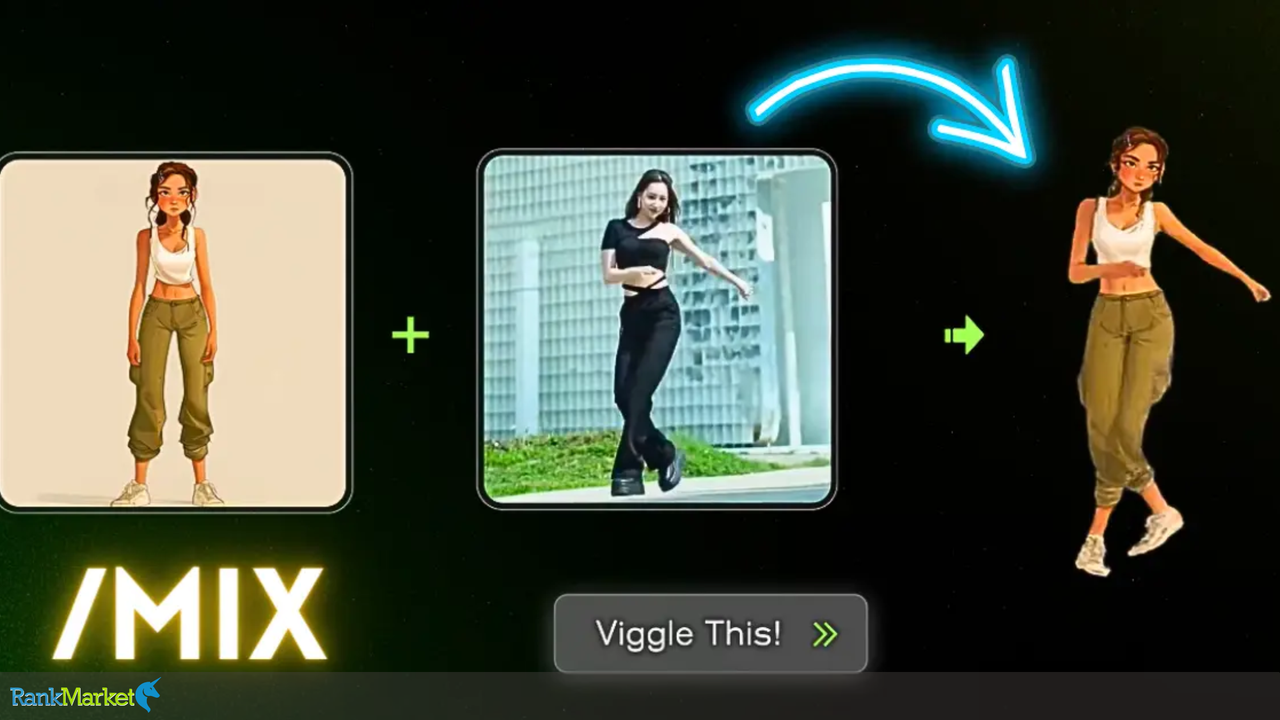
Viggle can be used in two primary ways. First, there’s Mix. It enables you to upload an image of any character, as well as a video that references the motion. Hit “Viggle This!” And the tool will create a video of your character doing that action which is in the clip.
This can be done as a cutout on a selected background of your choice or masked over the top portion of the raw video – the effect lets you even place yourself or your characters in existing scenes! Viggle's Multi works the same way, but you can swap multiple characters in a single scene.
Or breathe life into a character from a static image. Viggle calls this Move. Load up a reference video, preferably a recording of a simple or plain motion, and then click on a figure in the image you want to animate. As a result, you get a motion video that incorporates visual aspects of the original image.
The free meme generator from Viggle lets you see how well this technology works! The generator is basically a free teaser of its capabilities that enables you to insert someone (or a character) into popular videos doing the rounds on the internet, like the Tom Cruise running meme. It is most effective with a photo of the entire body.
Benefits of Using Viggle AI
Ease of Use
Viggle AI is designed to be accessible, so it suits beginners and professionals alike. The user-friendly interface and guided tools enable users to produce video animations without deep knowledge of animation software or coding. And as a content creator, marketer, or educator, you can turn your ideas into a tangible product in a matter of minutes.
Customization
This extreme customization is one of the most attractive features of Viggle AI. Adjustable animations can cater to a wide variety of needs—be it creating an engaging marketing campaign, creating an educational asset, or creating fun and interactive media. With options ranging from motion styles to character customization, Viggle AI allows users complete authority over the output.
Efficiency
Viggle AI uses advanced AI algorithms to help with the animation production process. This translates to the ability to quickly create professional-grade animations in a fraction of the time compared to standard approaches. Great for Teams or Timelines in Desperate Need of Goodness: ParticularlyBuffalo is a good platform for teams or individuals who are working under tight deadlines but want to produce some quality output.
Community Support
Besides its robust functionality, Viggle AI cultivates an inviting community. The Discord group is active and expanding, enabling the sharing of projects, healthy feedback and/or creative partners. Such an environment helps learning, motivation, and persistence.
Step-by-Step Guide: How to Use Viggle AI
1. Join the Viggle AI Community
The first step to get started using Viggle AI, is by joining their official Discord community. Welcome to the community, the place where you have access to all the Viggle AI tools, updates, ask any questions, and receive real time assistance from the Viggle AI team and other users.
- Check out the Viggle AI website or look for their Discord invite link.
- Create or login on your discord account
- Come to the new Viggle AI server and check out the guidelines to have a good time!
2. Familiarize Yourself with Key Commands
Most of how you will interact with Viggle AI will be through commands input via Discord. That allows you to quickly create, customize and animate characters with streamlined command. These commands will help you a lot with your workflow:
- /mix: Mix a static character image you upload with a previously-recorded motion video, so that you get a character with lifelike movements.
- /animate: Animate one static character by a description of its movement via a text prompt — for example, a character may jump or wave hello.
- /ideate: If you don’t have any existing image you want to iterate on, create a brand-new character video with only a text description!
- /Daz Studio: Animaker Style Character Creation/ Animation: $_: Create a character out of your text description with a motion of your choice.
- /Restyle — Use an existing character, alter its visual style, and animate it in a new look
Try playing with these commands to understand how each one works and how they can help (or hinder) your creative goals.
3. Creating Your First Animation
If you feel like you've gotten a hang of the commands, start putting together your first animation by following these instructions:
- List out as much info in the input: Full detailed info about the character you want to bring + you can upload by using discord upload feature if you have any clear and good quality narrative of the character for better results (Ex: template) For best results, take a well lit picture of the character, well visible.
- Enter Motion Prompt: After Upload, Describe What you would like your character to do with a simple, descriptive language: “dance happily”, “run fast”. The more specific your prompt, the more the AI can interpret your vision.
- Background Selection: The character should be placed in an environment within your animation context, so you need to select or upload a background image or video (for example, to represent a cityscape, classroom, fantasy landscape, etc.)
- Fine-Tune: Here you can modify the optional parameters like the animation speed, type of loop, positioning of the character, etc. to get the final output video as per your expectations. At this stage, you get to add your unique elements to take your animation to the next level.
4. Processing and Viewing Your Animation
Once all the inputs are entered, the Viggle AI system will start creating your animation. The process itself takes anywhere from 2 to 5 minutes, depending on how complex the file is and the server load.
When finished, the bot will either upload your animation to the discord channel or send it to you via direct message.
You can then watch the video, ensure that the quality is good enough, and download it to your own device where you can share it directly to social media or edit it even more.
5. Share and Collaborate
Viggle AI is all about community, so feel free to post your animations to other members on the Discord server.
Share your creations in channels to have your work featured.
Request feedback and constructive criticism to work on your next animations.
Work with fellow users to merge talents and development high-level projects.
Join challenges, take a tutorial, or participate in a community event for more ideas.
To learn more about how to use Viggle AI, you can visit the official Viggle AI website. There you'll find tutorials, examples, and helpful demos to get started.
Viggle AI Pro
Deliver Viggle AI ProAccess SharedType AI Video CreatorPlan ProDetails GB DetailsSalepage: https://viggle.ai/
View ProductConclusion
In conclusion, Viggle AI is an indispensable tool for anyone looking to streamline their daily tasks and improve efficiency. Thanks to RankMarket’s comprehensive support and guidance, you can confidently integrate Viggle AI into your routine. If you’re serious about maximizing your productivity and leveraging AI technology to its fullest potential, purchasing Viggle AI through RankMarket is your best choice.
With exclusive deals, reliable customer service, and expert advice, RankMarket stands out as the ideal platform for acquiring this powerful tool. Don’t miss the opportunity to elevate your work with Viggle AI today!