

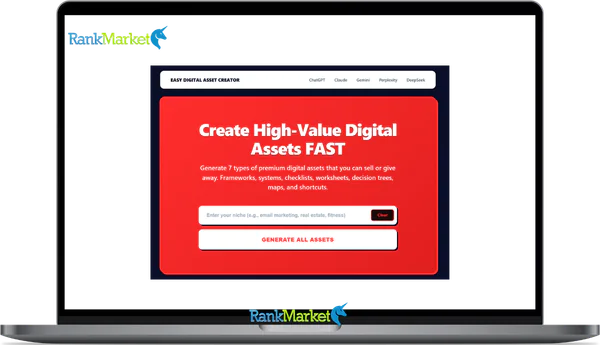
Buy Easy Digital Asset Creator + OTOs full account + Bonus
$10.00
Easy Digital Asset Creator is a prompt-based system that turns one idea into structured prompts for creating different types of digital products.
| Deliver | Easy Digital Asset Creator + OTOs |
|---|---|
| Access | Shared |
| Type | Digital asset prompts |
| Plan | FE + OTOs |
| Details | GB Details |
If you've been searching for Easy Digital Asset Creator, you probably want a direct answer, not a sales pitch. This guide gives you exactly that.
Easy Digital Asset Creator is a low-cost, prompt-based system that takes one single idea and turns it into 7 AI prompts for 7 different digital assets, all powered through tools like ChatGPT, Claude, or Gemini. It doesn't generate content on its own. Instead, it gives you the structured starting points that most creators spend hours trying to figure out from scratch.
This is a hands-on review built from repeated testing across multiple niches, including business, health, and productivity. Here's what this guide covers:
- What Easy Digital Asset Creator actually is, and what problem it solves
- How the step-by-step workflow functions in practice
- Which asset types it produces, with real-world use cases
- How it compares to tools like Jasper, Canva, and manual content creation
- An honest breakdown of strengths and limitations
- FAQs covering licensing, AI compatibility, and non-English use
The first step is understanding exactly what Easy Digital Asset Creator is and what problem it's designed to solve.
What Is Easy Digital Asset Creator?

Easy Digital Asset Creator is a prompt-based system that converts one idea or keyword into 7 asset-specific AI prompts, each structured for a different type of digital product.
Think of it like a preparation kit. Before you sit down to cook, you lay out your ingredients, tools, and recipe. Easy Digital Asset Creator does that for digital content, it removes the “blank page” problem by giving you a structured framework to work from, rather than asking you to invent one.
To be clear: it is not an AI model. You still need an external tool, ChatGPT (free version works), Claude, or Gemini, to generate the actual output. Easy Digital Asset Creator simply provides the precise, asset-specific prompts that get you there faster and with better structure than a generic “write me a checklist” command would.
It works across virtually any niche, fitness, parenting, B2B marketing, personal finance, coaching, e-commerce. That niche-agnostic quality is one of the reasons content creators and solopreneurs find it re-usable well beyond the first purchase.
|
Category |
Details |
|
Asset Type |
AI prompt system for digital asset creation |
|
Deliverables |
7 asset-specific prompts per idea |
|
Compatibility |
ChatGPT (free/paid), Claude, Gemini, and similar AI tools |
|
Ideal Users |
Creators, coaches, consultants, marketers, small businesses |
To decide whether this tool fits your workflow, you need to see who it was actually designed for, and where it tends to fall short.
Key Features and Deliverables: What You Actually Get
The system delivers one structured prompt for each of seven distinct digital asset types. Understanding what each type does, and when to use it, is where the tool's practical depth becomes clear.
A framework is a step, by, step model or process. It forms the structural backbone of a course module or workshop presentation. A “5, Stage Launch Framework for New Coaches,” for example, gives students a repeatable path to follow, not just disconnected tips.
A checklist is a tick, box task list. Its power lies in accountability, it converts knowledge into action. An agency using Easy Digital Asset Creator for client onboarding could generate a full onboarding checklist in one pass, then customise it per industry.
A worksheet provides guided fields and questions for the reader to fill in. Goal, setting worksheets and self, assessment templates are common use cases in coaching and personal development niches. They work equally well as paid downloads or free lead magnets.
A decision tree maps branching logic, “if this, then that,” to help the reader self, select the right path. A fitness coach could use a decision tree to guide prospects toward the right programme before a sales call.
A mind map is a hierarchical idea map that captures the full topic landscape at once. It's particularly useful for content strategy planning or as a visual overview within a course.
A cheat sheet is a condensed quick, reference summary, the kind of one, pager that students keep open while executing a task. An “SEO Quick Wins Cheat Sheet” or “Cold Email Formula Sheet” are examples that translate directly to giveaway content or course supplements.
A swipe file is a collection of reusable copy patterns, structures, and examples. Email follow, up sequences, social media caption templates, and sales page formulas all belong here.
|
Asset Type |
Definition |
Example Use Case |
Time Saved |
|
Framework |
Step, by, step model or process |
5, Stage Launch Framework |
1, 2 hours |
|
Checklist |
Tick, box task or criteria list |
Client onboarding checklist |
~1 hour |
|
Worksheet |
Guided questions or fields |
Goal, setting worksheet |
60, 90 minutes |
|
Decision Tree |
Branching options and logic |
Programme selection guide |
1, 2 hours |
|
Mind Map |
Hierarchical idea map |
Content strategy map |
~1 hour |
|
Cheat Sheet |
Quick, reference summary |
SEO quick wins sheet |
30, 60 minutes |
|
Swipe File |
Copy patterns and templates |
Email follow, up sequence |
1, 2 hours |
Each asset type has its own specialised prompt structure, that's the core distinction between this system and a standard “write me a checklist” command you'd type directly into ChatGPT. The depth of that distinction becomes clearer when you compare Easy Digital Asset Creator against other available options.
Pricing Plans and OTOs detailed
Front-End: Easy Digital Asset Creator FE
- AI-powered system for creating digital assets such as prompts, templates, and online content products.
- Simple dashboard for generating ready-to-sell digital products without technical skills.
- Built-in tools for packaging digital assets for marketplaces or personal websites.
- Beginner-friendly workflow designed for creators entering the digital product space.
- Commercial-use capability allowing users to sell or distribute generated assets.
OTO 1: Easy Digital Asset Creator Custom GPT
- Custom GPT builder designed to create specialized AI tools for digital asset generation.
- Ability to train GPT models with prompts, templates, and niche-specific instructions.
- Create personalized AI assistants for generating digital products automatically.
- Tools for packaging and selling custom GPT solutions as digital products.
- Scalable system for building multiple niche AI tools for business use.
OTO 2: Easy Prompt Creator Pro
- Advanced prompt generator designed for creating high-quality AI prompts.
- Prompt templates optimized for different niches and AI applications.
- Tools for organizing and managing prompt libraries efficiently.
- Ability to create and sell prompt packs as digital products.
- Automation features that speed up prompt creation for multiple projects.
OTO 3: Side Hu$tler
- Training and tools focused on building online side income with digital assets.
- Step-by-step strategies for monetizing digital products and prompts.
- Business frameworks designed for freelancers and digital creators.
- Resource library with tools for launching small online income streams.
- Practical methods for turning digital assets into recurring income opportunities.
OTO 4: Max Organic Traffic
- Organic traffic training focused on attracting visitors without paid ads.
- SEO strategies for promoting digital assets on search platforms.
- Social media traffic methods for expanding audience reach.
- Content marketing systems designed to increase long-term visibility.
- Traffic generation blueprint for promoting digital products consistently.
OTO 5: Niche Brainstormer
- AI-powered niche research tool for discovering profitable digital product ideas.
- Idea generator for creating digital assets across multiple niches.
- Market analysis tools that help identify trending opportunities.
- Brainstorming system designed to spark new product concepts quickly.
- Strategy framework for selecting niches with strong monetization potential.
Who Is Easy Digital Asset Creator Designed For in 2026?
Easy Digital Asset Creator is built for people who create structured content regularly, but don't want to spend hours figuring out how to frame it each time.
The primary audience includes solopreneurs, coaches, and course creators who need teaching materials assembled fast. A life coach building a goal, setting worksheet for a new client, for instance, doesn't want to start from zero. They need a framework with clear fields and guided questions, something Easy Digital Asset Creator gives them in minutes via a targeted prompt, not hours of independent drafting. The same applies to freelance marketers or copywriters who need frameworks and swipe files as deliverables. Agencies producing onboarding checklists for clients at scale will also find the system genuinely useful, since the unlimited, use structure means repeating the process across accounts adds no extra cost.
Small businesses building lead magnets or low, ticket digital offers fall squarely into the target profile. If the goal is to produce a “7, day meal plan checklist” or a “content calendar decision tree” for a landing page opt, in, this system maps directly to that need.
That said, it's not for everyone. If you're looking for a fully automated solution, one where you press a button and receive a finished, branded PDF, this is not that tool. The output requires your input into an AI model and some light editing on the back end. Similarly, if you're someone who avoids using AI tools entirely, the workflow won't align.
The system is accessible for non, technical users. No design skills, no coding, no advanced prompt engineering background is required to use it effectively.
If you fit one of these profiles, here's how Easy Digital Asset Creator actually works, from idea to finished asset.
How Easy Digital Asset Creator Works: Step, by, Step Workflow
The workflow is a four, stage process. Each stage is straightforward, and the entire cycle from idea to usable content takes approximately 5 to 15 minutes, including AI generation and light editing.
- Step 1, Enter your idea. You start with a single keyword or concept phrase. It could be something like “keto diet plan for beginners,” “Instagram growth for yoga teachers,” or “client onboarding process for freelancers.” The specificity of your idea doesn't need to be high, the system is designed to work with both narrow and broad inputs.
- Step 2, Receive 7 tailored prompts. From that single input, the system produces one prompt for each of the seven asset types: a framework, a checklist, a worksheet, a decision tree, a mind map, a cheat sheet, and a swipe file. Each prompt is individually structured for its asset type, which is what separates it from simply asking ChatGPT to “make something.”
- Step 3, Paste into your AI tool. Copy the chosen prompt into ChatGPT, Claude, or Gemini. You can also adjust variables, target audience, tone, length, before running. The AI does the generation, you do the review.
- Step 4, Export and format. Move the output into Google Docs, Notion, or Canva. Format it to match your brand, then export as a PDF for a lead magnet, upload it as a course module, or hand it to a client directly.
You can repeat this process with an unlimited number of ideas, which brings us to the question of what, exactly, each asset type gives you.
How It Compares to Other Tools and Manual Creation
Easy Digital Asset Creator occupies a specific position in the content creation landscape. It is not an AI engine, not a design platform, and not a full, funnel builder. Knowing where it fits, and where it doesn't, helps you decide how to integrate it into an existing workflow.
Compared to manual creation, Easy Digital Asset Creator wins on speed. Building a structured worksheet from scratch often takes 60 to 90 minutes. With the right prompt, the same structure is ready for editing in under 5 minutes. The cognitive load of overcoming the blank page problem alone justifies the one, time cost for most active content producers.
Compared to general AI writing tools like Jasper or Writesonic, the distinction is specialisation. Those tools are built for long, form copy, blog posts, ad scripts, email campaigns. They can technically produce a checklist, but they won't produce one with the structural depth that a dedicated, asset, specific prompt delivers. The difference is like asking a general contractor to build a custom bookshelf versus hiring a carpenter who specialises in exactly that.
Compared to Canva templates, the gap is in the opposite direction. Canva handles visual design and layout, it doesn't generate content structure or frameworks. Easy Digital Asset Creator handles structure and content, it doesn't design anything visually. For a complete workflow, both tools serve complementary roles.
|
Solution |
Pricing Model |
Core Strength |
Comparison Point |
|
Easy Digital Asset Creator |
One, time purchase |
Asset structures and targeted prompts |
Requires external AI and design tools |
|
General AI Writer |
Monthly subscription |
Long, form copy and blog content |
Less specialised for asset frameworks |
|
Canva Templates |
Monthly or Free tier |
Visual design and layout |
No content framework generation |
|
Manual Creation |
Time cost only |
Fully custom, brand, specific assets |
Slow, high blank, page friction |
The one, time pricing model is worth noting. Most comparable tools, even those with narrower utility, require ongoing subscriptions. For creators working across multiple niches or projects, the compounding value of unlimited use without monthly fees is a concrete advantage.
With the comparison landscape mapped, the natural next question is: what does actual use reveal about the real strengths and honest limitations?
Strengths and Limitations, Honest Pros and Cons
Key Advantages of Using Easy Digital Asset Creator
The advantages here are tied to concrete production outcomes, not theoretical benefits.
- Low one, time cost relative to output value. For creators producing multiple digital products per month, the per, asset cost approaches zero after the first few uses. Compare that to a single Jasper or Writesonic subscription, which costs significantly more on a recurring basis.
- Time savings on asset structure. The most difficult part of creating a digital asset is deciding how to organise it, not writing it. Easy Digital Asset Creator resolves that structural decision in one step, freeing up editing and customisation time instead.
- Eliminates blank, page friction. The system replaces “where do I even start?” with a clear, immediately usable starting point. For coaches or consultants who produce content between client sessions, that shift in workflow efficiency compounds over time.
- Works across any niche. A single purchase serves equally well for a fitness coach, an e, commerce consultant, a parenting blogger, or a B2B agency. The niche, agnostic nature means the tool doesn't limit your scope.
- Beginner, friendly copy, paste workflow. No prompt engineering skills are required. The system is designed for users who know what they want to create but don't know how to extract it from an AI tool effectively.
- Scalable for high, volume producers. An agency or prolific creator using this to batch, plan content calendars or product suites, say, producing a full digital product bundle for a client in one day, benefits from the unlimited, use structure. There's no cap on how many ideas you can process.
- Improves AI prompt quality across all your tools. Even if you already use ChatGPT daily, working with purpose, built, asset, specific prompts trains you to write better prompts over time. That skill transfers beyond Easy Digital Asset Creator itself.
Limitations, Trade, Offs, and When It Might Not Be Enough
Every tool has a ceiling. Understanding where Easy Digital Asset Creator's ceiling sits prevents disappointment and informs how you plan your workflow around it.
- Requires an external AI tool to function. ChatGPT, Claude, or Gemini must be open and active. If you don't already have an account with at least one of these platforms, that's an additional setup step, and a separate dependency.
- Does not produce finished, designed PDFs. The output is structured text content, not a formatted, brand, ready document. Moving that content into a visual format, Canva, Adobe Express, or a professional designer's hands, is a separate step.
- Output quality depends on your subject, matter knowledge. The prompts provide structure, you provide accuracy. In highly technical or regulated fields, finance, legal, medical, the AI output still requires thorough review by a qualified expert before distribution.
- Templated prompts can produce structurally similar assets. If two different creators use the same prompt system without meaningful customisation, they may end up with assets that share a recognisable structure. Light editing and niche, specific language are necessary to differentiate the output.
- No built, in funnel integration or analytics. There's no mechanism within the system to connect your assets to a landing page builder, email sequence platform, or performance tracking tool. Those integrations happen outside the system entirely.
To be precise, Easy Digital Asset Creator is a content, structure accelerator. It is not a business, in, a, box solution, and it doesn't position itself as one. If you need a brand, heavy e, book with custom illustrations and a designed layout, you'll need Canva or a designer after the content is generated. If you're producing for a highly regulated industry, the structural output is a starting point, not a final compliance, ready document.
With the strengths and limitations in full view, the remaining questions are usually the specific ones, the kind that don't fit neatly into a review section but matter before you make a decision.
Frequently Asked Questions About Easy Digital Asset Creator
- Is Easy Digital Asset Creator beginner, friendly if I've never used AI before?
Yes. The workflow is copy, paste by design. You receive a pre, built prompt, open a free AI tool like ChatGPT, paste it in, and receive your output. No prior knowledge of prompt engineering or AI configuration is required. If you can open a browser tab and paste text, you can use this system from day one.
- Do I need a paid ChatGPT subscription, or will the free version work?
The free version of ChatGPT (GPT, 3.5 or GPT, 4o mini) is compatible with the prompts. A paid subscription to GPT, 4 or GPT, 4o will produce more nuanced, detailed outputs, particularly for complex assets like decision trees or multi, step frameworks, but it is not a requirement. Starting free and upgrading later is a practical path for most users.
- Can I use it for non, English content or bilingual assets?
Yes, with a simple adjustment. Before running the prompt, add a language instruction, for example, “Write this entirely in Vietnamese” or “Produce a bilingual version in English and Vietnamese.” AI tools like ChatGPT and Claude handle this well for most major languages. The prompt structure itself remains effective, only the output language changes.
- Is there a limit to how many ideas or assets I can generate?
No. Easy Digital Asset Creator operates on a one, time purchase model with no usage caps. You can run the system against an unlimited number of ideas, whether you're producing one lead magnet or building out a full digital product suite across multiple client accounts.
- Can I resell the assets I create with it as paid products or in client projects?
The assets you generate are your own output, you own the content you create. That said, the licensing terms of the AI tool you use (ChatGPT, Claude, etc.) also apply to your outputs, particularly for commercial use. Review the current terms of service for the specific AI platform you're using, as these policies evolve. In general, content generated for client projects or sold as digital products falls within acceptable use for most major AI providers, but verification is always the prudent step.
- How is this different from just asking ChatGPT directly to “create a checklist”?
This is the most important distinction to understand. Asking ChatGPT to “create a checklist” produces a generic result, a flat list that lacks internal logic, hierarchy, or audience, specific framing. Easy Digital Asset Creator provides a purpose, built prompt that specifies asset type, structural requirements, audience angle, and contextual variables. The difference in output quality is similar to the difference between asking a contractor to “build something” versus handing them a technical blueprint.
- Does it work for technical or regulated niches like finance, health, or legal?
It works for generating the structural foundation of assets in those fields, but the output requires expert review before distribution. A checklist for “managing Type 2 diabetes with diet” can be structured via the prompt system, but a registered dietitian or physician should validate the specific claims and recommendations before that asset reaches an audience. The system provides the frame, your domain expertise, or a qualified reviewer's, fills it responsibly.
- What happens if AI tools change or update in the future, will the prompts still work?
Prompt systems are generally more durable than individual AI features because they rely on instruction, following logic, which is a foundational capability of all major language models. Minor updates to ChatGPT, Claude, or Gemini may change output style, but the structural prompts will continue to function. That said, very significant model changes could require prompt adjustments, a known trade, off for any system that depends on third, party AI infrastructure.
Every answer above points back to the same core value: Easy Digital Asset Creator eliminates blank, page syndrome for structured digital content. It doesn't replace your expertise, your editing judgment, or your design tools. What it removes is the single most common bottleneck in digital product creation, the time and mental friction of figuring out how to organise what you already know into a format that works.
Some Questions Before Join US
Group buying, also known as collective buying, offers products and services at significantly reduced prices on the condition that a minimum number of buyers would make the purchase.
- First, we will list product Here as people request & Collect Money From other peoples.
- Sec, Once enough moneys from customer, we will buy products From Developer.
- Then, we deliver to all Joiners.
- You can join directly by Purchase at our site and Reach Support about that to confirm.
- You can join via our Community : https://bit.ly/RMKDiscord
- How to Buy
We have 2 Product Status
- Instant-Deliver : Avaible and Deliver within 24-48hs (not on Sat-Sun, Holiday)
- Group Buy/Pre-Order : Not avaible, Still collect more people to join, need to wait.
OTO mean that One-Time-Offer/Upsell/Upgrade of Product For limited time only
Cancelled mean that order is not pay/process within 24hs. Please reach us with Order ID to check.
You will get Products by Download via Email .Once you finish payment to us and get confirm. You will get download Links inside your Account
- SAAS : You will get Individual account via Mail or On your Order List
- Shared Tool : via our chrome (WIN/MAC/Linux)
- WP : We will active key for your site.
- Course/Book/GraphicKit : Download link will send via mail or On your Order List.
- ETA Time : Fast maybe 3-4 days or 1 Week , Always be 3-4 Weeks or some times as Member Request it can be up to 3 Months to Group Buy WIN.
- GB Fail : You will get refund or exchange other.
– If Products problem, Capture screenshot/Video to us. We will forward to developer to fix it.
– If impossible sloved, we will exchange to other product. With Annual Product, we will refund or exchange by subtract times that you used.
– If used product for 1 or few years then not work. we will try to contact developer to fix it. But if some bad Vendors keep money and run, we just can give you some discount for future orders.
Warranty Time :
- Monthly Product : 30 days
- Annual/One Time Product : 1 year.
Our Store Credit mean credit can use to redeem on Your orders. 25 Credit = 1$.
Earn by some way :
- Place Orders. Each 1$ spend you will earn 1$
- Exchange some not work/not-fullfill orders by your agreed.
- By Reffer Your Friends to buy at our store.
How to redeem
- At Checkout page have redeem button to use it. Maxium is 250/orders.
- If you need redeem more. Reach our Support
We support only via 2 channel :
- Email : [email protected]
- Messenger : m.me/rankmarkenet (Live chat on Site)
TIme : From 9AM - 6PM Monday - Friday (GTM+8).
All Order/Ticket on Sat-Sun/Holiday will be supported on next Monday.
WE ARE TRY TO WORK HARD AND SUPPORT ALL PEOPLE BUT WE CAN NOT MAKE ALL HAPPY 100%
Thanks For You are here and belive US for longtime.
While working,we meet someone like & we will not support :
– People buy 1 but want to exchange to 10 Products.
– People who steal our products then ask refund.
– People fake payment to get our products.
– People always ask refund,can not wait for waiting product. Dont Pay. Wasted our Time.
Best Regards
David Green – RankMarket
Related products

SAAS Tools


SAAS Tools


SAAS Tools
SAAS Tools