


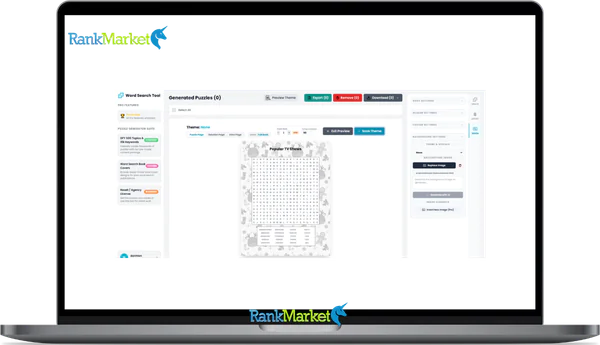
Buy WordSearch Puzzle Book Generator + OTOs full account + Bonus
$79.00
A wordsearch puzzle book generator is a tool that automatically creates complete, print-ready puzzle books from themed word lists.
| Deliver | WordSearch Puzzle Book Generator + OTOs |
|---|---|
| Access | Shared |
| Type | Puzzle book generator |
| Plan | FE + OTOs |
| Details | GB Details |
Puzzle books have found a steady place on Amazon KDP, in classrooms, and in homes around the world. Some word search titles rank within the top 10,000 on Amazon, a position that implies hundreds of copies sold each month. That kind of traction is hard to ignore, whether you are a teacher building vocabulary materials or a self-publisher building a passive income catalog.
A wordsearch puzzle book generator is software, web-based, desktop, or AI-assisted, that turns word lists into complete puzzle book interiors. It handles grid creation, solution pages, layout, and export, all in one workflow.
Two main groups reach for these tools. The first is education-focused users, teachers, tutors, and homeschooling parents who need custom learning materials fast. The second is income-focused users, Amazon KDP sellers, print-on-demand publishers, and digital product creators who want to build and scale puzzle book catalogs.
This guide covers the core definitions, a hands-on look at tool types, a complete 1-hour KDP workflow, niche strategies, and answers to the most common questions. Drawing on 10+ years in software, tools, and technology, the focus here is on what actually works, not theory.
- Definitions and core concepts
- A comparison of generator types (free and paid)
- A step-by-step KDP publishing workflow
- Profitable niche and monetization strategies
- FAQs and practical troubleshooting
All tools, specs, and market references in this guide are current as of 2026.
What Is a WordSearch Puzzle Book Generator?

A wordsearch puzzle book generator automates the process of turning large sets of themed words into complete puzzle books you can print, share, or sell.
At its core, a word search puzzle book generator is a software tool that accepts word lists as input, builds word search grids automatically, generates matching solution pages, and compiles everything into a print-ready or digital book interior. It removes the need for manual grid-drawing, cell-by-cell letter placement, or layout work in programs like Microsoft Word or Adobe InDesign.
It is worth separating two related but distinct concepts here. A single-puzzle generator produces one grid at a time, useful for classroom worksheets. A puzzle book generator, by contrast, handles 50 to 200+ puzzles in bulk, manages consistent pagination, and outputs a full interior file ready for print or upload.
The typical tool accepts three kinds of input: word lists organized by theme, a chosen difficulty level, and a target grid size. From there, it processes the placement logic, randomizes letter fills, applies font settings, and assembles the output. The final export is most commonly a PDF, PNG, or SVG file, often pre-configured for KDP trim sizes.
Standard features across most book generators include:
- Adjustable grid sizes, from 9×9 up to 25×25 cells
- Word placement directions: forward, backward, diagonal, and vertical
- Randomized or controlled letter fill for empty cells
- Page numbering, puzzle titles, and instruction text
- Optional decorative elements or themed visual headers
The practical difference between a puzzle generator and a puzzle book generator comes down to scale and output format. One builds a worksheet; the other builds a product.
How Does a Word Search Puzzle Book Generator Work (Step-by-Step)?
Understanding the internal process makes it easier to choose the right tool and troubleshoot when something goes wrong. The steps below apply across most generators, regardless of brand or interface.
Step 1, Input your word lists. You paste or upload themed word groups. Most tools let you organize these by puzzle, for example, 50 lists of 10 words each for a 50-puzzle book. Some platforms also accept CSV or spreadsheet imports for large batches.
Step 2, Configure your puzzle rules. You set the grid size, allowed word directions, and difficulty level. Larger grids with diagonal and backward placements create harder puzzles. Smaller grids with forward-only placement suit younger readers. You also select fonts, heading styles, and any instructional text.
Step 3, Generate the grids. The algorithm places each word into the grid, checking for conflicts, overlapping letters that do not match. Empty cells are then filled with random letters. Well-built generators use randomization seeds to ensure no two puzzles in the same book look identical, an important detail for reader experience.
Step 4, Create solution pages. The tool generates a mirrored version of each grid with the hidden words highlighted or circled. These appear either directly after each puzzle or in a dedicated answer key section at the back.
Step 5, Layout and pagination. Puzzles and their solution pages are arranged in sequence. Titles, page numbers, and spacing are applied consistently. This step is where book generators differ most from single-puzzle tools, the output is a structured document, not a loose collection of images.
Step 6, Export and download. The finished interior exports as a PDF (most common for KDP), PNG, or SVG. Many tools include preset bleed and margin settings for standard KDP trim sizes such as 6×9 inches (approximately 15×23 cm) and 8.5×11 inches (approximately 22×28 cm).
To make this concrete: take a 10-word “Animals” list, words like ELEPHANT, GIRAFFE, PENGUIN, and CROCODILE. Feed it into a generator set to a 15×15 grid with diagonal placement enabled. Within seconds, you get a filled grid puzzle plus a matching solution page. Multiply that by 50 themed lists, and you have a 100-page book interior in under five minutes.
Advanced options vary by tool. Some offer non-rectangular puzzle shapes (circles, stars, hearts). Others support mixed-format books that combine word searches with crosswords or sudoku grids. Batch processing is available in premium tiers and can handle hundreds of puzzles per session.
Who Uses a Word Search Puzzle Book Generator (And Why)?
The range of people who use these tools is wider than most assume. The common thread is that everyone wants output, either for learners or for buyers, without spending hours on manual layout work.
Teachers, Tutors, and Homeschooling Parents
The primary goal for this group is vocabulary reinforcement. Word searches help students recognize spelling patterns, remember subject-specific terminology, and stay engaged without the pressure of a test format.
Generators let educators create custom puzzles aligned to specific lessons, “Solar System,” “Shakespeare vocabulary,” “Spanish food words“, in minutes rather than hours. The same word list can produce a fresh grid layout each year, so the materials stay current without extra work. Typical outputs include printable classroom handouts, homework sheets, and seasonal activity packs.
Parents, Event Organizers, and Hobbyists
This group uses generators to entertain and personalize. A puzzle book with a child's name, their favorite characters, or inside references from a family reunion becomes something meaningful rather than generic.
Book generators are particularly useful here because they can produce 20 to 50 pages of themed content, enough to serve as a party favor, a birthday gift, or a travel activity packet. A bridal shower word search book, for example, takes an afternoon to produce without a generator but under 30 minutes with one.
KDP Sellers and Low-Content Book Publishers
For self-publishers on Amazon KDP, IngramSpark, or Etsy, word search book generators are tools for building catalogs at scale. The goal is to publish multiple titles per month across specific niches, “word searches for seniors,” “ESL vocabulary practice,” “holiday activity books for kids.”
Generators make this possible by handling bulk puzzle creation, applying KDP-spec margins and bleed automatically, and delivering consistent visual styling across dozens of titles. A seller targeting 10 to 50 book uploads per month cannot afford to build each interior manually. The generator replaces a significant portion of that production time.
Corporate Trainers, Therapists, and Niche Professionals
This is a smaller but real segment. Occupational therapists and cognitive training specialists use word search puzzles as low-stress mental engagement tools, particularly for seniors or patients in rehabilitation. The puzzles need to be large-print, simple in direction, and themed around familiar topics.
Corporate trainers use company-specific term lists to build brand familiarity materials or onboarding exercises. Where tools allow post-layout editing, a brand logo or custom header can be added. The generator produces the content engine; the professional adds the context.
Key Benefits of Using a Word Search Puzzle Book Generator
Why does it matter which tool you use, or whether you use one at all? The answer becomes clear when you look at what manual production actually costs in time and consistency.
Key Benefits of Using a Puzzle Generator
- Significant Time Savings: Building 100 puzzles by hand in Word or Excel takes 10 to 20+ hours; a generator completes the same task in 30 to 60 minutes. This efficiency is the core argument for high-volume publishers.
- Scalability Across Multiple Books: A single publisher can generate dozens of interiors per month without hiring a designer. The tool handles the repetitive work while the human provides the niche direction.
- Consistent, Professional Output: Every puzzle shares the same font, spacing, and grid styling. Manual production often introduces variations that signal low quality to readers and algorithms.
- Reduced Error Rate: Generators eliminate common manual errors like missing words, duplicate grids, and misaligned solution pages at the point of production.
- Automatic Solution Pages: Answer keys are generated alongside each puzzle, removing the massive burden of producing 100+ keys manually.
- Difficulty and Age-Level Tuning: Grid sizes and word directions can be set for specific audiences—such as 10×10 forward-only grids for children or 20×20 complex grids for adults.
- Commercial-Use Licensing: Most paid generators grant explicit commercial rights for KDP and print-on-demand, providing legal clarity for products intended for sale.
- KDP-Ready Export Settings: Built-in presets for trim sizes (6×9 in, 8.5×11 in), bleed, and margins remove a major source of Amazon upload rejections.
- Multi-Channel Output Flexibility: Support for multiple formats (PDF for KDP, PNG for slides, SVG for Etsy) allows for diverse product distribution.
- Low-Cost Niche Testing: Publishers can build and upload a sample interior in under an hour to test new audience ideas with minimal time or budget investment.
- Language and Character Support: Support for accented characters and non-English alphabets makes these tools valuable for ESL educators and multilingual markets.
- Branding and Style Control: Custom fonts and layout styles allow puzzles to match a school’s visual identity or a publisher’s specific series branding.
- Reusability of Word Lists: The same curated word list can generate a unique grid layout every time it is processed, which is ideal for recurring educational curriculums.
- Offline-Ready Classroom Materials: A single prepared interior file can be printed in batches for classroom use without any ongoing internet dependency.
Manual Creation vs. Using a Generator
|
Aspect |
Manual Creation |
Using a Generator |
|
Time per 100 puzzles |
10–20+ hours |
30–60 minutes |
|
Error risk |
High (missing words) |
Low (automated checks) |
|
Styling consistency |
Variable |
Uniform across all pages |
|
KDP compliance |
Requires manual spec matching |
Built-in trim/margin presets |
|
Scalability |
1–3 books per month |
10–50+ books per month |
To put royalty math in context: a word search book priced at $7.99 USD on Amazon KDP in a 6×9 paperback format earns roughly $2.50–$3.50 per sale after printing costs. At 100 sales per month across 10 titles, that is $2,500–$3,500 in monthly royalties from interiors that a generator produced in a single workday.
Pricing Plans
Basic Plan ($79)
- 100 pages per generation
- Standard AI word generator
- Basic fonts only
- 5 backgrounds included
Pro Plan ($89 – One-Time)
- Unlimited puzzle generation
- Advanced system prompts
- 10 premium fonts
- 10 premium backgrounds
- Insert custom images/backgrounds
- Auto intro builder
- Auto table of contents
- AI background generator
- 5 premium cover templates
Enterprise (Contact Us)
- Unlimited puzzle generation
- Advanced system prompts
- User-customized fonts
- User-customized backgrounds
- Insert custom images/backgrounds
- Auto intro builder
- Auto table of contents
- Unlimited AI background generator
- 5 premium cover templates
- Source code & local hosting included
Types of Word Search Puzzle Book Generators (And How to Choose)
Not every generator is built for the same purpose. In 2026, the market has shifted toward Agentic AI and cloud-based orchestration. Before selecting a tool, understand the four main categories.
Single-puzzle online generators (free) are the most accessible entry point. Tools like Puzzlemaker or Canva's basic templates produce one puzzle at a time, often as a printable worksheet. They work for teachers who need occasional custom puzzles, but they are not designed for book-scale production.
Integrated AI Workspaces (SaaS) are the new gold standard for 2026. Platforms like Skywork AI or KDPEasy separate the task into two parts: AI-driven content research and automated grid formation. These tools handle bulk generation of 50 to 200+ puzzles, apply consistent styling, and export KDP-ready PDFs with one click.
Template-based platforms (Canva AI + Add-ons) are design-first environments. In 2026, Canva's Magic Studio allows you to generate themed word search layouts using text-to-design prompts. They suit publishers who prioritize visual branding and “aesthetic” interiors for Etsy or boutique bookstores.
Desktop Batch Software remains a one-time purchase for power users. These tools offer the most control over grid algorithms, custom shapes, and randomized “seeds.” The trade-off is a steeper learning curve compared to modern cloud apps.
|
Tool Type |
2026 Examples |
Best For |
Typical Output |
|
Free / Basic |
Puzzlemaker |
Teachers, hobbyists |
Single worksheets |
|
AI Workspaces |
Skywork AI, KDPEasy |
Professional Publishers |
Full 100+ page books |
|
Design-First |
Canva AI |
Etsy sellers, branded books |
Highly stylized interiors |
|
Desktop / Pro |
Puzzle Wiz Pro |
Power users, high-volume batching |
Vector-perfect grids |
Best Niches and Audiences for Profitable Word Search Books (2026)
A profitable niche has four qualities: a defined audience, ongoing interest, room for a series, and demand that is not yet buried by competition.
Evergreen Educational and AI-Assisted Niches
Sight words for early learners remain a permanent requirement. However, in 2026, publishers are finding success with STEM-focused themes, “Coding for Kids,” “Renewable Energy Terms,” and “AI Literacy for Beginners.” These categories have permanent demand because parents need them every academic year.
The “Nostalgia” Niche for Seniors
This remains the most profitable segment on Amazon KDP. The priority is extra-large print (18pt+ font), simple grid directions, and topics tied to nostalgia, 1960s pop culture, classic radio shows, and vintage Americana. Using an AI tool to generate word lists about “Life in the 1970s” can build a 40-puzzle book in minutes.
Wellness and “Low-Stress” Hobbies
With the rise of “digital detox” trends, word searches themed around mental wellness, positive affirmations, and gardening therapy are top performers. These books are often marketed as “anxiety-relief” tools, requiring soft aesthetic designs and forward-only word placements to keep the experience stress-free.
Supplemental Q&A: Answers to Common Questions About Word Search Puzzle Book Generators
Can I legally sell books made with most word search puzzle generators?
Yes, in most cases. The majority of paid generators, such as Book Bolt or Skywork AI, include commercial-use rights in their license terms. Always check the specific license before publishing. Some free tools restrict commercial use, so reading the Terms of Service before uploading to KDP is a non-negotiable step.
Do I need graphic design skills to publish a word search book on KDP?
No. The puzzle interior is handled entirely by the generator. For the cover, tools like Canva offer KDP-compatible templates that require no design background. The full production workflow is accessible to someone with no formal design training.
Can free generators be used to create commercially sold books?
It depends on the tool. Some free generators explicitly permit commercial use, others do not. Check the license documentation on the tool's website. When the terms are unclear, contact the developer directly and get a written response before publishing.
Is it possible to create bilingual word search books with a generator?
Yes, though support varies. Some generators handle accented characters and non-Latin alphabets well, others do not. Testing with a small batch before committing to a full book interior is the practical approach. Tools with UTF-8 character encoding tend to handle multilingual input reliably.
Can I make money with just one word search book?
Technically yes, but one book rarely generates meaningful income on its own. The economics of KDP low-content publishing favor catalog size. A single title might earn $20, $50 per month in a well-chosen niche. A catalog of 30 to 50 titles in related niches compounds that figure into something more substantial.
What are the main types of word search puzzle book generators?
There are five main types: free single-puzzle online generators, paid book-focused SaaS tools, desktop software (one-time purchase), template-based platforms like Canva with puzzle add-ons, and spreadsheet / script-based DIY tools. Each serves a different production volume and budget level.
Which tools are best for teachers vs. KDP publishers?
Teachers working at low volume (10, 20 puzzles per week) are well served by free single-puzzle tools combined with Canva for layout. KDP publishers producing 10, 50 books per month need a paid bulk generator with KDP-ready PDF export. The feature set that matters for each group is fundamentally different.
What puzzle elements can be customized?
Grid size (typically 9×9 to 25×25), word placement directions (forward, backward, vertical, diagonal), font type and size, puzzle titles and headings, instruction text, letter fill method, page numbering style, and in some tools, grid shape (circular, heart-shaped, star-shaped). More advanced platforms also support custom decorative borders or themed visual elements.
What are the typical age groups for word search books?
The standard market segments are: early childhood (ages 4–6), early elementary (ages 6–9), upper elementary (ages 9–12), teens (ages 12–17), adults, and seniors. Each group has different grid size requirements, font size preferences, and content themes. Seniors in particular benefit from large-print formats, which is a distinct niche on Amazon KDP.
Which platforms can I use to sell word search books and printables?
The primary platforms are Amazon KDP (print-on-demand paperbacks and eBooks), IngramSpark (wider retail and library distribution), and Etsy (digital PDF downloads and physical books). Teachers Pay Teachers is a strong channel for educators selling classroom-ready content. Gumroad and Payhip work for direct-to-customer digital sales.
How do free word search generators compare to paid ones for KDP use?
Free tools handle single puzzles well but lack the bulk generation, pagination control, and KDP-spec export that book publishers need. Paid tools automate the entire interior production workflow. For KDP publishing at any meaningful scale, free tools create a bottleneck, you end up doing manually what the paid tool would have done in seconds.
What is the difference between a puzzle generator and a puzzle book generator?
A puzzle generator produces one puzzle at a time, one grid, one solution page. A puzzle book generator handles 50 to 200+ puzzles in a single session, manages consistent styling across every page, numbers the pages, and exports a single print-ready file. The book generator is a production tool; the single-puzzle generator is a worksheet tool.
Should I use a desktop app or an online SaaS puzzle generator?
Desktop apps offer more algorithm control and do not require an internet connection. Online SaaS tools tend to update more frequently, integrate with cloud storage, and have more modern interfaces. For most KDP publishers in 2026, an online SaaS tool is the practical choice unless you have specific offline requirements.
Is Canva alone enough, or do I need a dedicated puzzle generator?
Canva is a layout and design tool, it does not generate puzzle grids. You can design beautiful covers and format finished pages in Canva, but you still need a puzzle generator to create the actual word search content. The two tools work together: the generator produces the puzzle interior; Canva handles the cover and any custom page formatting.
How do word search books compare to other low-content books in terms of effort and reward?
Word search books sit in a middle tier of effort. Blank journals and lined notebooks require almost no content production but face extreme competition. Sudoku and crossword books require more complex generation logic. Word search books offer a balance: moderate production effort with a large, active buyer market across age groups and themes. The key variable is niche selection, a well-chosen topic with a defined audience outperforms a generic title regardless of format type.
Some Questions Before Join US
Group buying, also known as collective buying, offers products and services at significantly reduced prices on the condition that a minimum number of buyers would make the purchase.
- First, we will list product Here as people request & Collect Money From other peoples.
- Sec, Once enough moneys from customer, we will buy products From Developer.
- Then, we deliver to all Joiners.
- You can join directly by Purchase at our site and Reach Support about that to confirm.
- You can join via our Community : https://bit.ly/RMKDiscord
- How to Buy
We have 2 Product Status
- Instant-Deliver : Avaible and Deliver within 24-48hs (not on Sat-Sun, Holiday)
- Group Buy/Pre-Order : Not avaible, Still collect more people to join, need to wait.
OTO mean that One-Time-Offer/Upsell/Upgrade of Product For limited time only
Cancelled mean that order is not pay/process within 24hs. Please reach us with Order ID to check.
You will get Products by Download via Email .Once you finish payment to us and get confirm. You will get download Links inside your Account
- SAAS : You will get Individual account via Mail or On your Order List
- Shared Tool : via our chrome (WIN/MAC/Linux)
- WP : We will active key for your site.
- Course/Book/GraphicKit : Download link will send via mail or On your Order List.
- ETA Time : Fast maybe 3-4 days or 1 Week , Always be 3-4 Weeks or some times as Member Request it can be up to 3 Months to Group Buy WIN.
- GB Fail : You will get refund or exchange other.
– If Products problem, Capture screenshot/Video to us. We will forward to developer to fix it.
– If impossible sloved, we will exchange to other product. With Annual Product, we will refund or exchange by subtract times that you used.
– If used product for 1 or few years then not work. we will try to contact developer to fix it. But if some bad Vendors keep money and run, we just can give you some discount for future orders.
Warranty Time :
- Monthly Product : 30 days
- Annual/One Time Product : 1 year.
Our Store Credit mean credit can use to redeem on Your orders. 25 Credit = 1$.
Earn by some way :
- Place Orders. Each 1$ spend you will earn 1$
- Exchange some not work/not-fullfill orders by your agreed.
- By Reffer Your Friends to buy at our store.
How to redeem
- At Checkout page have redeem button to use it. Maxium is 250/orders.
- If you need redeem more. Reach our Support
We support only via 2 channel :
- Email : [email protected]
- Messenger : m.me/rankmarkenet (Live chat on Site)
TIme : From 9AM - 6PM Monday - Friday (GTM+8).
All Order/Ticket on Sat-Sun/Holiday will be supported on next Monday.
WE ARE TRY TO WORK HARD AND SUPPORT ALL PEOPLE BUT WE CAN NOT MAKE ALL HAPPY 100%
Thanks For You are here and belive US for longtime.
While working,we meet someone like & we will not support :
– People buy 1 but want to exchange to 10 Products.
– People who steal our products then ask refund.
– People fake payment to get our products.
– People always ask refund,can not wait for waiting product. Dont Pay. Wasted our Time.
Best Regards
David Green – RankMarket
Related products


SAAS Tools

SAAS Tools

SAAS Tools

SAAS Tools


SAAS Tools