

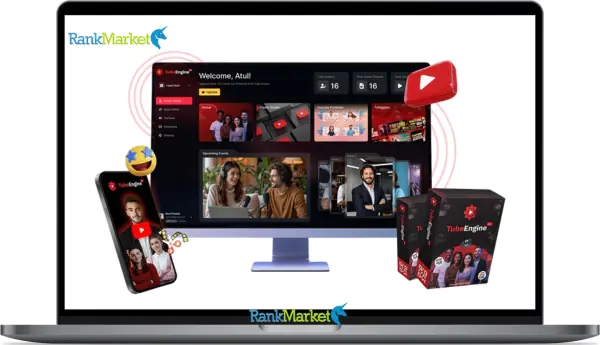
Buy Tube Engine AI + OTOs full account + Bonus
Original price was: $318.00.$40.00Current price is: $40.00.
Tube Engine AI is an AI-powered YouTube automation tool that creates, optimizes, and grows channels without manual video production.
| Deliver | Tube Engine AI + OTOs |
|---|---|
| Access | Individual |
| Type | SAAS |
| Plan | FE + OTO123 |
| Details | GB Details |
Have you ever hoped to earn money on YouTube without having to spend hours editing, filming videos, or revealing your identity? We'll go over all you need to know in this Tube Engine AI review, including how it operates, who it works best for, its benefits and drawbacks, and whether or not it fulfills its claim of hands-free YouTube growth.
What is Tube Engine AI
Tube Engine AI is a complete YouTube automation platform that lets you grow and build anonymous YouTube channels without having to record, edit, or appear on camera. It uses AI for everything from voiceovers, scripting, and ideation to video production, SEO, and publication.
Tube Engine AI can produce publish-ready videos with thumbnails, subtitles, and tags if you just enter keywords, select a template, and use your own voiceover or one of the available options. To keep your channel lively, the editor responds to comments instantly and is simple to drag and drop.
Tube Engine AI is ideal for creators, marketers, or businesses who need to manage profitable YouTube channels hands-free from a single, robust dashboard because it supports long-form, short-form, and multilingual videos.
Key features of Tube Engine AI
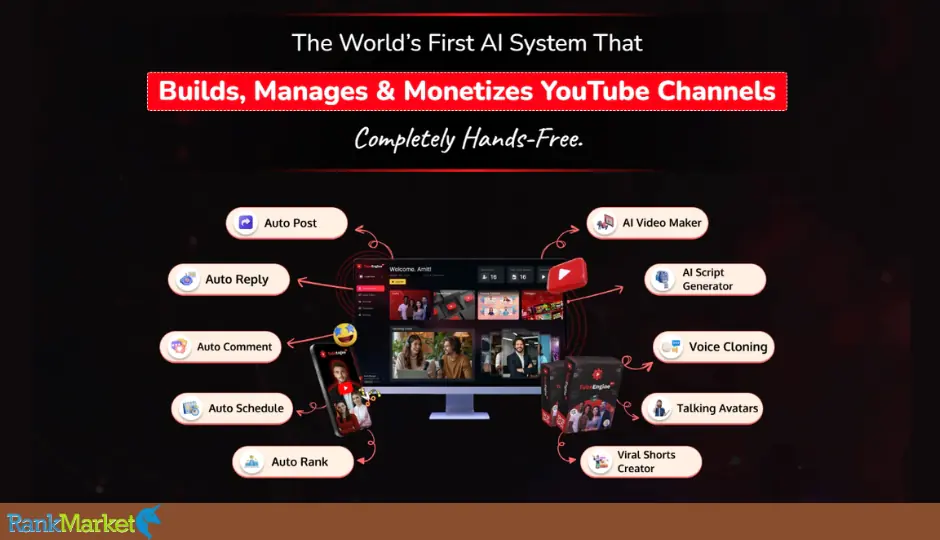
- Launch a Viral YouTube Channel in Minutes: You don't need to film, perform, or edit anything to get your anonymous YouTube channel up and running in only a few minutes. By automatically generating and customizing your channel with a professional name, thumbnail, and branding that fits your industry, VidBamboo's AI takes care of all the laborious work.
- AI Script Generator: Select your tone and length, enter keywords or a brief prompt, and you'll receive a completed, shoot-ready script. By preventing writer's block and maintaining the narrative flow, AI enables viewers to stay on the screen longer.
- AI Voice & Voice Cloning: To preserve brand consistency, clone your own voice or select from more than 120 genuine voices. Even if you are not the one narrating, use the same voice in both short and lengthy videos.
- Avatar from Photos or Library: Create a talking avatar with flawless lip synchronization and natural voices from any photo. Or select from more than 1,000 pre-made avatars that fit any age group, occupation, or sector.
- 100+ Professional Templates for Every Style: Choose a template for explainers, reviews, lists, or news. Every template is designed to increase interaction and maintain the uniformity of your movies' appearance and feel throughout the uploading process.
- Built-in AI Video Editor: Edit, crop, and enhance right in the platform. Add overlays, captions, emojis, or transitions without the need for external tools.
- SEO Optimization & Auto Ranking Tools:To improve your videos' search engine ranking and recommendations, VidBamboo automatically creates titles, tags, descriptions, and hashtags.
- Channel Name & Thumbnail Generator: Produce memorable channel names and thumbnails to boost click-through rates and establish your brand right away.
- Auto Post & Auto Interact: Your channel will remain active even while you're asleep thanks to scheduled posts, auto-comments, and auto-replies. It's easy to increase audience engagement.
- Multilingual Support (150+ Languages): Translate, subtitle, and subtitle your videos in 150+ languages for easy international reach.
- AI Trend Support & Viral Boost: Receive suggestions for popular subjects and improve your metadata. Viral Boost adds an additional algorithmic boost to your uploads to accelerate their growth.
- Custom Branding & Backgrounds: Use custom graphics, brand colors, and backgrounds to make your videos stand out and help viewers recognize your content right away.
- Commercial Rights & Agency: Produce branded YouTube videos for customers. Offer videos, scripts, and thumbnails together to open up additional revenue streams.
- Automation for Beginners: The technical work of development and posting is handled, so you can focus on creating content and building your following.
- 30-Day Money-Back Guarantee: Try completely risk-free. If you're not satisfied, get a full refund within 30 days—no hassle.
How to use Tube Engine AI
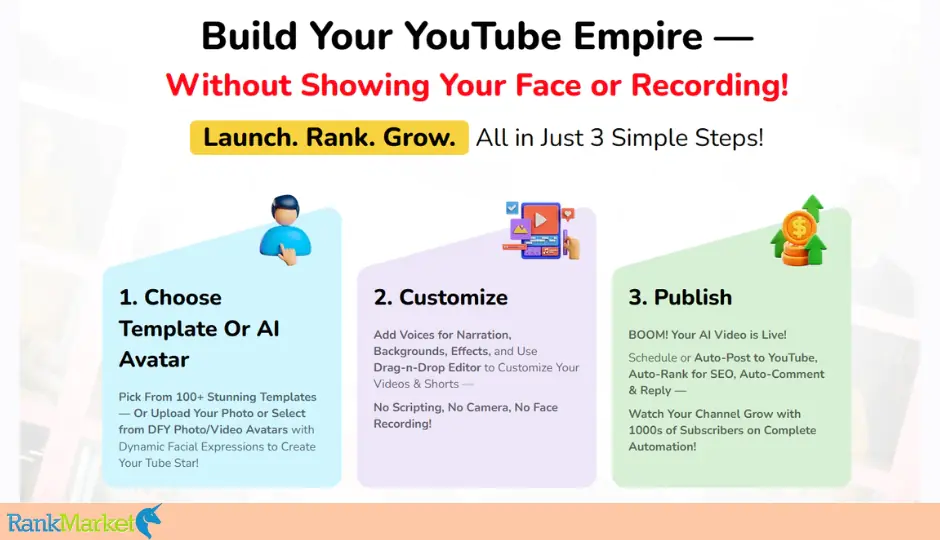
The command center for making, organizing, and monitoring all of your YouTube video projects is the VidBamboo Dashboard. Using a profile photo, making your own, or building a template are the three easy ways to make films. Here's how:
Step 1: Create a video with a profile picture
- Start by selecting a profile picture style. For simplicity, use a photo; for more movement and facial expressions, use a video.
- Add your video script after that, or have the integrated AI Script Assistant write it for you in a matter of seconds.
- Next, navigate to the voice options and select from more than 120 AI sounds or create your own voice for a customized sound.
- VidBamboo is ideal for anonymous artists since it will automatically synchronize the lips and facial expressions in your profile photo with your narration.
Step 2: Create a Video from Scratch
- Do you require a totally unique video? Open the AI Video Editor and start a new campaign.
- Here, you may use basic drag-and-drop functionality to add a thumbnail, text, emojis, backgrounds, b-roll, and transitions. You may quickly transform from blank to professional by adjusting the style and feel with a multi-track timeline.
Step 3: Use Pre-Designed Templates
- Benefit from more than 150 pre-made themes for all types of content, including sales videos, podcasts, reviews, and explainer videos.
- You can preview, select, and customize your preferred design by adding your voiceover, brand colors, or logo.
Step 4: Publish Your Video
Once your video is ready, publish it directly to YouTube without leaving your dashboard:
- Enter Details: Complete the thumbnail, tags, title, and description. Allow AI to assist you with SEO text and image optimization.
- Plan an Upload: Either publish right now or plan an upload for a later time. Add categories and select visibility (private, unlisted, or public).
- Preview & Publish: On the same page, preview your completed video, make any necessary modifications, and press Publish.
Why you should use Tube Engine AI
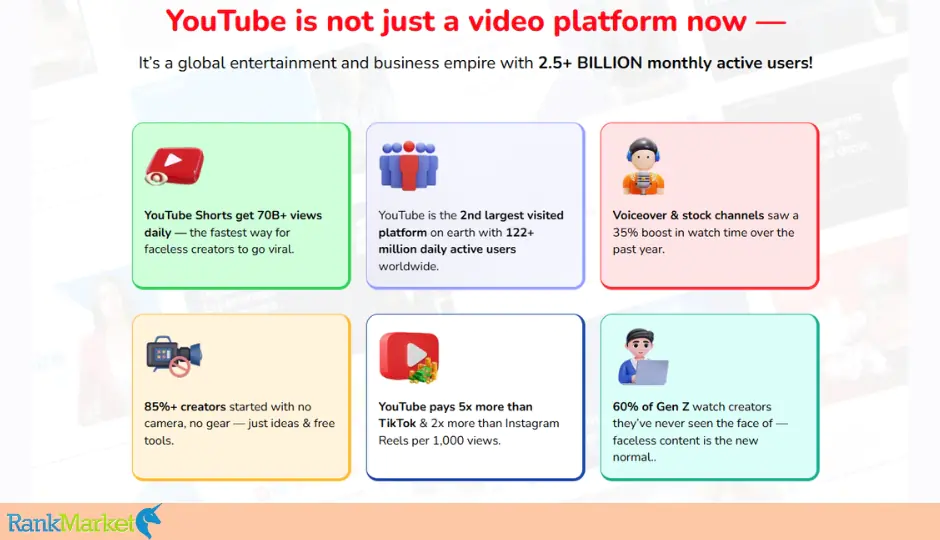
- Streamline the entire YouTube process: Tube Engine AI saves hours every video by managing scripting, narration, thumbnails, editing, uploading, SEO, and engagement from concept to publication.
- Create more, faster: Since making videos just takes minutes rather than days, you can publish more, test more quickly, and expand more quickly.
- Reach a global audience: You can easily connect with audiences worldwide by translating and subtitling your films into more than 150 languages.
- Increase visibility and earnings: AI and viral boosting technology give you the edge to rank higher, increase views, and earn money through ads or affiliate marketing.
- No filming or editing required: Just choose a template, edit your script, and publish – no software, microphone, or filming skills required.
- Hands-free channel management: Your channel remains active and engaged around-the-clock thanks to auto-posting, auto-commenting, and auto-reply.
- Run multiple channels or offer services: Easily manage multiple YouTube brands or use Tube Engine AI for client work with a commercial license.
- Perfect for beginners and busy creators: This tool takes care of the tedious tasks so you can concentrate on producing, expanding, and making money.
The Upgrade/OTO details
Front End: Tube Engine AI Commercial – $37
- Launch and manage faceless YouTube channels fast — no filming or editing.
- Create talking avatars, generate videos, scripts & thumbnails automatically.
- Includes 100+ video templates & 120+ AI voices.
- Auto-post, auto-comment, and auto-reply on YouTube.
- Publish up to 50 videos instantly with 10,000 free credits.
- Comes with a commercial license to sell videos or services
- Perfect for beginners testing their first channel or proof of concept.
OTO 1: Tube Engine AI Unlimited – $77
- Unlock unlimited videos, Shorts, avatars, voices, and thumbnails.
- Manage multiple channels with unlimited storage and bandwidth.
- “Viral Engine” auto-ranking for unlimited uploads.
- Unlimited posting, commenting, and engagement automation.
- Priority support & continuous updates included.
- Ideal for creators scaling multiple channels or posting daily.
OTO 2: Tube Engine AI Enterprise – $67
- Full timeline editor with drag-and-drop control.
- Background removal, motion effects, and cinematic transitions.
- Access a large royalty-free media library.
- Export in multiple formats: horizontal, vertical, or square.
- Commercial license included for client work.
- Perfect for pro editors and agencies who want studio-quality content.
OTO 3: Tube Engine AI Automation – $97
- Fully automate channel growth and engagement.
- 24/7 AI posting, scheduling, commenting, and traffic boosting.
- Built-in viral traffic engine & syndication to 100+ platforms.
- Smart AI SEO optimizer for titles, tags & descriptions.
- Integrates with CRM or email funnels for monetization.
- Best for hands-off creators who want a “set-and-forget” YouTube business.
OTO 4: Tube Engine AI Done-For-You – $97
- Complete hands-free channel setup with niche, branding & content plan.
- Preloaded with viral videos & Shorts ready to post.
- DFY SEO, thumbnails, metadata, and automation included.
- Dedicated account manager + 1-on-1 support.
- Includes AI Agency Setup for client service reselling.
- Ideal for busy users who want a ready-to-run YouTube channel instantly.
OTO 5: Tube Engine AI Agency License – $97–$147
- Build your own YouTube automation agency.
- 100 Licenses ($97) or Unlimited Licenses ($147) available.
- White-label dashboard — rebrand with your logo & domain.
- Manage unlimited clients & team members in separate workspaces.
- Keep 100% of profits — no revenue sharing.
- Includes agency training, proposals, and client templates.
- Best for freelancers and agencies offering YouTube automation services.
Bundle Deal: Tube Engine AI All-In-One Bundle – $367
- Includes Front End + All 5 OTOs at ~70% off total value.
- Get every tool, bonus, and upgrade in one license.
- Includes DFY setup, viral booster tech, commercial & agency rights.
- Lifetime access + 30-day money-back guarantee.
- The best-value option — unlocks the full YouTube automation ecosystem.
Advantages
- Hands-free YouTube development: Take care of everything, including engagement, publishing, video production, and writing.
- No need to reveal your face: Perfect for anonymous or niche channels using avatars or AI voices.
- Beginner-friendly interface: Anyone without prior video editing knowledge can make videos with an intuitive dashboard.
- Comprehensive workflow in one app: Write, record, edit, and publish — all in one app.
- AI-generated scripts, voiceovers, and graphics: Make your content fresh, engaging, and quick to create.
- Professional voiceovers and avatars: Without recording your own voice, demonstrate individuality and consistency.
- Multi-channel scaling: Manage several channels at once with little work.
- SEO integration and automation: Make sure videos rank higher by using automatic responses, comments, and publication.
- Handles over 150 languages: Expand internationally with voiceovers, multilingual subtitles, and automatic translation.
- Commercial usage options: Best for agencies or freelancers creating content for clients.
- One-time payment: Affordable, lifetime use versus recurring editing or outsourcing fees.
Disadvantages
- Basic video editor: Ideal for short productions, but lacks Pro Tools effects and sophisticated motion design.
- Avatar limitations: Lip-sync works best with short dialogues; longer dialogues may look less natural.
- Render time depends on: Complex or high-resolution modifications will render more slowly.
- Still requires creativity: AI makes it easy, but the secret to success lies in great themes, hooks, and consistency.
- Time to get used to: It can take a while for new users to get used to all the tools and workflows.
Who is it for?
Anyone who wants to expand and earn money on YouTube without ever having to go on camera, edit, or film should use Tube Engine AI. It is a comprehensive automation solution that facilitates quick, easy, and scalable video production. Those who stand to gain the most are:
- Beginners: those without any prior expertise in scriptwriting, filming, or editing who wish to launch a YouTube channel from the ground up. Everything is automated by Tube Engine AI, allowing them to publish confidently right away.
- Marketers: those that need to use video content to boost traffic, sales, and brand visibility without investing in a production crew or learning complex tools.
- Content creators: people who want to expand their audience or move into more obscure video content types like explainer videos, listicles, or short videos, all created with AI.
- Freelancers & Business Owners: who provide video creation or YouTube automation services to clients and are looking for a tool that can deliver quality content quickly.
- Entrepreneurs: who want to grow multiple YouTube channels to generate passive income, monetize with ads, affiliate marketing links, or sell digital products.
- Affiliate Marketers: who promote products automatically with AI-generated videos optimized to rank and convert viewers into buyers.
- Small Business Owners: who want to promote their brand, showcase products, or run campaigns on YouTube without investing in professional equipment or video editors.
- Coaches & Educators: who want to share tutorials, lessons, or knowledge with professional-quality videos without having to appear on camera.
What You Get (Compared to Buying at RankMarket)
- Exclusive Discounts & Coupons: We always offer the lowest launch price possible plus exclusive discount codes and early bird deals you won't find anywhere else.
- Verified Links: Our links lead directly to the official Tube Engine AI checkout, so your order is 100% safe and legit.
- Instant Bonus Package: Get our most premium bonus package right after checkout, training, templates, and automation tools that can help you grow your YouTube revenue faster.
- Latest Information: We track all updates, OTOs, and price changes so you always have the latest, real-time information before you buy.
- Unbiased Reviews from Real Users: Our reviews cover both the pros and cons so you're left with no doubt – no hype, just facts.
- Lifetime Deal Notifications: When developers relaunch exclusive bundles or lifetime deals, our readers will see them first so you'll never miss a deal.
- Priority Support for Our Readers: Having trouble setting up or receiving an offer? Our support team will get back to you faster for confirmed buyers through our platform.
FAQs
- Do I need experience to use it?
Absolutely not. Tube Engine AI is made for beginners. The drag-and-drop interface and step-by-step workflow make it easy to create professional videos even if you’ve never edited before. - Can I use it without showing my face?
Yes! That’s the main advantage. You can use a profile picture, voiceover, or text to create complete videos. No camera, no recording, and no appearance required. - How does Tube Engine AI help YouTube grow?
It includes built-in SEO tools, a viral ranking feature, and automated commenting and engagement. This allows your videos to rank higher, get more views, and grow your channel faster, all automatically. - What types of videos can I create with Tube Engine AI?
You can create listicles, explainers, reviews, tutorials, news recaps, how-to videos, and short videos. It supports multiple formats—horizontal, vertical, and square—for YouTube, TikTok, Instagram, and more. - Do they have a refund policy?
Yes. Tube Engine AI offers a 30-day money-back guarantee, so you can try it risk-free. You can ask for a full refund if you’re not satisfied within that time.
Conclusion
Tube Engine AI is one of the most sophisticated and user-friendly YouTube automation technologies available today. It takes care of everything, from ideation to publishing, so you can concentrate less on the technical aspects and more on expanding your channel. Tube Engine AI is the answer you've been seeking if you've been searching for a quick, tested method to create anonymous YouTube channels and expand your passive revenue sources. To receive the best launch pricing, special deals, and lifelong access before the offer expires, purchase Tube Engine AI through the website below.
References:
Tube Engine AI Review — Launch Faceless YouTube Channel on Autopilot?
The Official Page: https://www.tubeengineai.com/special/?aid=739943
Some Questions Before Join US
Group buying, also known as collective buying, offers products and services at significantly reduced prices on the condition that a minimum number of buyers would make the purchase.
- First, we will list product Here as people request & Collect Money From other peoples.
- Sec, Once enough moneys from customer, we will buy products From Developer.
- Then, we deliver to all Joiners.
- You can join directly by Purchase at our site and Reach Support about that to confirm.
- You can join via our Community : https://bit.ly/RMKDiscord
- How to Buy
We have 2 Product Status
- Instant-Deliver : Avaible and Deliver within 24-48hs (not on Sat-Sun, Holiday)
- Group Buy/Pre-Order : Not avaible, Still collect more people to join, need to wait.
OTO mean that One-Time-Offer/Upsell/Upgrade of Product For limited time only
Cancelled mean that order is not pay/process within 24hs. Please reach us with Order ID to check.
You will get Products by Download via Email .Once you finish payment to us and get confirm. You will get download Links inside your Account
- SAAS : You will get Individual account via Mail or On your Order List
- Shared Tool : via our chrome (WIN/MAC/Linux)
- WP : We will active key for your site.
- Course/Book/GraphicKit : Download link will send via mail or On your Order List.
- ETA Time : Fast maybe 3-4 days or 1 Week , Always be 3-4 Weeks or some times as Member Request it can be up to 3 Months to Group Buy WIN.
- GB Fail : You will get refund or exchange other.
– If Products problem, Capture screenshot/Video to us. We will forward to developer to fix it.
– If impossible sloved, we will exchange to other product. With Annual Product, we will refund or exchange by subtract times that you used.
– If used product for 1 or few years then not work. we will try to contact developer to fix it. But if some bad Vendors keep money and run, we just can give you some discount for future orders.
Warranty Time :
- Monthly Product : 30 days
- Annual/One Time Product : 1 year.
Our Store Credit mean credit can use to redeem on Your orders. 25 Credit = 1$.
Earn by some way :
- Place Orders. Each 1$ spend you will earn 1$
- Exchange some not work/not-fullfill orders by your agreed.
- By Reffer Your Friends to buy at our store.
How to redeem
- At Checkout page have redeem button to use it. Maxium is 250/orders.
- If you need redeem more. Reach our Support
We support only via 2 channel :
- Email : [email protected]
- Messenger : m.me/rankmarkenet (Live chat on Site)
TIme : From 9AM - 6PM Monday - Friday (GTM+8).
All Order/Ticket on Sat-Sun/Holiday will be supported on next Monday.
WE ARE TRY TO WORK HARD AND SUPPORT ALL PEOPLE BUT WE CAN NOT MAKE ALL HAPPY 100%
Thanks For You are here and belive US for longtime.
While working,we meet someone like & we will not support :
– People buy 1 but want to exchange to 10 Products.
– People who steal our products then ask refund.
– People fake payment to get our products.
– People always ask refund,can not wait for waiting product. Dont Pay. Wasted our Time.
Best Regards
David Green – RankMarket
Related products
SAAS Tools
SAAS Tools

SAAS Tools

SAAS Tools

SAAS Tools

SAAS Tools