

PlayON PLR + OTOs
$14.00
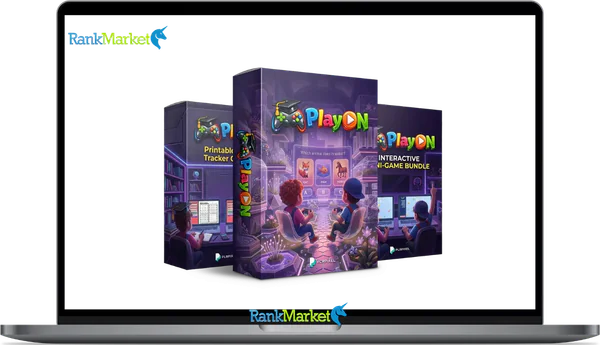
PlayON PLR is a bundle of ready-made kids’ educational digital products with full resale rights for rebranding and selling.
| Deliver | PlayON PLR + OTOs |
|---|---|
| Access | Shared |
| Type | PLR kids products |
| Plan | FE + OTOs |
| Details | GB Details |
If you sell digital products on Etsy, Teachers Pay Teachers (TPT), Shopify, or Gumroad, or if you run a homeschool blog, coaching program, or educational content channel, this guide was written with you in mind.
PlayON PLR is a no, code kids' interactive educational games bundle with full Private Label Rights (PLR), meaning you can edit, rebrand, and resell every asset as your own product. In 2026, parents and homeschool creators are actively searching for interactive learning games on digital marketplaces. Static worksheets no longer convert the way they used to. Buyers want something that feels like an app, and PlayON PLR is built to fill that gap.
This guide covers everything: what PlayON PLR is, what's inside the bundle, how PLR rights work, who the product suits, how to customize it without writing a single line of code, where to sell it, and direct answers to the most common questions buyers ask.
What Is PlayON PLR?

PlayON PLR is a ready, made digital product bundle, containing kids' interactive educational games, Canva design templates, HTML5 micro, games, and printable generators, distributed with full Private Label Rights so buyers can edit, rebrand, and resell the content as their own.
Think of it as a pre, built product line for the kids' education niche. You don't need development skills or design experience. You take the files, apply your branding, and list the finished product under your own shop or brand name. A seller might launch a product called “Kindergarten Brain Games Pack” in under 30 minutes, built entirely from PlayON PLR assets.
Inside the PlayON PLR Bundle: Components and Formats
Canva Game Templates (8+ Ready, to, Edit Designs)
The Canva templates are the backbone of the bundle. They include memory match games, vocabulary quizzes, picture puzzles, reward charts, and flashcard sets, all designed for early learners between ages 3 and 10.
Each template runs on the free version of Canva. You open the link, make a copy into your own Canva account, and then edit colors, fonts, text, and images through a drag, and, drop interface. No design software needed.
HTML5 Interactive Mini, Games and Challenge Tools
The HTML5 layer is what separates PlayON PLR from a standard printable bundle. These are browser, based mini, games, reward spinners, challenge wheels, randomizer tools, score trackers, and question prompts.
The files are delivered as zipped HTML packages. You open them in any web browser to preview the game, then deploy them on a website, embed them inside an LMS (Learning Management System), or package them as offline downloadable games. They work on mobile and desktop without extra plugins.
For sellers, this means you can offer something most Etsy or TPT competitors cannot, a product that behaves like a lightweight web app, not just a PDF download.
Printable Worksheet and Certificate Generators
The generator templates work as base designs. You adjust the content fields, skill level, topic, student name placeholders, and export as PDF. The process produces unlimited worksheet and certificate variations from one template source.
This makes it practical to offer tiered product packs, easy, medium, and hard difficulty sets, or grade, segmented versions (pre, K through Grade 3). Sellers can bundle multiple PDFs into a single zip file and list them as classroom resource packs or instant, download products.
Multi, Language and Localization Features
All text within the Canva templates sits on editable text layers. All visible strings within the HTML5 files are accessible through a basic config file or inline text field, no coding kiến thức needed to change them.
This makes localization straightforward. Duplicate the base template, replace the text with your target language, Spanish (ES), French (FR), German (DE), or Vietnamese (VI), adjust fonts if the language requires extended character support, and save the file with a language, suffix naming convention. One base product can generate three or four language variants, each as a separate listing.
File Types, Delivery, and Tech Requirements
A standard PlayON PLR delivery includes Canva template share links, zipped HTML5 game files, exported PDF samples, and a documentation folder. Here is a quick reference on what each output format allows in 2026:
|
Output Format |
How It's Delivered |
Where It Can Be Sold |
|
Canva, Edited PDF |
Export from Canva as PDF |
Etsy, TPT, Gumroad, own site |
|
HTML5 Game (zip) |
Zipped folder with HTML/CSS/JS |
Own website, LMS, Gumroad |
|
Printable Pack (PDF) |
Multiple PDFs bundled in zip |
Etsy, TPT, Shopify, own site |
|
Web Embed (iframe) |
Embed code from HTML file |
Membership site, course platform |
Tech requirements are minimal: a web browser, a free Canva account, and software to unzip files. No APIs, no coding, no hosting plans needed to get started.
Pricing plans and OTOs detailed
Front End: PlayOn Bundle – $14
- Access interactive Canva-based educational games and editable learning templates
- Create HTML mini-games and printable worksheets for kids’ activities
- Includes certificate generator and tools for building learning materials
- Full PLR rights to rebrand, customize, and sell your own products
- Beginner-friendly system to launch kids’ educational products quickly
OTO 1: PlayOn PRO – $19–$25
- Unlock 10 additional interactive Canva games for expanded learning topics
- Access 5 HTML mini-games to improve engagement and interactivity
- Includes 6 printable worksheet and tracker generator tools
- Fully editable assets with PLR rights for resale and branding
- Bonus extra mini-game included for added product variety
OTO 2: PlayOn Interactive Kids Productivity Micro Apps – $17
- Get 7 HTML-based productivity and habit-building micro apps for kids
- Includes tools like goal trackers, streak builders, and reward systems
- Encourages engagement through gamified learning and daily challenges
- No coding or installation required for instant deployment
- Full PLR rights to rebrand and sell as your own products
OTO 3: SmartKids Bundle – $32
- Access a large library of editable kids’ games and quizzes
- Includes 100+ animated science videos covering educational topics
- Create learning bundles, courses, or membership content بسهولة
- Fully customizable assets with complete PLR rights included
- Ideal for building a large-scale kids’ educational product catalog
OTO 4: Genius Kids Bundle – $29
- Unlock dozens of interactive learning games and quizzes for kids
- Includes a massive asset library with 36+ categories for game creation
- Access ready-made voiceovers and game script ideas
- Create and customize unlimited educational content quickly
- PLR rights included to rebrand and sell all materials
OTO 5: PLR Pixel Mega Bundle – $47
- Get access to multiple PLR Pixel products and their PRO versions
- Includes games, videos, planners, and kids’ content creation tools
- Build a complete kids’ education brand with diverse digital assets
- Rebrand, customize, and sell everything with full PLR rights
- Massive content library to scale faster and increase income potential
Who Is PlayON PLR Best For in 2026?
Digital Product Sellers (Etsy, Shopify, Gumroad, TPT)
If you already sell digital downloads on Etsy or TPT, PlayON PLR gives you a fast path to a higher, perceived, value product category. Most competitors in the kids' education niche sell flat PDFs.
Adding an HTML5 interactive game to a listing, or offering a “printable + digital game” bundle, creates a product that stands apart on the search page. For Etsy sellers, this differentiation is critical in 2026 as the marketplace becomes more saturated with standard AI, generated printables.
Teachers, Tutors, and Homeschool Creators
A classroom teacher who builds a side income selling resources can use PlayON PLR to create games aligned to specific curriculum units. The templates adapt cleanly to Montessori, style activities, Sunday school games, and bilingual learning sets.
Homeschool bloggers and tutors often build content for niche communities, unschoolers, classical education families, and language immersion households. PlayON PLR's localization feature makes it practical to serve those specific audiences with dedicated language, variant products.
Content Creators, Coaches, and Course Builders
Coaches running parenting or homeschool programs can use PlayON PLR assets as course bonuses, engagement tools inside a membership area, or free lead magnets to grow an email list. A “free kids' math game pack” opt, in is a concrete, high, conversion lead magnet in the parenting space.
Course creators building children's learning programs get a fast way to add interactive components without hiring a developer. The HTML5 games, in particular, work well as module activities inside platforms like Thinkific, Kajabi, or Teachable.
Agencies and Freelancers Serving Education Brands
Agencies working with schools, tutoring centers, or edtech startups can white, label PlayON PLR assets as part of a delivered service package. The output could be a branded kids' game library for a school website, a resource section for a tutoring platform, or a downloadable activity pack for a children's app landing page.
This use case has a longer sales cycle but a higher per, project value. In 2026, a single white, label delivery using PlayON PLR assets could form part of a $500–$1,500 client deliverable.
Core Benefits of PlayON PLR for Your Digital Business
The case for using PlayON PLR in your product catalog comes down to what it removes and what it adds. Here are the 7 reasons sellers and creators choose it in 2026:
- No development cost. You get browser, ready HTML5 games without paying a developer. Custom game builds typically cost $500–$3,000+ (khoảng 12–75 triệu VNĐ) per project.
- High perceived value. A product that behaves like a mini web app commands a higher price point than a flat worksheet. Buyers associate interactive games with premium quality.
- Hybrid product formats. Each asset can become a digital download, a printable pack, or a web, embedded activity. This flexibility lets you list the same core content across multiple formats.
- Multi, language catalog growth. One base template generates multiple language variants. A single afternoon of translation can produce four separate product listings.
- Unlimited SKU variations. Minor content edits, changing the theme from animals to space, or switching the skill from letters to numbers, create new product SKUs.
- Clear market differentiation. The kids' education market is crowded with static PDFs. An interactive game visually stands out and justifies a higher price tier.
- Bundling and upsell potential. Individual game packs combine naturally into higher, ticket mega bundles, seasonal collections, or membership content libraries.
- Cross, grade and cross, subject reuse. A memory game template designed for alphabet recognition works equally well for sight words, math facts, or science vocabulary. The structure transfers across grade levels and subject areas with minimal editing.
- Strong visual product presentation. The Canva templates produce cover images and preview slides that photograph well for marketplace thumbnails. A polished product page directly affects click, through rate on Etsy and TPT.
- Low entry cost relative to alternatives. The one, time purchase of a PLR bundle costs a fraction of what a freelance designer or developer would charge to build comparable assets. For a creator starting out, that cost efficiency matters.
With the benefits mapped out, the natural next question is: how do you actually take these files and turn them into finished, sellable products? That's exactly what the next section covers.
How to Customize PlayON PLR (No, Code) Step by Step
Getting Access and Organizing Your Files
After purchase, you'll receive a download link to a compressed (zip) file. Extract it and organize the contents into three primary folders: /Canva, Templates, /HTML5, Games, and /Docs. If you plan to create multiple product lines, rename each project subfolder by niche, for example, /Canva, Templates/PhonicsSet or /HTML5, Games/MathSpin.
This folder structure saves time when you return to a project weeks later. Clear file naming is a production habit, not an optional step.
Editing Canva Templates: Branding, Colors, and Content
The Canva editing process follows a fixed sequence:
- Open the Canva share link from the documentation file.
- Click “Use template” to copy it into your own Canva account.
- Swap the color palette to match your brand's primary and secondary colors.
- Replace the font set with your brand fonts (or a clean free alternative from Canva's library).
- Edit all game text, instructions, labels, answer fields, to match your target grade level and topic.
- Duplicate pages to generate additional game variations within the same file.
- Export as PDF Print (for printable packs) or PDF Standard (for digital downloads).
Customizing HTML5 Mini, Games
Open the HTML file from the /HTML5, Games folder trực tiếp in a web browser, Chrome, Firefox, hoặc Edge all work. You'll see the game running live. This is your preview.
To edit the game's visible text and labels, open the HTML file in a basic text editor (Notepad on Windows, TextEdit on Mac). The vendor documentation identifies each editable string. In most PlayON PLR files, text labels appear inside clearly commented sections, no need to read code, just find the text and replace it.
Creating and Exporting Printable Packs
Open the generator template in Canva. Adjust the content, topic, skill focus, difficulty level, and export each variation as a separate PDF. Name each file descriptively: PhonicsWorksheet_Easy.pdf, PhonicsWorksheet_Hard.pdf.
Collect the full set of PDFs into a single zip file using your computer's built, in compress function. This zip file is your finished product upload for Etsy, TPT, or Gumroad.
Efficiency Goal: 60 minutes of editing should yield one English pack, one Spanish translation, and one thematically distinct variant (e.g., space theme instead of animal theme). That's three product listings from one working session.
Creating Multi, Language or Themed Variations
Duplicate the finished base template in Canva before making language changes. Work from the copy, not the original. Replace all visible text with the target language content.
If the language uses accented or non, Latin characters, Vietnamese (VI), French (FR), German (DE), test the font first to confirm it renders those characters correctly. Export the translated version, name the file with a language suffix (_ES, _FR, _VI), and store it in a /Translations subfolder.
For HTML5 games, the same approach applies: duplicate the folder, edit the text strings, test in browser, and repackage as a new zip.
PlayON PLR FAQs: Direct, People, First Answers
Can I resell PlayON, based products on Etsy?
Yes, if you have edited and rebranded the files before listing. PLR licenses grant resale rights to the finished, modified product, not to the raw source files. List your own version under your own shop name.
Can I give my buyers PLR rights to these files?
No. Standard PLR licenses allow you to resell the finished product to end users, but they do not permit you to pass along the PLR rights themselves. Your buyers receive a personal, use or commercial, use license, not PLR.
Can I translate the games and sell them in another language? Y
- es. As covered in section 5, translating and rebranding a PlayON PLR asset creates a distinct product. Translated variants can be listed as separate SKUs on any supported platform in 2026.
What exactly counts as “rebranding” a PLR product?
Rebranding means replacing the original product's visual identity with your own. At minimum: your shop name or logo, your color scheme, and your product title. Editing the content itself, changing game topics, adjusting skill levels, goes further and creates a more distinct product.
What's the difference between PLR and resale rights?
PLR (Private Label Rights) grants the right to edit the content and sell it as your own work. Resale rights (Master Resale Rights, or MRR) allow resale but typically not editing. PLR gives you more control over the final product.
What is an HTML5 mini, game in this context?
An HTML5 mini, game is a browser, based interactive activity built with standard web technology (HTML, CSS, and JavaScript). It runs in any modern browser without apps or plugins. PlayON PLR delivers these as zip folders containing the game files, ready to upload or embed.
What types of products can I create from PlayON PLR?
The bundle supports four output formats: digital downloadable PDFs, printable physical packs, browser, based interactive games (HTML5), and web, embedded activities for membership sites or course platforms. Each format targets a different buyer need and sales channel.
Which age or grade levels are these games best for?
The templates and games are designed for early learners, broadly, ages 3 to 10 (preschool through Grade 3). Skill levels range from basic shape and color recognition to early reading, phonics, and foundational math. Sellers can shift the content to fit older grades through topic substitution, but the format works best for the early childhood segment.
What niches inside kids' education does PlayON PLR serve best?
The strongest fit is in early literacy (phonics, sight words, alphabet games), early numeracy (counting, shapes, number recognition), and language learning (vocabulary matching, bilingual activities). Secondary niches include Montessori, aligned activities, Sunday school games, and seasonal educational content packs.
How does PlayON PLR compare to buying kids' games on Canva marketplaces without PLR?
Canva marketplace templates without PLR give you personal, use design files, you cannot resell derivative products. PlayON PLR explicitly grants resale and rebranding rights. The distinction is not about file quality, it's about what you're legally permitted to do with the output.
Is PlayON PLR better for beginners or experienced digital sellers?
It works for both, but the entry point is genuinely accessible for beginners. The no, code customization path, Canva editing plus basic text substitution, doesn't require prior product, building experience. Experienced sellers benefit from the speed of production and the volume of SKUs they can build from a single bundle.
Should I choose PlayON PLR or invest in a custom app/game build first?
For most creators, PlayON PLR is the right starting point. A custom game build carries upfront cost (typically $1,000–$5,000), a longer development timeline, and maintenance responsibility. PlayON PLR removes those variables. Once you've validated demand in your niche through PLR products, a custom build becomes a more informed investment with an existing audience behind it.
Some Questions Before Join US
Group buying, also known as collective buying, offers products and services at significantly reduced prices on the condition that a minimum number of buyers would make the purchase.
- First, we will list product Here as people request & Collect Money From other peoples.
- Sec, Once enough moneys from customer, we will buy products From Developer.
- Then, we deliver to all Joiners.
- You can join directly by Purchase at our site and Reach Support about that to confirm.
- You can join via our Community : https://bit.ly/RMKDiscord
- How to Buy
We have 2 Product Status
- Instant-Deliver : Avaible and Deliver within 24-48hs (not on Sat-Sun, Holiday)
- Group Buy/Pre-Order : Not avaible, Still collect more people to join, need to wait.
OTO mean that One-Time-Offer/Upsell/Upgrade of Product For limited time only
Cancelled mean that order is not pay/process within 24hs. Please reach us with Order ID to check.
You will get Products by Download via Email .Once you finish payment to us and get confirm. You will get download Links inside your Account
- SAAS : You will get Individual account via Mail or On your Order List
- Shared Tool : via our chrome (WIN/MAC/Linux)
- WP : We will active key for your site.
- Course/Book/GraphicKit : Download link will send via mail or On your Order List.
- ETA Time : Fast maybe 3-4 days or 1 Week , Always be 3-4 Weeks or some times as Member Request it can be up to 3 Months to Group Buy WIN.
- GB Fail : You will get refund or exchange other.
– If Products problem, Capture screenshot/Video to us. We will forward to developer to fix it.
– If impossible sloved, we will exchange to other product. With Annual Product, we will refund or exchange by subtract times that you used.
– If used product for 1 or few years then not work. we will try to contact developer to fix it. But if some bad Vendors keep money and run, we just can give you some discount for future orders.
Warranty Time :
- Monthly Product : 30 days
- Annual/One Time Product : 1 year.
Our Store Credit mean credit can use to redeem on Your orders. 25 Credit = 1$.
Earn by some way :
- Place Orders. Each 1$ spend you will earn 1$
- Exchange some not work/not-fullfill orders by your agreed.
- By Reffer Your Friends to buy at our store.
How to redeem
- At Checkout page have redeem button to use it. Maxium is 250/orders.
- If you need redeem more. Reach our Support
We support only via 2 channel :
- Email : [email protected]
- Messenger : m.me/rankmarkenet (Live chat on Site)
TIme : From 9AM - 6PM Monday - Friday (GTM+8).
All Order/Ticket on Sat-Sun/Holiday will be supported on next Monday.
WE ARE TRY TO WORK HARD AND SUPPORT ALL PEOPLE BUT WE CAN NOT MAKE ALL HAPPY 100%
Thanks For You are here and belive US for longtime.
While working,we meet someone like & we will not support :
– People buy 1 but want to exchange to 10 Products.
– People who steal our products then ask refund.
– People fake payment to get our products.
– People always ask refund,can not wait for waiting product. Dont Pay. Wasted our Time.
Best Regards
David Green – RankMarket
Related products

Courses

Courses