


Buy Audio2Video + OTOs full account + Bonus
$37.00
Audio2Video lets you instantly convert any audio file into a dynamic, fully customizable video with animated waveforms, captions, and brand visuals, all in your browser.
| Deliver | Audio2Video + OTOs |
|---|---|
| Access | Individual |
| Type | Audio-to-video converter |
| Plan | OTO 12 |
| Details | GB Details |
If you’ve ever struggled with video editing or felt overwhelmed by complex software, Audio2Video might be exactly what you’ve been waiting for, a lightweight yet powerful tool that turns your plain audio files into professional, eye-catching videos in just a few minutes. In this review, we’ll break down how Audio2Video works, who it’s best for, what makes it stand out, and whether it’s truly worth the price.
What is Audio2Video
Audio2Video is an innovative browser-based application that turns any audio file into a beautiful, professional-grade video — in a matter of clicks. As a podcaster, musician, marketer, or content creator, this software makes it incredibly simple to convert your sound into captivating visuals without needing to have editing skills.
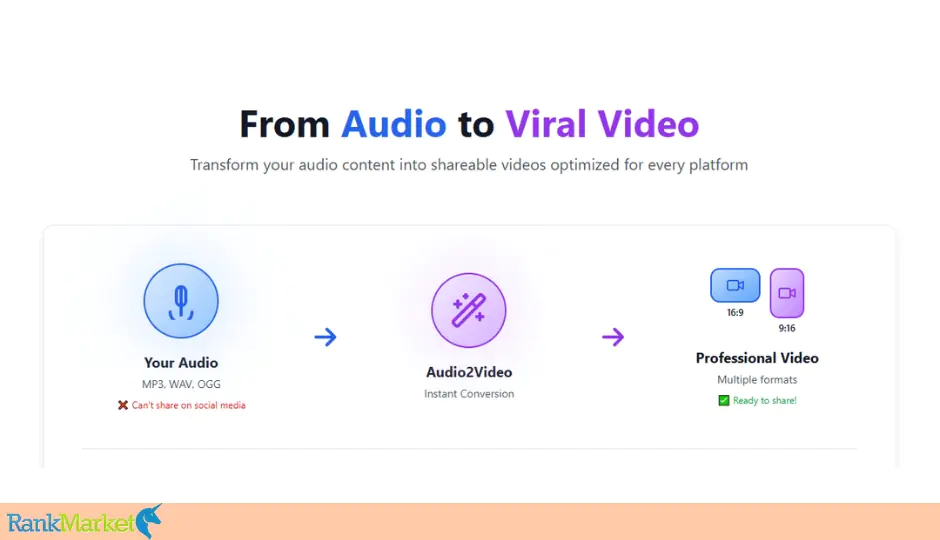
Simply upload your MP3, WAV, or OGG file, choose a visual style, and Audio2Video will instantly produce an attractive MP4 video — with animated waveforms, timing-synced subtitles, and your own brand customizations. From pulsating rounds to trendy bars and energetic sound waves, every animation sways in perfect harmony to your audio's rhythm, captivating your audience from start to finish.
But Audio2Video is much more than a simple converter. It makes you the master of your creative intent with editable templates — change fonts, colors, designs, and even add your logo, host image, or show title for a fresh, branded look. Export videos in several aspect ratios (16:9 for YouTube or 9:16 for TikTok and Reels), so your content looks great on any platform.
Even better, Audio2Video runs offline when you download it — no installations, internet connectivity, or signups required. It runs directly from your browser, making it one of the simplest and most personal content creation tools available.
Key features of Audio2Video
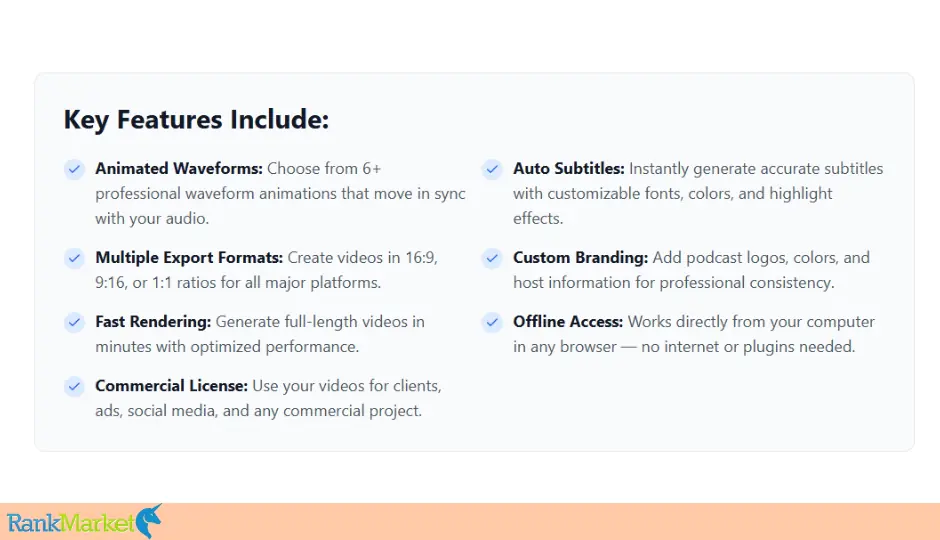
Audio2Video is a complete, beginner-friendly tool that turns any audio file into a stunning, professional video in minutes. Podcasters, artists, marketers, and creators love it for its speed, simplicity, and easy customization without any editing or technical expertise.
Here are its main features:
- Instant Audio to Video Conversion: Convert your MP3, WAV, or OGG audio into stunning, shareable videos in seconds. From audiobooks, podcast episodes, songs, and voiceovers, Audio2Video automatically converts your audio into stop-motion video—no editing, no software required.
- Dynamic, immersive waveforms: Bring your audio to life with mesmerizing waveform effects—bars, dots, circles, pulses, and more. Every movement is perfectly matched to your music or voice, visually entertaining your audience from start to finish.
- AI-powered caption generator: Create accurate, easy captions with live word highlighting. Personalize and tweak fonts, colors, and layouts to make your content more accessible, professional, and SEO-friendly on YouTube and social.
- Personalized Backgrounds & Layouts: Give your videos a personal touch with solid colors, your own photos, or moving video backgrounds that match your campaign or theme. Be consistent across all the content you create.
- Optimized aspect ratios for every platform: Export your videos in the right size for every platform — 16:9 for YouTube, 9:16 for TikTok and Reels, or 1:1 for Facebook and Instagram. No resizing or editing required — export and upload.
- Text, Titles & Overlays: Add intros, outros, subtitles, quotes, or speaker names instantly. Audio2Video gives your content a polished, professional look, ready to share anywhere.
- Full branding and waveform customization: Free up creativity with the ability to add logos, watermarks, brand colors, and change waveform color, size, and position. Each video can be personalized and reflect your brand.
- High-quality HD video export: Send your videos in Full HD for a sharp, professional look that looks great on any platform and device.
- Commercial rights included: Create and monetize videos for yourself, clients, or companies — every project is 100% yours to sell. Perfect for freelancers, agencies, and online marketers.
- One-time payment — Lifetime access: Get a lifetime license without subscriptions or recurring monthly fees. With a one-time purchase, you get unlimited usage, future updates, and complete creative freedom — forever.
Reasons why you should use Audio2Video
After experimenting with dozens of audio-to-video tools across the years, I can firmly vouch that Audio2Video is one of the easiest and most enjoyable platforms I've ever had the privilege to work with. From the very first project, it was fast, intuitive, and beautifully streamlined for creators of every skill level — no confusing menus, no intimidating learning curve, and definitely no grueling setup process.
In minutes, I converted an ordinary podcast audio file into a ready-to-publish, professionally formatted video, complete with subtitles, animated waveforms, and branded visuals that could have been made in a studio. What impressed me most, though, was how seamlessly everything played out directly in the browser: no downloads, no lag, and instant live previews of all my changes.
But Audio2Video does more than save time, it maximizes the effectiveness of your content. Here's why it's a must-have in your creative arsenal:
- Increase Engagement: Attractive waveforms and crisp subtitles make your videos immediately more engaging and scroll-stopping.
- Increase Reach: Reuse your audio on YouTube, TikTok, Instagram, or Facebook without having to learn complicated video editing software.
- Save Money: Say goodbye to monthly subscription fees or paying for designers — Audio2Video delivers pro results at a fraction of the cost.
- Repurpose Content: Instantly convert podcasts, voiceovers, and music into video content for advertising, education, or entertainment.
- Professional Branding: Customize colors, fonts, and layouts to match your business or personal brand, keeping your content consistent and on-brand.
- Offline Use: Once you've downloaded it, the app even works offline, so you can keep creating at any time, anywhere.
For fresh creatives, podcasters, marketers, or freelancers, Audio2Video is a game-changer. It makes the entire video-making process easy, cutting hours of boring editing and creating streamlined, platform-ready videos that boost your brand and get more eyes. If you’ve been searching for a simple yet powerful tool to turn your audio into engaging visual content, Audio2Video is absolutely worth trying. It’s beginner-friendly, affordable, and most importantly, it makes video creation feel effortless.
How to use Audio2Video
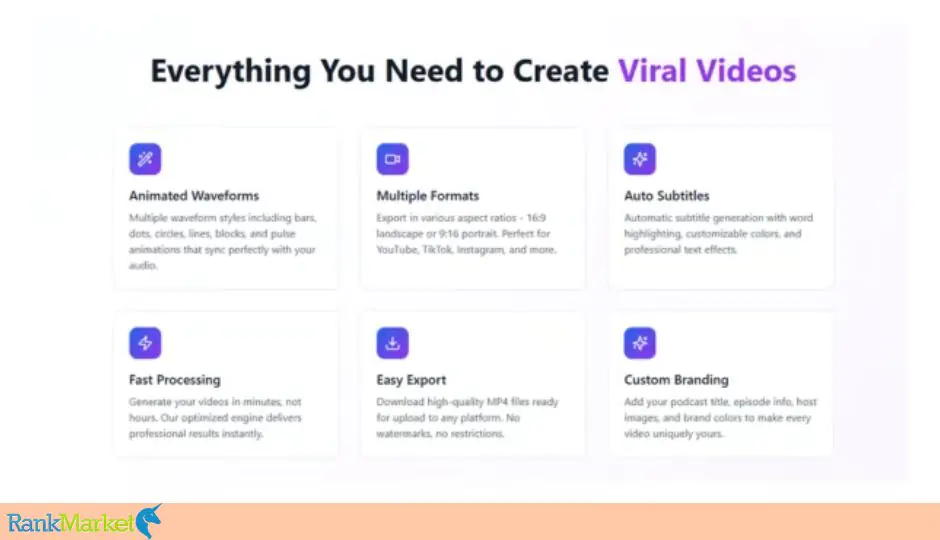
One of the best things about Audio2Video is how easy it is to use. No installation is required, nor do you have to struggle with complicated configurations – simply open it in your browser and you're ready to create pro videos in minutes. It all happens right in your browser, no installation, no account sign-up, and no intense cloud processing. It's a refreshingly seamless, user-first experience that democratizes video creation for everyone.
Within the web app, the workflow is surprisingly simple: upload your audio, personalize your visuals, and render your video in just a few clicks. Here's how it works:
Step 1: Upload or Record Your Audio
Getting started is easy. Upload your audio file (MP3, WAV, or OGG) or record directly in the app. Podcast episode, narration, or background track — Audio2Video converts your audio in real time, without any other software or plugins.
Step 2: Customize Your Video in Real Time
This is where the magic occurs. On the right side, you will see a live preview that renders in real-time as you make edits. The built-in tools enable you to personalize every visual element:
- Visuals: Choose from a variety of waveform styles, then adjust their position, size, and color to match your brand or style.
- Text: Add your podcast title, subtitle, or any text overlay, and customize the fonts, effects, and layout for that professional appearance.
- Background: Set the mood with a solid color, upload your own image, or select from pre-loaded visuals to help make your video more engaging.
- Avatar: Emphasize the host or multiple speakers with names and avatar positions for that clean, balanced appearance.
- Theme: Select from pre-made presets to instantly enhance your video's overall look and feel.
Edits are all displayed in real time, so you can complete your design before export.
Step 3: Render Your Video
If you're happy with how everything looks, simply click “Generate Video.” Audio2Video will render for you.
The Upgrade/OTO details
Front-End: Audio2Video ($19)
- One-time fee of $19 and get lifetime access — there's no monthly subscription, no hidden fees, and no recurring payments.
- An easy-to-use platform for beginners at video creation, branding, subtitle-making, and waveform animation — all under one roof.
- Total creative freedom with no ongoing cost of other AI or editing software.
- A 14-day money-back guarantee, so you can try it risk-free. If it doesn't live up to its promises, you'll get a full refund — no questions asked.
OTO 1: The Secret Studio ($29)
- Create unlimited studio-quality AI voiceovers — completely free of monthly fees or API limits.
- Easy step-by-step setup instructions (no technical skills required).
- Free AI voiceover software that matches paid alternatives.
- Voice cloning techniques with no recurring charge.
- Pro editing and refinement processes.
- Script formats for better delivery and flow.
- Commercial use right and license guidelines.
- Quality control checklist for replicable results.
- Production process optimization strategies for faster turnaround.
OTO 2: Website Agency Builder ($69)
- AI website — just enter your agency name and services, and it designs a complete professional website for you.
- Personalized design that's specific to your brand and services.
- Client acquisition manual showing where to find clients and how to close clients.
- Ready-to-use templates with pre-written outreach and follow-up emails.
- Mobile-responsive design that looks stunning on any device.
- Easy setup — get your complete agency website up in less than 5 minutes.
OTO 3: Audio2Video – Reseller License ($149)
- Get full resell rights to Audio2Video and The Secret Studio, along with everything you need to start selling immediately.
- Active Audio2Video HTML app — ready to deliver immediately.
- The Secret Studio ebook (PDF) packed with proven-and-tested voiceover strategies.
- Complete sales page (HTML) with high-converting professional copy.
- Order bump page (HTML) to boost your average order value by 50%+.
- Thank you pages (HTML) per offer for a seamless customer experience.
- Product graphics package with 3D covers, mockups, and marketing images.
- Email marketing swipes — pre-made emails to easily promote your offer.
- Commercial license with unlimited resales and 100% profit retention.
Advantages
- Extremely User-Friendly Interface: Audio2Video is incredibly easy to work with. The interface is clean, easy to use, and beginner-friendly — even if you have no idea about video editing. Everything is labeled, and the live preview makes it easy for you to see your changes in real time. You can go from inserting your audio to exporting a finalized video in a couple of minutes, with no technical hassle.
- Fast and Smooth Video Rendering: One of the biggest strengths of the platform is its speed. Audio2Video exports and renders videos extremely fast — even for long audio files. In my tests, most of the videos came ready within three minutes, with smooth playback and no observable lag. That makes it ideal for writers who need to publish frequently or work under tight timetables.
- Multiple Waveform Styles and Aspect Ratios: The app offers different customizable waveform structures that instantly enhance your sound more dynamic and visually appealing. You can also choose different aspect ratios — square, vertical, or widescreen — so it will be easy to customize your films for YouTube, TikTok, Instagram, or even for another platform.
- Automatic Subtitle Generation: Audio2Video provides auto-subtitling to your videos with the click of a button, freeing you from the hours of manual transcription. Edit the caption, swap fonts, and nudge position to your brand — a major benefit for accessibility and maximizing social media audience engagement.
- Custom Branding and Design Flexibility: From colors and logos to backgrounds and fonts, Audio2Video gives you complete control over how your video looks. You can simply set everything to your business or personal brand, so that all of your videos look professional and seamless.
- One-Time Payment with Lifetime Access: Unlike most SaaS tools that hide features behind recurring billing, Audio2Video gives you unlimited access for the price of a one-off payment. You even receive lifetime updates and enhancements — making it an affordable option for anyone producing videos regularly.
Disadvantages
- Only supports Audio-to-Video Conversion: While Audio2Video is excellent at turning audio into pretty-to-watch videos, it is not a traditional video editor. No timeline editing, no transitions, no intense animation layers. It's really made to reuse audio content — and does so exceptionally.
- No Advanced Cinematic Effects: If you’re looking to create high-end cinematic videos with multi-scene storytelling or complex effects, you’ll likely need to pair Audio2Video with another editing tool like Premiere Pro or CapCut. That said, for quick, professional-looking videos focused on audio visualization, it’s more than enough.
Who is it for?
Audio2Video is meant for anyone who wants to turn dull audio into interesting, shareable videos – quick and simple. No matter what kind of content you create, Audio2Video makes it easy to convert your audio into professional, platform-ready videos in minutes. You can be a complete beginner or a seasoned creator; it gives you everything to produce studio-quality videos without needing editing skills or expensive software.
Here's who will benefit most from it:
- Podcasters & Coaches: Convert voice recordings or podcast audio into branded video snippets in seconds, shareable on YouTube, Instagram, or TikTok.
- Musicians & DJs: Bring your tracks to life with captivating waveforms and striking visuals that make your music stand out.
- Content Creators & YouTubers: Convert audio clips into engaging videos to boost your audience and interaction.
- Digital Marketers & Agencies: Create scroll-stopping videos for ads, campaigns, and client projects — no designer or video editor needed.
- Educators & Course Creators: Turn your lessons, tutorials, or voiceovers into engaging visual content that keeps students interested and helps them learn more.
- Social Media Influencers: Post sleek, bite-sized audio-based videos optimized for all the major platforms.
- Freelancers & Entrepreneurs: Expand your services or market your brand better with Audio2Video's bundled commercial rights.
What You Get (Compared to Buying at RankMarket)
If you are going to get Audio2Video, buying it through RankMarket is the smartest choice. You're not just buying a fantastic tool, you're getting better value, safe checkout, and first-rate support. It's the perfect way to ensure your investment pays off in the long term. Here's why:
- Safe and Genuine Purchase: RankMarket ensures a legitimate, secure buy straight from the approved sellers. No third-party links or counterfeit copies — only original software with full license rights.
- Bonuses and Special Offers: RankMarket often includes premium bonus packages and launch discount promotions you won't find anywhere else. These bonuses are designed to provide you with even more value from your buy-back — whether as extra training, templates, or promotional materials.
- Clear Pricing — Zero Hidden Charges: You pay for what you receive. RankMarket offers open, upfront pricing with no hidden surprise upsells or fees hidden from you. You will know clearly what you're getting when you purchase.
- Effective Customer Support: Having questions or need assistance after purchasing? RankMarket's support staff is quick, reliable, and really helpful, especially in the event of license activation or delivery of bonuses.
- Loved by Marketers and Creators: RankMarket has become a go-to place for digital marketers, bloggers, and freelancers looking for high-quality genuine SaaS tools at affordable prices. Buying on RankMarket is an exercise in community membership that distinguishes good software when it sees it.
FAQs
- Do I need to download or install software to use Audio2Video?
No, Audio2Video runs from your web browser. There is nothing you have to download or install. It will run happily in all the main browsers like Chrome, Firefox, Safari, and Edge. You can even keep working offline once you've loaded the page. - Which kinds of audio files can Audio2Video process?
You can upload standard formats like MP3, WAV, and OGG. Your file is processed by the tool automatically and prepared for video conversion — no file conversion or extra setup required. - Can I brand my videos to suit my brand?
Yes. Audio2Video lets you tailor everything: colors, fonts, and logos to background images and waveform styles. You can easily create consistent, branded images that fit your content identity. - How fast is it to create a video?
It's less than three minutes to produce most videos, depending on how long your audio and how complicated your visuals are. It's designed to be fast — perfect when you have to make a bunch of clips in a hurry. - Is there a subscription or recurring charge?
Zero repeat fees at all. Audio2Video offers lifetime access for a single payment of $19, with updates and access to all functionality. Optional upgrades (OTOs) are offered, but the base app already accommodates all you'll need to start producing best-level videos.
Conclusion
In a world where content moves fast, Audio2Video delivers the perfect mix of simplicity, speed, and professional results. Whether you’re turning podcasts into shareable clips, adding visuals to your music, or creating branded videos for clients, it saves hours of editing while keeping your videos clean and engaging.
If you're interested in converting your audio into scroll-stopping videos without expensive software or steep learning curves, Audio2Video is a sound investment, especially at its single-payment price. Get Audio2Video today at RankMarket and enjoy verified access, exclusive bonuses, and a lifetime of updates. It's the best way to unlock the full potential of this tool and start creating stunning videos right away.
References:
Some Questions Before Join US
Group buying, also known as collective buying, offers products and services at significantly reduced prices on the condition that a minimum number of buyers would make the purchase.
- First, we will list product Here as people request & Collect Money From other peoples.
- Sec, Once enough moneys from customer, we will buy products From Developer.
- Then, we deliver to all Joiners.
- You can join directly by Purchase at our site and Reach Support about that to confirm.
- You can join via our Community : https://bit.ly/RMKDiscord
- How to Buy
We have 2 Product Status
- Instant-Deliver : Avaible and Deliver within 24-48hs (not on Sat-Sun, Holiday)
- Group Buy/Pre-Order : Not avaible, Still collect more people to join, need to wait.
OTO mean that One-Time-Offer/Upsell/Upgrade of Product For limited time only
Cancelled mean that order is not pay/process within 24hs. Please reach us with Order ID to check.
You will get Products by Download via Email .Once you finish payment to us and get confirm. You will get download Links inside your Account
- SAAS : You will get Individual account via Mail or On your Order List
- Shared Tool : via our chrome (WIN/MAC/Linux)
- WP : We will active key for your site.
- Course/Book/GraphicKit : Download link will send via mail or On your Order List.
- ETA Time : Fast maybe 3-4 days or 1 Week , Always be 3-4 Weeks or some times as Member Request it can be up to 3 Months to Group Buy WIN.
- GB Fail : You will get refund or exchange other.
– If Products problem, Capture screenshot/Video to us. We will forward to developer to fix it.
– If impossible sloved, we will exchange to other product. With Annual Product, we will refund or exchange by subtract times that you used.
– If used product for 1 or few years then not work. we will try to contact developer to fix it. But if some bad Vendors keep money and run, we just can give you some discount for future orders.
Warranty Time :
- Monthly Product : 30 days
- Annual/One Time Product : 1 year.
Our Store Credit mean credit can use to redeem on Your orders. 25 Credit = 1$.
Earn by some way :
- Place Orders. Each 1$ spend you will earn 1$
- Exchange some not work/not-fullfill orders by your agreed.
- By Reffer Your Friends to buy at our store.
How to redeem
- At Checkout page have redeem button to use it. Maxium is 250/orders.
- If you need redeem more. Reach our Support
We support only via 2 channel :
- Email : [email protected]
- Messenger : m.me/rankmarkenet (Live chat on Site)
TIme : From 9AM - 6PM Monday - Friday (GTM+8).
All Order/Ticket on Sat-Sun/Holiday will be supported on next Monday.
WE ARE TRY TO WORK HARD AND SUPPORT ALL PEOPLE BUT WE CAN NOT MAKE ALL HAPPY 100%
Thanks For You are here and belive US for longtime.
While working,we meet someone like & we will not support :
– People buy 1 but want to exchange to 10 Products.
– People who steal our products then ask refund.
– People fake payment to get our products.
– People always ask refund,can not wait for waiting product. Dont Pay. Wasted our Time.
Best Regards
David Green – RankMarket
Related products

SAAS Tools


SAAS Tools
SAAS Tools


SAAS Tools